


 Home
Home


Asian Paints Alchemy 2026
Table of content:
- Difference Between a Switch and a Hub
- What is a Hub in Networking?
- Types of Hubs
- Applications Of Hub
- Advantages and Disadvantages of a Hub
- What is a Switch in Networking?
- Types of Switches
- Applications of a Switch
- Advantages and Disadvantages of a Switch
- Key Difference Between Hub and Switch Explained
- Similarities Between Hub and Switch
- Conclusion
- Frequently Asked Questions (FAQs)

Hub Vs. Switch: Understanding the Key Differences in Computer Networks
Explore the key differences between network hubs and switches. Understand the functions, efficiency, security, types, and practical applications of LANs in detail.
 0 min read
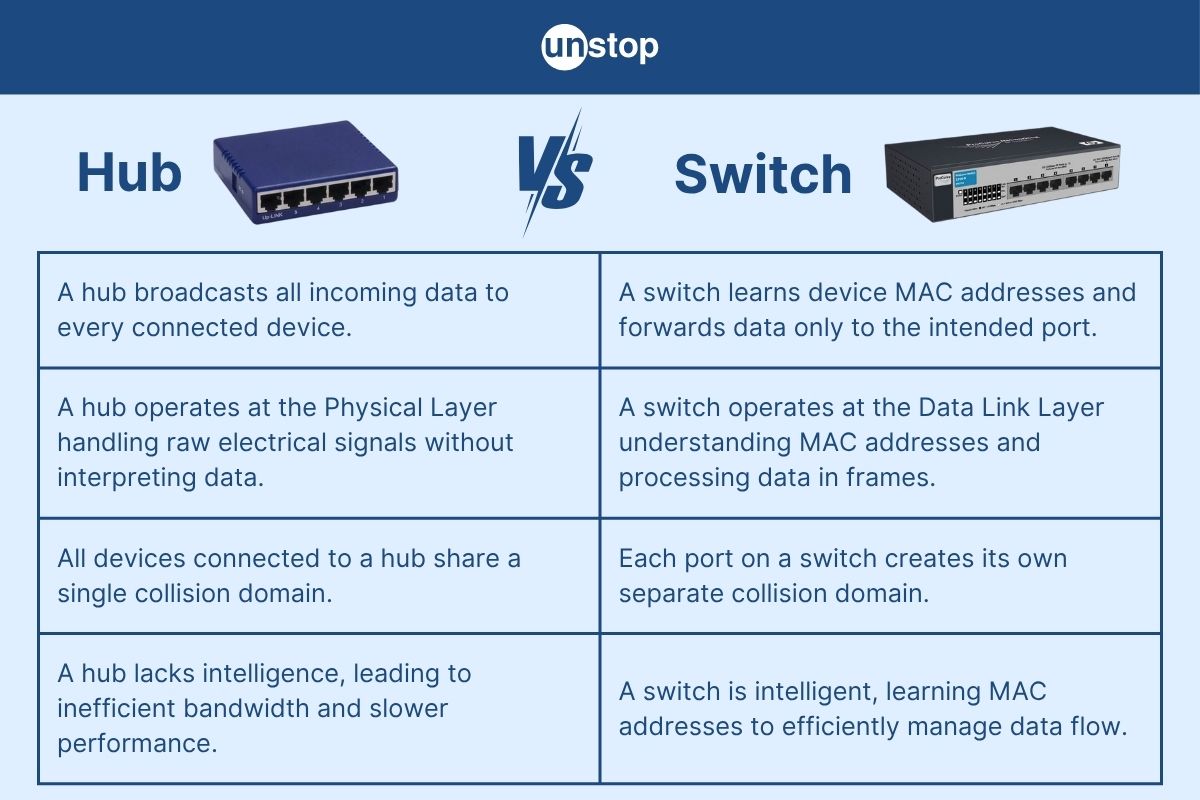
In today's interconnected world, networking devices play a critical role in ensuring seamless communication between computers and other digital systems. They form the backbone of modern computer networks by managing data traffic, enhancing efficiency, and enabling resource sharing.
In this article, we will explore the difference between a hub and a switch, two fundamental networking devices that may look similar but operate very differently in how they manage data transmission.
What is a Hub in a Computer Network?
A hub is a basic networking device in a computer that connects multiple computers or network devices in a local area network (LAN). It transmits data to all devices in the network, regardless of the intended recipient, which can lead to network inefficiencies.
What is a Switch in a Computer Network?
A switch is a more intelligent networking device that connects devices within a LAN and uses MAC addresses to direct data only to the specific device it is intended for, reducing network congestion and improving performance.
Difference Between a Switch and a Hub
|
Feature |
Hub |
Switch |
|
Basic Function |
A hub broadcasts incoming data to all ports, regardless of the destination, leading to inefficient communication. |
A switch intelligently forwards data only to the specific device it’s intended for, based on MAC addresses. |
|
Layer of Operation |
Operates at the Physical Layer (Layer 1) of the OSI model, only replicating signals without data inspection. |
Operates at the Data Link Layer (Layer 2), enabling it to analyze MAC addresses and manage traffic. |
|
Data Transmission |
Data packets are sent to every connected device, increasing the risk of collisions. |
Data is sent only to the intended device, minimizing collisions and enhancing performance. |
|
MAC Address Table |
Does not maintain any MAC address table; cannot identify or track devices. |
Maintains a MAC address table and dynamically learns the addresses of devices for accurate data forwarding. |
|
Collision Domain |
All devices share a single collision domain, meaning multiple devices can interfere with each other's transmissions. |
Each port has its own collision domain, preventing data collisions and ensuring cleaner communication. |
|
Speed and Efficiency |
Slower and less efficient due to frequent data collisions and unnecessary data distribution. |
Faster and more efficient because it only sends data where it needs to go, reducing network traffic. |
|
Full-Duplex Support |
Supports only half-duplex, so devices can either send or receive data at one time—not both. |
Supports full-duplex, allowing simultaneous sending and receiving of data on each port. |
|
Network Traffic |
Generates more traffic by sending every data packet to all devices in the network. |
Minimizes traffic by delivering packets only to the intended recipients. |
|
Security |
Less secure, as data is visible to all connected devices, increasing vulnerability. |
More secure as data is shared only with the destination device, enhancing privacy and data integrity. |
|
Intelligence |
Not intelligent—acts like a signal repeater without any decision-making capabilities. |
Intelligent device—can filter and forward data smartly based on learned addresses. |
|
Cost |
Generally cheaper due to its simpler functionality and design. |
More expensive than a hub, but offers better performance and features. |
|
Usage |
Typically used in small, outdated, or experimental setups where network performance is not a priority. |
Used in modern home, office, and enterprise networks for reliable and efficient communication. |
|
Port Switching Logic |
Uses broadcasting logic; sends data to all ports without knowing the target. |
Uses switching logic to determine the correct port for each data packet based on the MAC address. |
|
Bandwidth Sharing |
Devices share total bandwidth, which can lead to congestion and slower data transmission. |
Each port has dedicated bandwidth, resulting in better overall performance even with multiple devices connected. |
|
Device Learning |
Cannot learn or store device information, making it less adaptive. |
Learns and remembers the MAC addresses of connected devices for faster and more accurate data delivery. |
What is a Hub in Networking?
A hub is a basic networking device used to connect multiple computers or network devices within a local area network (LAN). It acts as a central point of communication, receiving data from one device and broadcasting it to all other devices connected to the hub. It operates at the Physical Layer (Layer 1) of the OSI model, meaning it does not analyze or manage data traffic.
Hubs do not differentiate between devices or data packets; they simply replicate the electrical signal to all ports. As a result, hubs are simple and inexpensive, but they are also inefficient and outdated for modern networking due to their inability to filter traffic or reduce collisions.
Working of a Hub (Point-wise)
Receives Data: The hub receives a data packet (in the form of electrical signals) from one of the connected devices.
Broadcasts to All Ports: It then broadcasts the signal to all its other ports, regardless of the intended recipient.
All Devices Receive: Every connected device receives the data, but only the intended device processes it; others discard it.
No Address Learning: A hub does not store or identify MAC addresses, so it cannot intelligently direct data.
High Collision Risk: Because of its broadcasting method, multiple devices may send data at the same time, leading to data collisions.
Half-Duplex Communication: Hubs support only one-way communication at a time—either sending or receiving, not both.
Types of Hubs
Active Hub
- An active hub not only connects multiple devices but also regenerates and amplifies the signals it receives.
- It helps in extending the distance a signal can travel and is suitable for larger networks.
Passive Hub
- A passive hub simply connects devices without amplifying or cleaning the signal.
- It acts more like a physical connector and doesn’t improve signal quality; it is mostly used in small setups.
Intelligent Hub
- Also known as a smart hub, it performs all functions of an active hub but adds management and monitoring capabilities.
- It may include ports that can be remotely controlled, and it can provide diagnostic information about the network.
Applications Of Hub
Some of the most common applications of hub devices in networking are:
- Small Home Networks: Hubs are often used in basic home networking setups to connect a few devices where high speed and efficiency are not critical.
- Legacy or Educational Networks: Hubs are used in classroom or lab environments to demonstrate the fundamentals of network communication due to their simplicity.
- Network Monitoring: Passive hubs can be used in scenarios where network traffic monitoring is required, such as connecting a sniffer or analyzer.
- Temporary or Experimental Setups: Hubs are useful in short-term network configurations where ease of setup and cost-effectiveness are more important than performance.
- Low-Budget Networks: In cost-sensitive environments, hubs may be used to build simple LANs without investing in more expensive switches.
Role of a Hub in Networking
Central Connection Point: A hub serves as a central device that connects multiple computers or devices in a local area network (LAN).
Data Broadcasting: It receives data from one device and broadcasts it to all other connected devices, regardless of the intended recipient.
Signal Repeater: An active hub can regenerate and strengthen signals to extend the distance over which data can travel.
Non-Intelligent Device: It does not analyze or filter data packets; it simply repeats the signals to every port.
Half-Duplex Communication: Hubs support communication in only one direction at a time, which can limit efficiency in busy networks.
Shared Bandwidth: All connected devices share the hub’s bandwidth, which may cause network congestion and data collisions.
Cost-Effective for Small Networks: Hubs are inexpensive and easy to set up, making them suitable for simple or temporary networks.
Useful in Learning Environments: Often used in educational labs to demonstrate basic networking concepts and how data transmission works.
Advantages and Disadvantages of a Hub
|
Advantages of Hub |
Disadvantages of Hub |
|
Simple and Cost-Effective: Inexpensive and easy to install, ideal for small or temporary networks. |
Low Efficiency: Sends data to all connected devices, causing unnecessary traffic and reduced network performance. |
|
No Configuration Needed: Requires minimal setup or technical knowledge. |
No Traffic Management: Cannot filter or manage data; all devices receive all packets. |
|
Useful for Learning Purposes: Good for teaching networking basics and packet broadcasting. |
Higher Collision Rate: Frequent network collisions due to broadcasting, especially in busy networks. |
|
Signal Boosting (Active Hubs): Regenerates signals, slightly extending network range. |
Lacks Security Features: No mechanisms to protect data or control access between devices. |
|
Compatible with Older Devices: Can be used with legacy hardware. |
Shared Bandwidth: All connected devices share the same bandwidth, leading to reduced speed as more devices are added. |
What is a Switch in Networking?
A switch is a network device used in communication networks that connects multiple devices (computers, printers, etc.) and facilitates the transfer of data between them. The switch operates primarily at the data link layer (Layer 2) of the OSI model, though multi-layer switches also operate at the network layer (Layer 3). A switch ensures that data packets are forwarded to the correct device on the network, improving the efficiency and security of the communication.
The switch works by learning the MAC (Media Access Control) addresses of devices on the network and storing them in a MAC address table. When a data packet arrives at the switch, it looks at the destination MAC address and forwards the packet to the correct port, where the device with the corresponding MAC address is connected. This method is more efficient than using a hub, as it reduces network collisions and traffic congestion.
Working of a Switch
- Learning: The switch learns the MAC addresses of devices connected to each of its ports. This is done by reading the source MAC address from incoming frames.
- Forwarding: After learning the MAC addresses, when the switch receives a frame, it checks the destination MAC address. It then forwards the frame to the specific port associated with the destination MAC address.
- Filtering: If a switch receives a frame whose destination MAC address is the same as the source MAC address (the device that sent the frame), it will filter the frame and not forward it.
- Flooding: If the switch does not know the destination MAC address, it will broadcast the frame to all ports except the port from which it received the frame. This is called flooding.
- MAC Address Table: The switch maintains a MAC address table, which is updated dynamically as devices are added or removed. This table helps the switch make forwarding decisions more efficiently.
- Collision Domain Segmentation: Each port on a switch creates a separate collision domain, minimizing the chances of collisions in the network, unlike hubs, which cause all connected devices to share the same collision domain.
- Full-Duplex Communication: Switches typically support full-duplex communication, allowing devices to send and receive data simultaneously, unlike half-duplex devices, which can either send or receive data at any given time.
Types of Switches
Unmanaged Switch
These are basic plug-and-play devices with no configuration required. They automatically forward traffic based on the MAC address table and are ideal for small networks or home setups.
Managed Switch
Managed switches offer more control over the network. They provide features such as VLAN support, quality of service (QoS), monitoring, and remote management, which are beneficial for larger, more complex networks.
Layer 3 Switch (Multilayer Switch)
A Layer 3 switch operates at both Layer 2 and Layer 3 of the OSI model. It can perform routing functions in addition to switching, making it suitable for routing packets between different subnets or VLANs.
PoE (Power over Ethernet) Switch
PoE switches provide power along with data transmission to devices such as IP cameras, VoIP phones, and wireless access points, simplifying installations by reducing the need for separate power supplies.
Stackable Switch
Stackable switches are designed to be stacked together physically to function as a single unit. This allows for easy scalability and centralized management in larger network environments.
Enterprise Switch
These are high-performance switches typically used in large organizations or data centers. They support advanced features such as high-speed throughput, redundancy, and more granular management capabilities for enterprise-level network performance.
Smart Switch
A smart switch offers some managed features like VLANs and traffic prioritization, but without the complexity or price of fully managed switches. It provides a middle ground between unmanaged and managed switches for small to medium-sized businesses.
Applications of a Switch
Some of the key applications of network switches are:
Local Area Networks (LANs): Switches are commonly used to create LANs by connecting devices such as computers, printers, and servers, facilitating efficient communication within a specific geographical area, like an office or home.
Data Centers: Switches are integral to the infrastructure of data centers, where they connect servers and storage devices, supporting high-speed data transfer and efficient management of network traffic.
Internet of Things (IoT): Switches play a critical role in IoT networks by connecting a large number of IoT devices, ensuring seamless communication between devices in smart homes, industrial automation, and other IoT applications.
Enterprise Networks: In large-scale enterprise networks, switches help optimize traffic flow between devices, allowing for secure, high-performance connections in business environments.
Telecommunication Networks: Switches are used in telecommunication systems to route and manage voice, data, and video traffic, ensuring efficient communication between different network segments.
Power over Ethernet (PoE) Applications: PoE switches enable devices such as IP cameras, wireless access points, and VoIP phones to receive both power and data through a single Ethernet cable, simplifying installation in remote or difficult-to-access locations.
Virtual LANs (VLANs): Switches are used to segment networks into VLANs, improving network security and traffic management by logically separating devices within the same physical network.
Network Security: Managed switches are utilized in network security applications, providing features such as access control lists (ACLs), port security, and traffic monitoring to enhance the protection and monitoring of network traffic.
Multimedia Applications: In environments that require high-bandwidth applications, such as video streaming, gaming, and virtual conferencing, switches ensure that data flows smoothly without bottlenecks or disruptions.
Role of a Switch in a Computer Network
Data Packet Forwarding: A switch receives data packets from connected devices and forwards them to the appropriate destination based on the device's MAC address, ensuring efficient data transfer.
Collision Domain Segmentation: By creating separate collision domains for each connected device, a switch reduces the chances of data collisions, thus improving network performance and reducing congestion.
Bandwidth Optimization: Switches allocate dedicated bandwidth for each device connection, ensuring that multiple devices can communicate simultaneously without competing for bandwidth, unlike hubs.
MAC Address Learning: A switch builds and maintains a MAC address table to map devices to specific ports, allowing it to intelligently forward data only to the appropriate destination device.
Minimized Network Traffic: Unlike hubs, which broadcast data to all connected devices, switches only send data to the device that needs it, thus reducing unnecessary network traffic and improving efficiency.
Full-Duplex Communication: Switches support full-duplex communication, meaning that devices can send and receive data at the same time, improving data transfer speeds and overall network efficiency.
VLAN Support: Switches enable the segmentation of networks into Virtual Local Area Networks (VLANs), helping to organize the network into logical groups, improve security, and optimize network performance.
Security Features: Managed switches offer security features like port security, which limits access to certain devices, and traffic monitoring, which helps in detecting suspicious network activities and enhancing overall security.
Quality of Service (QoS): Switches support QoS mechanisms, which prioritize traffic such as voice and video calls, ensuring that critical applications receive the necessary bandwidth and do not experience delays.
Scalability: Switches support the addition of more devices without significant degradation in performance, making them an essential component for expanding networks in businesses, data centers, and other large-scale environments.
Advantages and Disadvantages of a Switch
|
Advantages of Switch |
Disadvantages of Switch |
|
Efficient Data Transmission: Sends data only to the intended recipient, reducing unnecessary traffic. |
Cost: Managed and high-performance switches can be significantly more expensive than hubs. |
|
Reduces Collisions: Creates separate collision domains per port, minimizing data collisions and improving performance. |
Complexity: Managed switches require configuration and maintenance, demanding more technical knowledge. |
|
Full-Duplex Communication: Allows devices to send and receive data simultaneously, boosting transfer speeds. |
Potential Overhead: Maintaining a large MAC address table in vast networks can cause performance degradation if not properly managed. |
|
Scalability: Easily accommodates more devices by adding ports or stacking switches. |
Requires Power: Switches, especially PoE models, need an adequate power supply. |
|
Security Features: Managed switches offer advanced security, like Access Control Lists (ACLs) and port security. |
Limited Range: Restricted by the number of ports and physical location, requiring additional switches for large area coverage. |
|
Improved Network Performance: Manages traffic efficiently, reducing congestion and prioritizing high-priority traffic (e.g., VoIP). |
Dependency on Power: Requires continuous power; outages can lead to network failures. |
|
VLAN Support: Allows network segmentation into VLANs, enhancing security and organization. |
Setup Complexity: Initial setup of managed switches and advanced features (VLANs, QoS) can be complex and time-consuming. |
|
Reduced Latency: Forwards data based on MAC addresses, decreasing latency compared to hubs or repeaters. |
Risk of MAC Table Overload: In very large networks, the MAC address table can become overwhelmed, potentially slowing down the switch or causing errors. |
Key Difference Between Hub and Switch Explained
In this section, we will elaborate on a few key differences between hubs and switches:
Functionality
Hub: A hub is a basic network device that receives data from a connected device and broadcasts it to all other connected devices. It operates using a "broadcast" method, meaning every device connected to the hub receives the same data, even if it’s not intended for that device. This often results in network congestion and collisions.
Switch: A switch operates more intelligently by forwarding data packets directly to the specific device (or port) that needs them. It uses the MAC (Media Access Control) address to determine where to send data, reducing traffic and improving efficiency by eliminating unnecessary broadcasts.
Operation at the Physical Layer
Hub: A hub operates at the physical layer (Layer 1) of the OSI model. It doesn’t have the capability to read or interpret data packets. It simply transmits electrical signals to all connected devices.
Switch: A switch operates primarily at the data link layer (Layer 2) of the OSI model. It can read the MAC addresses from incoming data packets, allowing it to make forwarding decisions based on the destination MAC address.
Connections
Hub: A hub allows multiple devices to connect to a single central point. It typically has 4, 8, or 24 ports. Since it broadcasts data to all devices, it creates a shared bandwidth environment.
Switch: A switch also allows multiple devices to connect but creates individual, dedicated communication paths for each device connected to its ports. Each device has a private bandwidth, improving overall network performance.
Networking Devices
Hub: A hub is considered a simple networking device that doesn’t offer advanced features. It only functions to connect devices and facilitate communication, without any intelligent handling of traffic.
Switch: A switch is more advanced and capable of handling traffic efficiently. It can create Virtual LANs (VLANs), manage quality of service (QoS), and perform security features like port security, making it a more suitable choice for modern networks.
Link Layer
Hub: Since a hub operates at the physical layer, it doesn’t understand or manage the data link layer information (such as MAC addresses). It merely forwards bits to all devices in the network.
Switch: A switch operates at the data link layer and maintains a MAC address table, which helps it make intelligent forwarding decisions based on the destination MAC address of data packets.
Cost
Hub: Hubs are typically less expensive than switches, as they are simpler devices with fewer features. They are often used in smaller, less demanding network setups.
Switch: Switches tend to be more expensive than hubs due to their advanced functionality and greater efficiency in handling network traffic. Managed switches with features like VLAN support, QoS, and security come at a higher cost.
Manufacturers
Hub Manufacturers: While hubs are less commonly used today, they were traditionally manufactured by companies like Cisco, Netgear, D-Link, and Linksys.
Switch Manufacturers: Switches are manufactured by several well-known companies, including Cisco, Juniper, HP, Netgear, and Aruba. Managed switches from these manufacturers provide more advanced features and are used in enterprise environments, data centers, and large networks.
When to Use a Hub
Simple and Small Networks: Hubs are typically used in smaller, less complex networks where the demand for high performance and security is not critical. They are suited for environments where budget constraints are a priority, and advanced features are not needed.
Cost-Effective Solutions: Since hubs are less expensive than switches, they are an ideal solution when budget is a concern, especially in small offices, home networks, or temporary setups.
Example: Imagine a small office with just 2-3 devices that need to be connected to a local network, and there is no need for advanced features like VLANs or security. I
n this case, a hub could be sufficient, as the devices don’t require dedicated bandwidth or data security. The simplicity of the hub makes it an easy and inexpensive solution.
When to Use a Switch
Larger, More Complex Networks: Switches are ideal for larger networks or networks with multiple devices requiring efficient communication. Switches help reduce network congestion by forwarding data only to the intended destination rather than broadcasting it to all devices.
Improved Network Performance: In environments where performance and low latency are critical (e.g., video conferencing, VoIP, large file transfers), a switch is essential because it prevents network congestion and data collisions by segmenting traffic efficiently.
Security and Management Needs: Managed switches offer advanced features like VLANs, quality of service (QoS), port security, and remote management, making them the preferred choice for enterprise networks and situations where security and traffic management are important.
Example: Consider a medium-sized office with around 30 employees. Each employee’s computer, as well as several printers and servers, needs to communicate with each other.
In this scenario, using a switch would ensure that each device receives its intended data, improving overall network performance by avoiding the network-wide data broadcasts typical of a hub. Additionally, a switch can help prioritize critical traffic like VoIP calls or video streaming, which would be more difficult to manage with a hub.
Similarities Between Hub and Switch
|
Criteria |
Similarities Between Hub and Switch |
|
Network Connectivity |
Both are used to connect multiple devices within a network. |
|
Ethernet-Based |
Both devices operate using Ethernet cables and support Ethernet networking standards. |
|
Physical Layer Involvement |
Both involve physical layer components for data transmission (though a switch primarily operates at Layer 2). |
|
Data Transmission |
Both transmit data between connected devices on the network. |
|
Port-based Connections |
Both hubs and switches have multiple ports for connecting devices. |
|
Communication Medium |
Both devices work over a wired network medium (e.g., Ethernet cables). |
|
Used in LANs |
Both are fundamental components used in Local Area Networks (LANs) for intra-network communication. |
|
Basic Network Components |
Both are essential building blocks of computer networks, facilitating communication. |
|
Simple Configuration |
Both are relatively easy to install and configure in a network, especially basic models. |
|
Support for Multiple Devices |
Both devices allow several connected devices to communicate with each other within the same network segment. |
Conclusion
Both hubs and switches serve the fundamental purpose of connecting multiple devices within a network, but they differ significantly in terms of performance, efficiency, and functionality. Hubs are simpler and more cost-effective, suitable for small or temporary networks where advanced features are unnecessary. In contrast, switches offer intelligent data forwarding, better security, and improved network performance, making them ideal for modern, larger-scale, and high-demand network environments.
Ultimately, the choice between a hub and a switch depends on the size and complexity of the network, the desired speed and efficiency, and budget considerations. Understanding the key differences and similarities between hubs and switches, as outlined in this article, enables users and network administrators to make informed decisions tailored to their specific networking needs.
Frequently Asked Questions (FAQs)
Q1. What is the difference between a hub, a switch, and a router?
A hub is a basic networking device that broadcasts data to all connected devices without any filtering. A switch is more advanced, forwarding data only to the specific device it is intended for, using MAC addresses. A router, on the other hand, connects different networks together (such as a home network to the internet) and uses IP addresses to route data between them. Routers also offer additional features like DHCP, NAT, and firewall protection.
Q2. What is the difference between a switch and a router?
A switch operates at the data link layer (Layer 2) and is used to connect devices within the same local network. It manages traffic efficiently by forwarding data only to the appropriate device. A router works at the network layer (Layer 3) and connects multiple networks together, directing data between them based on IP addresses. While switches manage internal communication, routers manage external communication and internet access.
Q3. What is the purpose of a switch?
A switch is used to connect multiple devices (like computers, printers, and servers) in a network and enable them to communicate efficiently. It uses MAC addresses to forward data only to the intended recipient, reducing unnecessary traffic and improving overall network performance. Switches are essential in both small office/home networks and large enterprise networks.
Q4. What are the functions of a hub, bridge, switch, and router?
Hub: Broadcasts data to all connected devices, regardless of the destination.
Bridge: Connects two separate networks and filters traffic based on MAC addresses.
Switch: Forwards data to specific devices within a network using MAC address tables.
Router: Connects different networks and routes data using IP addresses, often managing internet traffic.
Q5. Which is better, a hub or a switch?
A switch is generally better than a hub because it provides more efficient data transmission, reduces network congestion, and increases overall network performance. Unlike hubs, switches send data only to the device it's intended for, ensuring better use of bandwidth and greater security. While hubs may still be used in very small or temporary networks, switches are the standard in modern networking.
This article was contributed by Johns Joseph, Unstop Intern and Campus Ambassador.
Suggested reads:
- File System Vs. DBMS: Key Differences & Usages Explained in Detail
- HTML Vs. DHTML: Key Differences, Components & Web Development Uses
- Array Vs. Linked List: Key Differences & Usages Explained in Detail
- Hardwired Vs. Microprogrammed Control Unit: Differences & Examples
- Difference between Webpage and Website Explained! (+Similarities)
Login to continue reading
And access exclusive content, personalized recommendations, and career-boosting opportunities.
Don't have an account? Sign up

Never miss an
Update

Featured Opportunities

Top-Rated Practice by Students






Subscribe
to our newsletter






Comments
Add comment