


 Home
Home


HP Power Lab 3.0
Table of content:
- Overview Of Trees & Graphs
- Difference Between Tree And Graph (Comparison Table)
- What Is A Tree?
- What Is A Graph?
- Key Differences Between Tree And Graph Explained
- Tree vs. Graphs Practical Applications: A Comparative Look
- Conclusion
- Frequently Asked Questions

10 Key Differences Between Tree And Graph With Applications & More
It is important to understand the key difference between trees and graphs to choose the correct data structure for specific practical applications/programs.
 0 min read
In computer science, data structures are the building blocks that allow us to organize and manage data efficiently. In this article, we explore two of the most fundamental structures, i.e., trees and graphs, and uncover the differences between them. By understanding these concepts, you’ll be better equipped to choose the right structure for your application.
Overview Of Trees & Graphs
Trees: A tree is a hierarchical data structure that organizes data in a parent–child relationship.
- It starts with a single root node and branches out into sub-nodes, forming a structure similar to an inverted tree.
- Trees are ideal for representing data with inherent hierarchies, such as organizational charts, file systems, or binary search trees used for fast lookup and sorting.
Graphs: A graph is a flexible, non-linear data structure composed of nodes (vertices) connected by edges.
- Unlike trees, graphs can represent complex relationships where connections are not strictly hierarchical and cycles are allowed.
- Graphs excel in modeling networks such as social networks, transportation systems, or communication networks, where relationships between entities can be many-to-many.
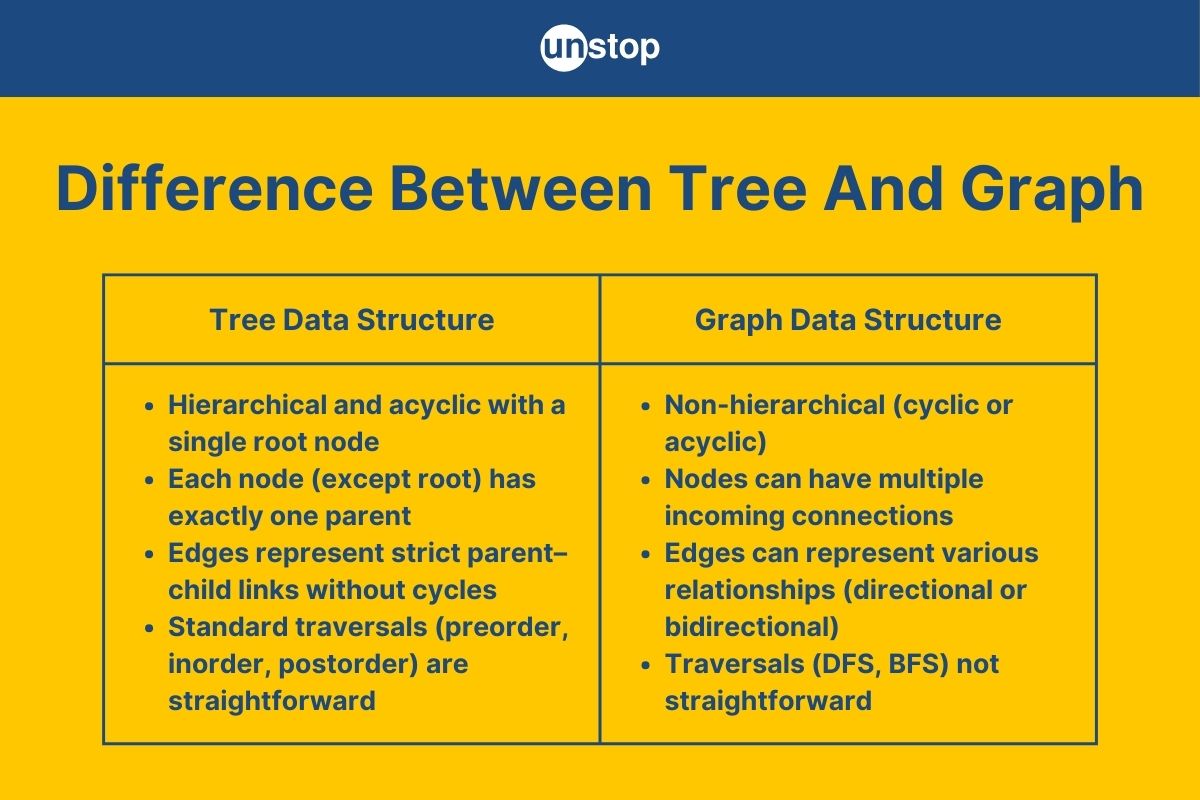
Difference Between Tree And Graph (Comparison Table)
Trees and graphs are both vital data structures, yet they serve different purposes and exhibit distinct characteristics. Understanding the difference between trees and graphs will help you in selecting the right structure based on your application needs.
The table below summarises the key difference between the two data structures:
|
Aspect |
Tree |
Graph |
|
Structure |
Hierarchical and acyclic with a single root node |
Non-hierarchical; can be cyclic or acyclic |
|
Parent–Child Relationship |
Each node (except the root) has exactly one parent, ensuring a unique path from the root |
Nodes can have multiple incoming connections; no unique path is guaranteed |
|
Edge Characteristics |
Edges represent strict parent–child links without cycles |
Edges can represent various relationships; may be directional or bidirectional and can form cycles |
|
Traversal Methods |
Standard traversals (preorder, inorder, postorder) are straightforward |
Traversals (DFS, BFS) require additional mechanisms (e.g., cycle detection) |
|
Memory Representation |
Typically implemented with pointers (or arrays for heaps), with moderate overhead |
Memory usage varies with representation—adjacency lists for sparse graphs or matrices for dense graphs |
|
Constraints |
Must be acyclic and fully connected; each node (except root) has one parent |
Fewer structural constraints; graphs can be disconnected, cyclic, or include self-loops |
|
Implementation Complexity |
Generally simpler to implement (often with recursive algorithms) |
More complex due to arbitrary connectivity and potential cycles |
|
Use Cases |
Ideal for hierarchical data like file systems, decision trees, or XML/JSON parsing |
Suited for modeling networks such as social networks, transportation, or dependency graphs |
|
Directionality |
Implicitly directed from parent to children |
Can be directed (digraphs) or undirected, offering greater flexibility |
|
Search and Efficiency |
Efficient search in balanced trees (e.g., O(log n) in binary search trees) |
Performance depends on the algorithm and graph density; often requires more complex methods |
What Is A Tree?
A tree is a hierarchical data structure composed of nodes connected by edges, where each node (except the root) has one parent and zero or more children. This structure naturally represents hierarchical relationships found in many real-world scenarios, such as file systems, organizational charts, and decision-making processes.
Key Features of Trees
- Hierarchical Structure: Trees naturally represent data in levels with a single root and subsequent branches.
- Acyclic Nature: By definition, trees do not contain cycles, ensuring there is only one unique path from the root to any node.
- Ordered Relationships: Trees provide a clear ordering of elements, which makes them useful for tasks like searching and sorting (especially in binary search trees).
- Versatility in Applications: Whether representing hierarchical data (like family trees or organizational charts) or supporting efficient algorithms (like tree traversals), trees are fundamental to many computing tasks.
Simple Code Example: Binary Tree Traversal
Below is a short Python snippet that demonstrates an inorder traversal of a simple binary tree:
            class Node:
    def __init__(self, value):
        self.value = value
        self.left = None
        self.right = None

def inorder_traversal(root):
    if root:
        inorder_traversal(root.left)
        print(root.value, end=' ')
        inorder_traversal(root.right)

# Constructing a simple binary tree:
#         4
#        / \
#       2   6
#      / \ / \
#     1  3 5  7

root = Node(4)
root.left = Node(2)
root.right = Node(6)
root.left.left = Node(1)
root.left.right = Node(3)
root.right.left = Node(5)
root.right.right = Node(7)

print("Inorder Traversal of the tree:")
inorder_traversal(root)
Y2xhc3MgTm9kZToKICAgIGRlZiBfX2luaXRfXyhzZWxmLCB2YWx1ZSk6CiAgICAgICAgc2VsZi52YWx1ZSA9IHZhbHVlCiAgICAgICAgc2VsZi5sZWZ0ID0gTm9uZQogICAgICAgIHNlbGYucmlnaHQgPSBOb25lCgpkZWYgaW5vcmRlcl90cmF2ZXJzYWwocm9vdCk6CiAgICBpZiByb290OgogICAgICAgIGlub3JkZXJfdHJhdmVyc2FsKHJvb3QubGVmdCkKICAgICAgICBwcmludChyb290LnZhbHVlLCBlbmQ9JyAnKQogICAgICAgIGlub3JkZXJfdHJhdmVyc2FsKHJvb3QucmlnaHQpCgojIENvbnN0cnVjdGluZyBhIHNpbXBsZSBiaW5hcnkgdHJlZToKIyDCoCDCoCDCoCDCoCA0CiPCoCDCoCDCoCDCoCAvIFwKIyDCoCDCoCDCoCAyIMKgIDYKI8KgIMKgIMKgIC8gXCAvIFwKIyDCoCDCoCAxwqAgMyA1wqAgNwoKcm9vdCA9IE5vZGUoNCkKcm9vdC5sZWZ0ID0gTm9kZSgyKQpyb290LnJpZ2h0ID0gTm9kZSg2KQpyb290LmxlZnQubGVmdCA9IE5vZGUoMSkKcm9vdC5sZWZ0LnJpZ2h0ID0gTm9kZSgzKQpyb290LnJpZ2h0LmxlZnQgPSBOb2RlKDUpCnJvb3QucmlnaHQucmlnaHQgPSBOb2RlKDcpCgpwcmludCgiSW5vcmRlciBUcmF2ZXJzYWwgb2YgdGhlIHRyZWU6IikKaW5vcmRlcl90cmF2ZXJzYWwocm9vdCk=
In this example, we create a class named Node, wherein we define the structure of each tree node, containing a value and pointers to left and right children.
- Then, we define a function inorder_traversal(,) which uses a recursive approach to traversing the tree in an "inorder" fashion– first visiting the left subtree, then the node itself, followed by the right subtree.
- This concise example illustrates both the hierarchical nature of trees and one of the common ways to process them.
How Is A Tree Represented In Memory?
Trees are typically implemented using one of two main methods:
|
Approach |
Description |
|
Pointer-Based Representation |
Each node is a dynamically allocated object or structure that contains the data and pointers (or references) to its child nodes. This method is well-suited for dynamic or irregular tree structures and can handle trees where nodes have varying numbers of children (using techniques like left-child right-sibling for general trees). |
|
Array-Based Representation |
Nodes are stored sequentially in a contiguous block of memory (an array). In binary trees, parent–child relationships are derived using index calculations (e.g., for a node at index i, the left child is at 2i + 1 and the right child at 2i + 2). This approach works best for complete or nearly complete trees and often improves memory efficiency and cache performance. |
For more information on this data structure, its components, and operations, read: What Is Tree Data Structure? Operations, Types & More (+Examples)
What Is A Graph?
A graph is a non-linear data structure that consists of a set of vertices (or nodes) and edges that connect these vertices. Unlike trees, graphs do not enforce a hierarchical structure; instead, they allow for complex relationships, including cycles and multiple connections between nodes. Graphs are ideal for modeling real-world networks such as social networks, transportation systems, or communication networks.
Key Characteristics Of Graphs
- Vertices (Nodes): The individual elements or entities in the graph.
- Edges: The connections between vertices, which can be directed (showing a one-way relationship) or undirected (showing a two-way relationship).
- Flexibility: Graphs can represent a variety of relationship types, including one-to-one, one-to-many, and many-to-many connections.
- Cycles: Graphs can contain cycles, meaning you might be able to start at one node and follow a path that eventually loops back to it.
Simple Code Example: Graph Traversal Using DFS
Below is a concise Python snippet that demonstrates a depth-first search (DFS) on a graph represented by an adjacency list:
            def dfs(graph, start, visited=None):
    if visited is None:
        visited = set()
    visited.add(start)
    print(start, end=' ')
    for neighbor in graph[start]:
        if neighbor not in visited:
            dfs(graph, neighbor, visited)
    return visited

# Graph represented as an adjacency list
graph = {
    'A': ['B', 'C'],
    'B': ['D', 'E'],
    'C': ['F'],
    'D': [],
    'E': ['F'],
    'F': []
}

print("DFS traversal starting from 'A':")
dfs(graph, 'A')
ZGVmIGRmcyhncmFwaCwgc3RhcnQsIHZpc2l0ZWQ9Tm9uZSk6CiAgICBpZiB2aXNpdGVkIGlzIE5vbmU6CiAgICAgICAgdmlzaXRlZCA9IHNldCgpCiAgICB2aXNpdGVkLmFkZChzdGFydCkKICAgIHByaW50KHN0YXJ0LCBlbmQ9JyAnKQogICAgZm9yIG5laWdoYm9yIGluIGdyYXBoW3N0YXJ0XToKICAgICAgICBpZiBuZWlnaGJvciBub3QgaW4gdmlzaXRlZDoKICAgICAgICAgICAgZGZzKGdyYXBoLCBuZWlnaGJvciwgdmlzaXRlZCkKICAgIHJldHVybiB2aXNpdGVkCgojIEdyYXBoIHJlcHJlc2VudGVkIGFzIGFuIGFkamFjZW5jeSBsaXN0CmdyYXBoID0gewogICAgJ0EnOiBbJ0InLCAnQyddLAogICAgJ0InOiBbJ0QnLCAnRSddLAogICAgJ0MnOiBbJ0YnXSwKICAgICdEJzogW10sCiAgICAnRSc6IFsnRiddLAogICAgJ0YnOiBbXQp9CgpwcmludCgiREZTIHRyYXZlcnNhbCBzdGFydGluZyBmcm9tICdBJzoiKQpkZnMoZ3JhcGgsICdBJyk=
In this example, the graph is represented as a dictionary where each key is a vertex, and its corresponding value is a list of adjacent vertices.
- The dfs function uses recursion to visit each node, ensuring each vertex is processed only once.
- This snippet highlights the flexible, non-hierarchical nature of graphs and provides a practical example of traversing a graph.
Components Of Graph
A graph is built from a few fundamental components that define its structure and behavior:
- Vertices (Nodes): The basic units or points in a graph that hold data or represent entities.
- Edges: The connections between vertices. Edges illustrate the relationships between nodes. They can be:
- Directed: Indicating a one-way relationship (from one vertex to another).
- Undirected: Representing a two-way, mutual relationship.
- Weights (Optional): Some graphs assign weights to edges to represent cost, distance, or capacity, adding an extra dimension for analysis.
- Adjacency Structure: How the graph is stored in memory. This can be in the form of:
- Adjacency Lists: Each vertex maintains a list of its neighbors.
- Adjacency Matrices: A 2D array is used where each cell indicates whether a pair of vertices is connected (and possibly the weight of the connection).
- Subgraphs and Components: A graph may consist of several connected subgraphs, known as components. In a connected graph, every vertex is reachable from every other vertex; otherwise, the graph is said to be disconnected.
Understanding these components provides the foundation for analyzing more complex graph properties, including the types of edges and the various forms of graphs used in different applications.
For more information of this data structure, its components, and more, read: Graph Data Structure | Types, Algorithms & More (+Code Examples)
Key Differences Between Tree And Graph Explained
While both trees and graphs are fundamental data structures, they differ in several key ways that affect how they are used and implemented. In this section, we will take a deeper look at the differences between tree and graph data structures.
Structural Organization | Difference Between Tree And Graph
Trees: Trees are inherently hierarchical.
- They start with a single root node and branch out into sub-levels.
- Every node (except the root) has exactly one parent, ensuring that there is only one unique path from the root to any given node.
- This structure makes trees especially suitable for representing hierarchies, such as file systems or organizational charts.
Graphs: Graphs are more general and can represent complex relationships.
- They consist of nodes (vertices) and edges that connect any pair of nodes.
- Graphs do not enforce a hierarchical structure; nodes can be interconnected in any way, and there can be multiple paths between nodes.
- This flexibility makes graphs ideal for modeling networks like social networks or transportation systems.
Connectivity and Cycles | Difference Between Tree And Graph
Trees: By definition, trees are acyclic.
- This means that once you traverse from the root to a leaf, you will never revisit a node—ensuring a clear, non-repeating structure.
- The acyclic nature simplifies many operations, such as traversal and search.
Graphs: Graphs may be cyclic or acyclic.
- The presence of cycles means that special care (like using visited markers) is needed during traversals to avoid infinite loops.
- Cycles in graphs enable the representation of more complex interconnections, such as those seen in communication networks or dependency graphs.
Parent–Child Relationship vs. Arbitrary Connections | Difference Between Tree And Graph
Trees: In a tree, every node (aside from the root) has a single parent and a clearly defined set of children. This one-to-many relationship forms a predictable structure that is easy to navigate and manipulate.
Graphs: Graphs allow for arbitrary connections–nodes can have multiple incoming and outgoing edges without a fixed parent-child relationship. This many-to-many connectivity enables the modeling of diverse real-world relationships but can also lead to increased complexity in operations like traversal and search.
Use-Case Scenarios | Difference Between Tree And Graph
Trees: Trees excel in scenarios that require a clear hierarchy and ordered structure. They are widely used in applications like:
- File systems and directory structures.
- Decision trees in machine learning.
- Syntax trees in compilers.
- Binary search trees for efficient sorting and searching.
Graphs: Graphs shine in situations where relationships are complex and not strictly hierarchical. They are used to model:
- Social networks where individuals can be connected in many different ways.
- Road networks and transportation systems.
- Communication and dependency networks.
- Any scenario where cycles and arbitrary relationships are common.
Tree vs. Graphs Practical Applications: A Comparative Look
Both trees and graphs are versatile data structures, but each shines in different contexts. Understanding their practical applications can help you decide which structure best fits a given problem.
Trees In Practice
- Hierarchical Data Representation: Trees are naturally suited for data with an inherent hierarchy. For example, file systems, organizational charts, and XML/HTML document structures are commonly represented as trees.
- Efficient Searching and Sorting: Binary Search Trees (BSTs) are widely used for fast data retrieval, insertion, and deletion. They enable efficient lookup operations, which are ideal for scenarios like database indexing or maintaining sorted lists.
- Decision-Making and Parsing: Decision trees in machine learning help model decision processes, while compilers use Abstract Syntax Trees (ASTs) to parse and analyze source code.
Graphs In Practice
- Network and Relationship Modeling: Graphs excel at representing complex relationships where entities are interconnected in non-hierarchical ways. Social networks, communication networks, and transportation systems are prime examples where graphs are used.
- Routing and Navigation: Algorithms like Dijkstra's and A* operate on graphs to determine the shortest or most efficient paths. This makes graphs indispensable in mapping applications and network routing.
- Dependency and Relationship Analysis: Graphs effectively model dependencies—such as task scheduling, package management systems, or even knowledge graphs—where multiple entities interact in various ways.
|
Application Area |
Tree |
Graph |
|
Data Representation |
Hierarchical structures (e.g., file systems, org charts) |
Complex networks (e.g., social or transportation networks) |
|
Search and Sorting |
Binary search trees for fast lookup and sorted order |
Not typically used for sorting, but ideal for pathfinding |
|
Decision & Parsing |
Decision trees and ASTs in compilers |
Useful for modeling interdependencies and relationships |
|
Routing & Navigation |
Rarely used |
Ideal for implementing routing algorithms (Dijkstra’s, A*) |
The choice between trees and graphs in practical applications depends on the nature of your data:
- Use trees when the data is inherently hierarchical and ordered.
- Choose graphs when you need to represent complex, non-linear relationships with potential cycles.
Conclusion
Trees and graphs are both essential data structures with distinct strengths. Trees offer a simple, hierarchical framework that excels in modeling ordered, acyclic relationships, while graphs provide the flexibility to represent complex, interconnected networks. By understanding the core difference between tree and graph and their practical applications, you can choose the most effective structure for your problem. Whether organizing hierarchical data or mapping intricate networks, selecting the right structure is key to building efficient, scalable systems.
Frequently Asked Questions
Q1. What is the difference between tree and graph search?
The key difference lies in the structure being traversed:
|
Tree Search |
Graph Search |
|
Structure: Trees are hierarchical and acyclic, meaning there is only one unique path from the root to any node. |
Structure: Graphs can be cyclic and may have multiple paths between nodes. This flexibility means that the structure is less predictable than a tree. |
|
Algorithm Simplicity: Since trees don’t contain cycles, tree search algorithms (like preorder, inorder, or postorder traversals) don’t need to track visited nodes. |
Cycle Handling: Graph search algorithms (like depth-first search or breadth-first search) must incorporate mechanisms to track visited nodes, preventing infinite loops and redundant processing. |
|
Redundancy: In trees, duplicate nodes are generally not a concern, as each node appears only once in the structure. |
Complexity: Due to potential cycles and arbitrary connections, graph search can be more complex and may require additional considerations such as weights or the directionality of edges. |
In summary, while tree search is straightforward due to the acyclic, hierarchical nature of trees, graph search demands extra care to handle cycles and multiple paths effectively.
Q2. When should I use a tree over a graph?
Use trees when your data has an inherent hierarchical structure—for example, in file systems, organizational charts, or decision trees. Trees are optimal for operations that require an ordered, acyclic relationship. Graphs are preferable when relationships are complex and not strictly hierarchical, such as in social networks, road maps, or dependency networks.
Q3. What are the common operations performed on trees and graphs?
For trees, common operations include:
- Insertion and Deletion: Adding or removing nodes while preserving the hierarchy.
- Traversals: Inorder, preorder, postorder (for binary trees), or level-order traversals.
- Searching: Efficient lookup in structures like binary search trees (BSTs).
For graphs, typical operations include:
- Search Algorithms: Depth-first search (DFS) and breadth-first search (BFS) with cycle detection.
- Shortest Path: Algorithms like Dijkstra’s or A* for finding the best route.
- Connectivity Analysis: Determining connected components or detecting cycles.
Q4. How is a tree represented in memory compared to a graph?
Trees are commonly implemented using either:
- Pointer-Based Representations: Each node is an object with data and pointers to its children.
- Array-Based Representations: Often used for complete binary trees (e.g., heaps), where relationships are calculated via indices.
Graphs, on the other hand, are typically represented using:
- Adjacency Lists: Each node stores a list of its adjacent nodes, ideal for sparse graphs.
- Adjacency Matrices: A 2D array where each cell indicates whether a pair of nodes is connected, which works well for dense graphs.
Q5. What is a binary search tree (BST), and how does it differ from a general binary tree?
A BST is a specialized binary tree where each node’s left subtree contains only nodes with keys less than the node's key, and the right subtree contains only nodes with keys greater than the node's key. This ordering allows for efficient searching, insertion, and deletion operations (typically in O(log n) time). A general binary tree, however, does not enforce this ordering, which means it may not support efficient search operations.
Q6. Can trees or graphs be used for both searching and sorting?
Trees, especially binary search trees, are particularly well-suited for both searching and sorting due to their ordered structure. Traversing a BST in-order produces sorted output. Graphs are generally used for modeling relationships and connectivity rather than sorting, although graph search algorithms are essential for exploring networks and finding optimal paths.
By now, you must have a clear idea of the difference between tree and graph and what works for you. Do explore more interesting topics:
- What Is Linear Data Structure? Types, Uses & More (+ Examples)
- Single Linked List In Data Structure | All Operations (+Examples)
- Doubly Linked List Data Structure | All Operations Explained (+Codes)
- Time Complexity Of Algorithms: Types, Notations, Cases, and More
- DSA Cheatsheet Unlocked: Roadmap, Boot Camp & Must-Know Resources
Login to continue reading
And access exclusive content, personalized recommendations, and career-boosting opportunities.
Don't have an account? Sign up

Never miss an
Update





Top-Rated Practice by Students






Subscribe
to our newsletter






Comments
Add comment