


 Home
Home


HP Power Lab 3.0
Table of content:
- Difference Between Webpage and Website
- What Is a Webpage? A Detailed Explanation
- What is a Website? A Detailed Explanation
- Understanding the Differences Between a Webpage and a Website

Difference between Webpage and Website Explained! (+Similarities)
Confused about web pages and websites? This article breaks down the key differences, definitions, and similarities between a single webpage and an entire website.
 0 min read
In the digital age, most of what we interact with online—whether reading news, shopping, or researching—is made possible through web technologies. From a user's perspective, it may all appear to be a seamless experience, but behind the scenes, there are fundamental building blocks that form the structure of the internet. Two terms that often come up—and are sometimes used interchangeably—are webpage and website. While they may sound similar, they refer to distinct components of the web ecosystem.
This article will examine the distinction between a webpage and a website, enabling us to understand how each functions, their relationship to one another, and why this difference matters for both developers and users. We will begin with definitions before moving on to a more detailed comparison of both websites and web pages to clarify each one's role within a digital environment.
Brief Definition of Webpage
A webpage is a document that is presented for viewing in a web browser. It is capable of containing text, images, video, hyperlinks, and sound, and may consist of other multimedia elements. Think of it as a page in a book—part of a larger structure but complete and viewable by itself. Webpages are usually written in HTML, CSS, and sometimes JavaScript, in order to bring interactivity.
Brief Definition of Website
A website comprises a collection of interlinked webpages that all share a common domain. These sites are connected through a menu and hyperlink navigation, which makes accessing information possible and coherent. An e-commerce site could have a homepage, product list, checkout, and contact information- all under one site domain.
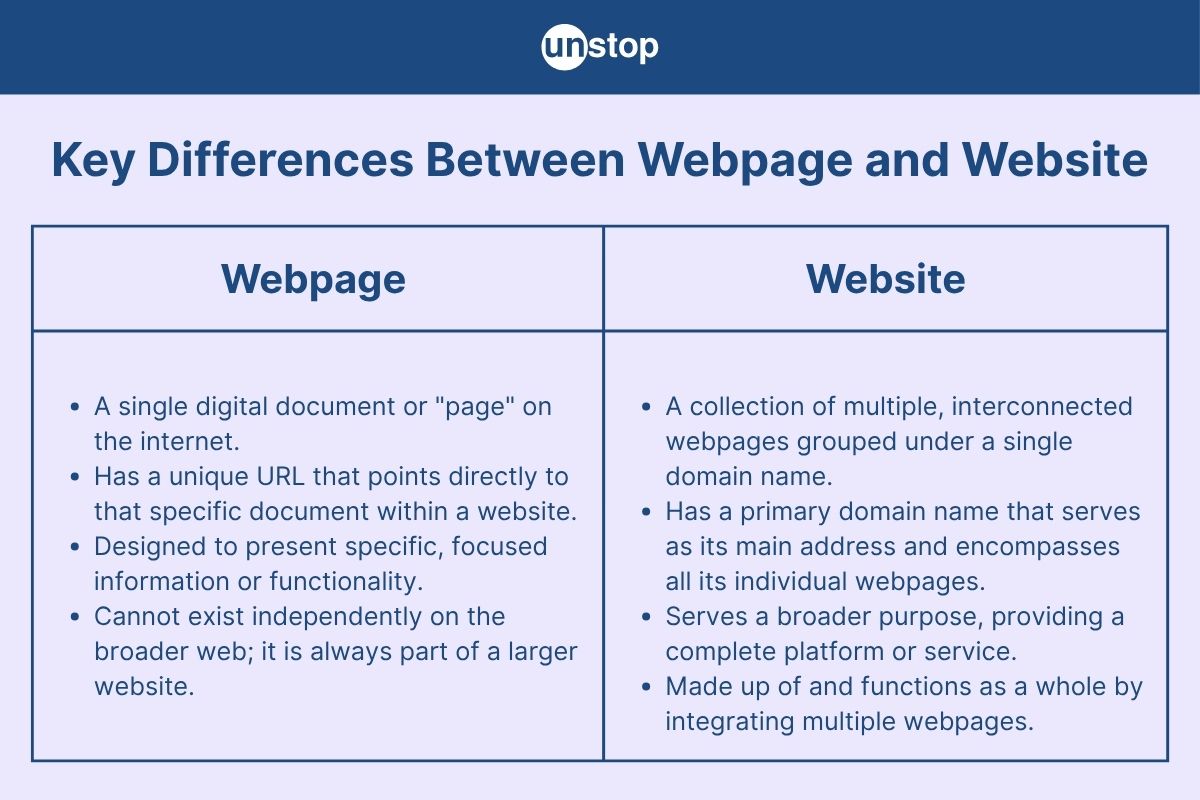
Difference Between Webpage and Website
|
Feature |
Webpage |
Website |
|
Definition |
A webpage is a single document that can be displayed in a web browser, usually written in HTML and CSS. |
A website is a collection of related webpages grouped under a common domain name. |
|
Components |
Contains content such as text, images, links, and multimedia. It is a part of a website. |
Includes multiple webpages, media files, databases, and other resources managed together. |
|
URL |
A webpage has a unique URL identifying that specific document within the website. |
A website has a main URL (domain) and may include multiple URLs for its pages. |
|
Navigation |
Typically has hyperlinks to other webpages, either within the same site or external ones. |
Provides a structured navigation system (menus, links) to access different webpages and resources. |
|
Storage |
Stored as an individual file on a web server. |
Comprises many files and directories stored and managed on a web server. |
|
Interdependence |
A webpage cannot exist independently in the broader web context; it’s usually part of a website. |
A website is made up of multiple webpages and functions as a whole. |
|
Development |
Created using HTML, CSS, and optionally JavaScript for dynamic content. |
Developed using a combination of web technologies including HTML, CSS, JavaScript, server-side scripting, databases, and CMSs. |
|
Purpose |
To convey specific information or functionality (e.g., an article, form, or product detail). |
To serve a complete platform or service (e.g., e-commerce, news portal, educational site). |
|
Examples |
https://example.com/about.html (a single page) |
https://example.com (the homepage and its linked pages form a complete website) |
|
Maintenance |
Easier to maintain individually, especially for static content. |
Requires broader management and version control to handle multiple interconnected pages. |
|
User Interaction |
May have limited interaction, like form submission or simple scripts. |
May include complex interactions, authentication, content management, and integrated tools. |
|
Size |
Comparatively smaller in file size and content. |
Larger in scope, including multiple webpages, assets, and possibly backend integration. |
What Is a Webpage? A Detailed Explanation
A webpage refers to an individual document, accessible via the internet using a web browser. It is generally written in HTML with enhancements provided by CSS for styling and JavaScript for interactivity. Every single time you open your browser to go to an article, an online form, or a page featuring a video, you are viewing a webpage. It may appear to be an entire platform, but it's just one document in a larger collection, usually termed a website.
Features of a Webpage
- Single Document View: Each webpage represents a unique HTML document.
- Unique URL: Every webpage has its own unique web address or link (URL).
- Browser-Based Access: Can be viewed using web browsers like Chrome, Firefox, or Safari.
- Content-Rich: Includes text, images, videos, hyperlinks, buttons, and more.
- Responsive Design: Modern webpages are optimized to work across devices—desktop, tablet, and mobile.
- Fast Loading: Typically lightweight and optimized to load quickly for a better user experience.
- Client-Side or Server-Side Rendering: Depending on how it's built, content can be static or dynamically generated.
Functionality of a Webpage
- Information Display: Presents information such as articles, blog posts, or product descriptions.
- Navigation Gateway: Often includes links to other pages, forming part of a website's structure.
- User Interaction: Supports forms, clickable buttons, animations, and interactive elements via JavaScript.
- Content Updating: Can load new data without reloading the whole page using AJAX or API calls.
- SEO Optimization: Tailored with meta tags and structured data to rank in search engine results.
- Accessibility: Built to be accessible for users with disabilities via alt text, semantic HTML, and ARIA labels.
Types of Webpages
Here are the most common types of webpages, each serving a distinct purpose:
Static Webpage: A fixed page written in HTML that displays the same content to every visitor. It doesn't change unless the developer updates it manually.
Example: company "About Us" page.
Dynamic Webpage: Content is generated in real-time based on user input or backend logic. These pages interact with databases and are common in social media, e-commerce, and blogs.
Example: a user profile page on Facebook.
Landing Page: A standalone page created specifically for marketing or advertising purposes. It often encourages visitors to take a specific action, like signing up or downloading an app.
Homepage: The main entry point of a website. It introduces users to the site's purpose and links to other important pages.
Product or Service Page: Provides detailed information about a specific product or service. Common in e-commerce websites to showcase features, prices, and user reviews.
Blog Post Page: A webpage dedicated to a single blog entry. Typically includes a title, content, media, tags, and a comment section.
Error Page (e.g., 404 Page): Displays when the requested page cannot be found. These pages are often customized to help users navigate back to active parts of the site.
What Is a Website? A Detailed Explanation
A website refers to a group of pages that are related to each other and share a common domain name, interlinked with each other over the internet. It serves as an online platform for individuals, businesses, or organizations to showcase their information, services, or interactions with a much wider audience.
Whenever you enter the homepage of a company, a store, or a personal blog, you are visiting a website. Websites can comprise multiple individual and different types of static or dynamic web pages depending on the purpose and design.
Primary Features of a Website
- Domain-Based Access: Websites are identified by domain names (e.g., www.example.com), making them easy to access via web browsers.
- Multi-Page Structure: A website typically contains multiple webpages, such as a homepage, contact page, about page, and more.
- Navigation Menus: Most websites feature navigation menus to help users move between pages easily.
- Responsive Design: Modern websites are designed to work seamlessly on both desktops and mobile devices.
- Interactivity: Many websites allow user interaction, such as forms, buttons, shopping carts, or login systems.
- Media Integration: Websites can host multimedia elements like images, audio, video, animations, and downloadable files.
- Backend Support: Dynamic websites use databases and server-side scripting to store and retrieve user data.
Functionality of a Website
- Information Sharing: Websites can distribute information, ranging from articles and news to tutorials and FAQs.
- Online Presence: Businesses use websites to build credibility and reach a global audience.
- E-Commerce: Online stores allow users to browse, select, and purchase products or services.
- Communication: Websites often include contact forms, chatbots, or forums to facilitate communication.
- User Registration: Many websites offer membership areas or user profiles to store preferences or enable services.
- Marketing & SEO: Websites serve as tools for digital marketing and are optimized for search engines to drive traffic.
- Content Management: Through CMS platforms like WordPress, users can easily update and manage content on a website.
Types of Websites
Static Website: These websites consist of fixed content coded in HTML and CSS. Every time a user visits, they see the same content. Ideal for small portfolios or informational pages.
Dynamic Website: Dynamic websites generate content in real-time using server-side scripting (like PHP or Node.js). These are more complex and personalized—e.g., user dashboards, news portals.
E-commerce Website: Built for online selling, these websites feature product listings, shopping carts, payment gateways, and order tracking. Examples include Amazon and Flipkart.
Blog or Personal Website: These are content-focused websites where individuals or groups post articles, images, or personal updates. Examples: travel blogs, cooking blogs.
Business Website: Created by companies to showcase services, portfolios, contact details, and achievements. They are designed to convert visitors into customers.
Portfolio Website: Mostly used by freelancers, designers, and artists to showcase their work samples. These websites often feature galleries and project case studies.
Educational Website: Designed for learning purposes, these websites include tutorials, courses, quizzes, and certifications.
Social Media Website: Platforms like Facebook, Instagram, and LinkedIn are websites built for networking and sharing content among users.
Understanding the Differences Between a Webpage and a Website
In this section, we will break down the key differences between a webpage and a website by comparing them across several aspects such as structure, purpose, accessibility, development, and more.
Structure
A webpage is a single document on the internet—just one page of content that could include text, images, links, videos, or interactive elements. Think of it as a single slide in a presentation.
A website, on the other hand, is a collection of multiple interlinked webpages hosted under a common domain name. It's the full presentation, with all the slides, navigation, and sections.
Purpose
The purpose of a webpage is usually focused and specific. For example, a webpage might serve as an article, product description, contact form, or blog post.
A website's purpose is broader—it serves as a platform for delivering a complete user experience. It might be used for e-commerce, branding, portfolios, news publishing, social networking, or service offerings.
Accessibility
A webpage can sometimes be accessed directly via its unique URL (e.g., www.example.com/about-us). It may or may not be visible in the website's navigation bar.
A website is the entry point to access all its webpages. It typically starts with the homepage (www.example.com) and links to other internal pages through menus or buttons.
Development
Creating a webpage often involves basic HTML and CSS, especially for static content. Dynamic webpages may also include JavaScript or be generated by server-side scripts.
Building a website is more complex. It involves structuring multiple webpages, creating navigation, setting up hosting, managing domains, and possibly using a CMS (Content Management System) like WordPress.
Navigation
Webpages typically have links that connect them to other parts of the website, but individually, they may not offer full navigation or site-wide menus.
Websites are built around organized navigation systems—like headers, footers, and sidebars—that allow users to browse between different webpages easily.
Content Scope
A webpage usually covers a single topic or segment of information.
A website provides comprehensive content across multiple topics, often structured into categories or sections for easier access and understanding.
Conclusion
Any person wishing to maneuver through the digital world needs to understand the difference between a webpage and a website. A webpage is designed to provide focused content, while a website is a set of interconnected webpages that provide a unified interface for the user. If a webpage is the building block of a website, the website is the master of ceremonies, giving direction and organization to a smooth user experience.
The difference between a webpage and a website really boils down to the domains and functions of each. A webpage stands by itself with isolation, focusing on very particular content or actions; a website, on the larger scope, basically hosts a collection of webpages that give out all-encompassing information and navigation.
Understanding these differences will give you insights into how a website is structured and how each page contributes to the general web experience for easier design, development, and management of the website.
Frequently Asked Questions (FAQs)
Q1. What is the difference between a webpage and a website?
A webpage is a single document or page that is accessible via the internet and typically contains specific information, images, or media. It is often a part of a website, which is a broader collection of interconnected webpages that function as a complete entity. A website is an entire platform made up of multiple webpages, usually organized with navigation tools to allow users to move from one page to another. The distinction lies in the scale — a webpage is a singular unit, while a website is the collective term for many pages.
Q2. Can a website function without webpages?
No, a website cannot function without webpages. Webpages are the foundational elements that make up a website. While the overall design and layout of a website may vary, it always consists of at least one webpage. A website typically requires multiple webpages to provide users with comprehensive content and facilitate navigation. In short, webpages are the essential building blocks of a website.
Q3. Is a homepage the same as a webpage?
No, a homepage is a specific type of webpage. It is the main or introductory page of a website, often acting as the starting point for visitors. While the homepage is a webpage itself, it serves as the entryway to the rest of the content within a website. A webpage, on the other hand, can be any individual page of a website, which could include blogs, product pages, or contact forms, among others.
Q4. How are webpages and websites related to web design?
Web design refers to the process of creating both web pages and websites. While designing individual webpages, the goal is to ensure that each page is user-friendly, visually appealing, and functional. When designing a website, however, web designers focus on ensuring that all webpages are integrated effectively, offering a cohesive experience. Web design encompasses both the creation of individual pages and their organization into a full website structure.
Q5. Can you have a website with just one webpage?
Yes, it is entirely possible to have a website with just one webpage. This is commonly referred to as a single-page website or a one-page website. These websites typically feature all the content on one page, where users can scroll to view different sections or information. This type of website is often used for portfolios, promotional pages, or landing pages where the goal is to provide a simple, concise experience to the user. Despite having only one page, it still qualifies as a website due to its domain and structure.
This article was contributed by Johns Joseph, Unstop Intern and Campus Ambassador.
Suggested reads:
Login to continue reading
And access exclusive content, personalized recommendations, and career-boosting opportunities.
Don't have an account? Sign up

Never miss an
Update





Top-Rated Practice by Students





Subscribe
to our newsletter






Comments
Add comment