


 Home
Home


HP Power Lab 3.0
Python Programming
- What Is Python? An Introduction
- What Is The History Of Python?
- Key Features Of The Python Programming Language
- Who Uses Python?
- Basic Characteristics Of Python Programming Syntax
- Why Should You Learn Python?
- Applications Of Python Language
- Advantages And Disadvantages Of Python
- Some Useful Python Tips & Tricks For Efficient Programming
- Python 2 Vs. Python 3: Which Should You Learn?
- Python Libraries
- Conclusion
- Frequently Asked Questions
- It's Python Basics Quiz Time!
- What is Python & its Brief History
- Key Features of Python Programming Language
- Applications of Python Language
- Practical Python Code Examples
- About Python IDLE
- Comparative Features of Python, Java, & C++
- Conclusion
- Frequently Asked Questions
- Take A Quiz To Rehash Python's Features!
- What Is Python IDLE?
- What Is Python Shell & Its Uses?
- Primary Features Of Python IDLE
- How To Use Python IDLE Shell? Setting Up Your Python Environment
- How To Work With Files In Python IDLE?
- How To Execute A File In Python IDLE?
- Improving Workflow In Python IDLE Software
- Debugging In Python IDLE
- Customizing Python IDLE
- Code Examples
- Conclusion
- Frequently Asked Questions (FAQs)
- How Well Do You Know IDLE? Take A Quiz!
- What Is A Variable In Python?
- Creating And Declaring Python Variables
- Rules For Naming Python Variables
- How To Print Python Variables?
- How To Delete A Python Variable?
- Various Methods Of Variables Assignment In Python
- Python Variable Types
- Python Variable Scope
- Concatenating Python Variables
- Object Identity & Object References Of Python Variables
- Reserved Words/ Keywords & Python Variable Names
- Conclusion
- Frequently Asked Questions
- Rehash Python Variables Basics With A Quiz!
- What Is A String In Python?
- Creating String In Python
- How To Create Multiline Python Strings?
- Reassigning Python Strings
- Accessing Characters Of Python Strings
- How To Update Or Delete A Python String?
- Reversing A Python String
- Formatting Python Strings
- Concatenation & Comparison Of Python Strings
- Python String Operators
- Python String Functions
- Escape Sequences In Python Strings
- Conclusion
- Frequently Asked Questions
- Rehash Python Strings Basics With A Quiz!
- What Is Python Namespace?
- Lifetime Of Python Namespace
- Types Of Python Namespace
- The Built-In Namespace In Python
- The Global Namespace In Python
- The Local Namespace In Python
- The Enclosing Namespace In Python
- Variable Scope & Namespace In Python
- Python Namespace Dictionaries
- Changing Variables Out Of Their Scope & Python Namespace
- Best Practices Of Python Namespace
- Conclusion
- Frequently Asked Questions
- Test Your Knowledge Of Python Namespaces!
- What Are Logical Operators In Python?
- The AND Python Logical Operator
- The OR Python Logical Operator
- The NOT Python Logical Operator
- Short-Circuiting Evaluation Of Python Logical Operators
- Precedence of Logical Operators In Python
- How Does Python Calculate Truth Value?
- Final Note On How AND & OR Python Logical Operators Work
- Conclusion
- Frequently Asked Questions
- Python Logical Operators Quiz– Test Your Knowledge!
- What Are Bitwise Operators In Python?
- List Of Python Bitwise Operators
- AND Python Bitwise Operator
- OR Python Bitwise Operator
- NOT Python Bitwise Operator
- XOR Python Bitwise Operator
- Right Shift Python Bitwise Operator
- Left Shift Python Bitwise Operator
- Python Bitwise Operations On Negative Integers
- The Binary Number System
- Application of Python Bitwise Operators
- Python Bitwise Operator Overloading
- Conclusion
- Frequently Asked Questions
- Test Your Knowledge Of Python Bitwise Operators!
- What Is The Print() Function In Python?
- How Does The print() Function Work In Python?
- How To Print Single & Multi-line Strings In Python?
- How To Print Built-in Data Types In Python?
- Print() Function In Python For Values Stored In Variables
- Print() Function In Python With sep Parameter
- Print() Function In Python With end Parameter
- Print() Function In Python With flush Parameter
- Print() Function In Python With file Parameter
- How To Remove Newline From print() Function In Python?
- Use Cases Of The print() Function In Python
- Understanding Print Statement In Python 2 Vs. Python 3
- Conclusion
- Frequently Asked Questions
- Know The print() Function In Python? Take A Quiz!
- Working Of Normal Print() Function
- The New Line Character In Python
- How To Print Without Newline In Python | Using The End Parameter
- How To Print Without Newline In Python 2.x? | Using Comma Operator
- How To Print Without Newline In Python 3.x?
- How To Print Without Newline In Python With Module Sys
- The Star Pattern(*) | How To Print Without Newline & Space In Python
- How To Print A List Without Newline In Python?
- How To Remove New Lines In Python?
- Conclusion
- Frequently Asked Questions
- Think You Can Print Without a Newline in Python? Prove It!
- What Is A Python For Loop?
- How Does Python For Loop Work?
- When & Why To Use Python For Loops?
- Python For Loop Examples
- What Is Rrange() Function In Python?
- Nested For Loops In Python
- Python For Loop With Continue & Break Statements
- Python For Loop With Pass Statement
- Else Statement In Python For Loop
- Conclusion
- Frequently Asked Questions
- Think You Know Python's For Loop? Prove It!
- What Is Python While Loop?
- How Does The Python While Loop Work?
- How To Use Python While Loops For Iterations?
- Control Statements In Python While Loop With Examples
- Python While Loop With Python List
- Infinite Python While Loop in Python
- Python While Loop Multiple Conditions
- Nested Python While Loops
- Conclusion
- Frequently Asked Questions
- Mastered Python While Loop? Let’s Find Out!
- What Are Conditional If-Else Statements In Python?
- Types Of If-Else Statements In Python
- If Statement In Python
- If-Else Statement In Python
- Nested If-Else Statement In Python
- Elif Statement In Python
- Ladder If-Elif-Else Statement In Python
- Short Hand If-Statement In Python
- Short Hand If-Else Statement In Python
- Operators & If-Esle Statement In Python
- Other Statements With If-Else In Python
- Conclusion
- Frequently Asked Questions
- Quick If-Else Statement Quiz– Let’s Go!
- What Is Control Structure In Python?
- Types Of Control Structures In Python
- Sequential Control Structures In Python
- Decision-Making Control Structures In Python
- Repetition Control Structures In Python
- Benefits Of Using Control Structures In Python
- Conclusion
- Frequently Asked Questions
- Control Structures in Python – Are You the Master? Take A Quiz!
- What Are Python Libraries?
- How Do Python Libraries Work?
- Standard Python Libraries (With List)
- Important Python Libraries For Data Science
- Important Python Libraries For Machine & Deep Learning
- Other Important Python Libraries You Must Know
- Working With Third-Party Python Libraries
- Troubleshooting Common Issues For Python Libraries
- Python Libraries In Larger Projects
- Importance Of Python Libraries
- Conclusion
- Frequently Asked Questions
- Quick Quiz On Python Libraries – Let’s Go!
- What Are Python Functions?
- How To Create/ Define Functions In Python?
- How To Call A Python Function?
- Types Of Python Functions Based On Parameters & Return Statement
- Rules & Best Practices For Naming Python Functions
- Basic Types of Python Functions
- The Return Statement In Python Functions
- Types Of Arguments In Python Functions
- Docstring In Python Functions
- Passing Parameters In Python Functions
- Python Function Variables | Scope & Lifetime
- Advantages Of Using Python Functions
- Recursive Python Function
- Anonymous/ Lambda Function In Python
- Nested Functions In Python
- Conclusion
- Frequently Asked Questions
- Python Functions – Test Your Knowledge With A Quiz!
- What Are Python Built-In Functions?
- Mathematical Python Built-In Functions
- Python Built-In Functions For Strings
- Input/ Output Built-In Functions In Python
- List & Tuple Python Built-In Functions
- File Handling Python Built-In Functions
- Python Built-In Functions For Dictionary
- Type Conversion Python Built-In Functions
- Basic Python Built-In Functions
- List Of Python Built-In Functions (Alphabetical)
- Conclusion
- Frequently Asked Questions
- Think You Know Python Built-in Functions? Prove It!
- What Is A round() Function In Python?
- How Does Python round() Function Work?
- Python round() Function If The Second Parameter Is Missing
- Python round() Function If The Second Parameter Is Present
- Python round() Function With Negative Integers
- Python round() Function With Math Library
- Python round() Function With Numpy Module
- Round Up And Round Down Numbers In Python
- Truncation Vs Rounding In Python
- Practical Applications Of Python round() Function
- Conclusion
- Frequently Asked Questions
- Revisit Python’s round() Function – Take The Quiz!
- What Is Python pow() Function?
- Python pow() Function Example
- Python pow() Function With Modulus (Three Parameters)
- Python pow() Function With Complex Numbers
- Python pow() Function With Floating-Point Arguments And Modulus
- Python pow() Function Implementation Cases
- Difference Between Inbuilt-pow() And math.pow() Function
- Conclusion
- Frequently Asked Questions
- Test Your Knowledge Of Python’s pow() Function!
- Python max() Function With Objects
- Examples Of Python max() Function With Objects
- Python max() Function With Iterable
- Examples Of Python max() Function With Iterables
- Potential Errors With The Python max() Function
- Python max() Function Vs. Python min() Functions
- Conclusion
- Frequently Asked Questions
- Think You Know Python max() Function? Take A Quiz!
- What Are Strings In Python?
- What Are Python String Methods?
- List Of Python String Methods For Manipulating Case
- List Of Python String Methods For Searching & Finding
- List Of Python String Methods For Modifying & Transforming
- List Of Python String Methods For Checking Conditions
- List Of Python String Methods For Encoding & Decoding
- List Of Python String Methods For Stripping & Trimming
- List Of Python String Methods For Formatting
- Miscellaneous Python String Methods
- List Of Other Python String Operations
- Conclusion
- Frequently Asked Questions
- Mastered Python String Methods? Take A Quiz!
- What Is Python String?
- The Need For Python String Replacement
- The Python String replace() Method
- Multiple Replacements With Python String.replace() Method
- Replace A Character In String Using For Loop In Python
- Python String Replacement Using Slicing Method
- Replace A Character At a Given Position In Python String
- Replace Multiple Substrings With The Same String In Python
- Python String Replacement Using Regex Pattern
- Python String Replacement Using List Comprehension & Join() Method
- Python String Replacement Using Callback With re.sub() Method
- Python String Replacement With re.subn() Method
- Conclusion
- Frequently Asked Questions
- Know How To Replace Python Strings? Prove It!
- What Is String Slicing In Python?
- How Indexing & String Slicing Works In Python
- Extracting All Characters Using String Slicing In Python
- Extracting Characters Before & After Specific Position Using String Slicing In Python
- Extracting Characters Between Two Intervals Using String Slicing In Python
- Extracting Characters At Specific Intervals (Step) Using String Slicing In Python
- Negative Indexing & String Slicing In Python
- Handling Out-of-Bounds Indices In String Slicing In Python
- The slice() Method For String Slicing In Python
- Common Pitfalls Of String Slicing In Python
- Real-World Applications Of String Slicing
- Conclusion
- Frequently Asked Questions
- Quick Python String Slicing Quiz– Let’s Go!
- Introduction To Python List
- How To Create A Python List?
- How To Access Elements Of Python List?
- Accessing Multiple Elements From A Python List (Slicing)
- Access List Elements From Nested Python Lists
- How To Change Elements In Python Lists?
- How To Add Elements To Python Lists?
- Delete/ Remove Elements From Python Lists
- How To Create Copies Of Python Lists?
- Repeating Python Lists
- Ways To Iterate Over Python Lists
- How To Reverse A Python List?
- How To Sort Items Of Python Lists?
- Built-in Functions For Operations On Python Lists
- Conclusion
- Frequently Asked Questions
- Revisit Python Lists Basics With A Quick Quiz!
- What Is List Comprehension In Python?
- Incorporating Conditional Statements With List Comprehension In Python
- List Comprehension In Python With range()
- Filtering Lists Effectively With List Comprehension In Python
- Nested Loops With List Comprehension In Python
- Flattening Nested Lists With List Comprehension In Python
- Handling Exceptions In List Comprehension In Python
- Common Use Cases For List Comprehensions
- Advantages & Disadvantages Of List Comprehension In Python
- Best Practices For Using List Comprehension In Python
- Performance Considerations For List Comprehension In Python
- For Loops & List Comprehension In Python: A Comparison
- Difference Between Generator Expression & List Comprehension In Python
- Conclusion
- Frequently Asked Questions
- Rehash Python List Comprehension Basics With A Quiz!
- What Is A List In Python?
- How To Find Length Of List In Python?
- For Loop To Get Python List Length (Naive Approach)
- The len() Function To Get Length Of List In Python
- The length_hint() Function To Find Length Of List In Python
- The sum() Function To Find The Length Of List In Python
- The enumerate() Function To Find Python List Length
- The Counter Class From collections To Find Python List Length
- The List Comprehension To Find Python List Length
- Find The Length Of List In Python Using Recursion
- Comparison Between Ways To Find Python List Length
- Conclusion
- Frequently Asked Questions
- Know How To Get Python List Length? Prove it!
- List of Methods To Reverse A Python List
- Python Reverse List Using reverse() Method
- Python Reverse List Using the Slice Operator ([::-1])
- Python Reverse List By Swapping Elements
- Python Reverse List Using The reversed() Function
- Python Reverse List Using A for Loop
- Python Reverse List Using While Loop
- Python Reverse List Using List Comprehension
- Python Reverse List Using List Indexing
- Python Reverse List Using The range() Function
- Python Reverse List Using NumPy
- Comparison Of Ways To Reverse A Python List
- Conclusion
- Frequently Asked Questions
- Time To Test Your Python List Reversal Skills!
- What Is Indexing In Python?
- The Python List index() Function
- How To Use Python List index() To Find Index Of A List Element
- The Python List index() Method With Single Parameter (Start)
- The Python List index() Method With Start & Stop Parameters
- What Happens When We Use Python List index() For An Element That Doesn't Exist
- Python List index() With Nested Lists
- Fixing IndexError Using The Python List index() Method
- Python List index() With Enumerate()
- Real-world Examples Of Python List index() Method
- Difference Between find() And index() Method In Python
- Conclusion
- Frequently Asked Questions
- Think You Know Python List Indexing? Take A Quiz!
- How To Remove Elements From List In Python?
- The remove() Method To Remove Element From Python List
- The pop() Method To Remove Element From List In Python
- The del Keyword To Remove Element From List In Python
- The clear() Method To Remove Elements From Python List
- List Comprehensions To Conditionally Remove Element From List In Python
- Key Considerations For Removing Elements From Python Lists
- Why We Need to Remove Elements From Python List
- Performance Comparison Of Methods To Remove Element From List In Python
- Conclusion
- Frequently Asked Questions
- Quiz– Prove You Know How To Remove Item From Python Lists!
- How To Remove Duplicates From A List In Python?
- The set() Function To Remove Duplicates From Python List
- Remove Duplicates From Python List Using For Loop
- Using List Comprehension Remove Duplicates From Python List
- Remove Duplicates From Python List Using enumerate() With List Comprehension
- Dictionary & fromkeys() Method To Remove Duplicates From Python List
- Remove Duplicates From Python List Using in, not in Operators
- Remove Duplicates From Python List Using collections.OrderedDict.fromkeys()
- Remove Duplicates From Python List Using Counter with freq.dist() Method
- The del Keyword Remove Duplicates From Python List
- Remove Duplicates From Python List Using DataFrame
- Remove Duplicates From Python List Using pd.unique and np.unipue
- Remove Duplicates From Python List Using reduce() function
- Comparative Analysis Of Ways To Remove Duplicates From Python List
- Conclusion
- Frequently Asked Questions
- Think You Know How to Remove Duplicates? Take A Quiz!
- What Is Python List & How To Access Elements?
- What Is IndexError: List Index Out Of Range & Its Causes In Python?
- Understanding Indexing Behavior In Python Lists
- How to Prevent/ Fix IndexError: List Index Out Of Range In Python
- Handling IndexError Gracefully Using Try-Except
- Debugging Tips For IndexError: List Index Out Of Range Python
- Conclusion
- Frequently Asked Questions
- Avoiding ‘List Index Out of Range’ Errors? Take A Quiz!
- What Is the Python sort() List Method?
- Sorting In Ascending Order Using The Python sort() List Method
- How To Sort Items In Descending Order Using Python sort() List Method
- Custom Sorting Using The Key Parameter Of Python sort() List Method
- Examples Of Python sort() List Method
- What Is The sorted() List Method In Python
- Differences Between sorted() And sort() List Methods In Python
- When To Use sorted() & When To Use sort() List Method In Python
- Conclusion
- Frequently Asked Questions
- Take A Quick Python's sort() Quiz!
- What Is A List In Python?
- What Is A String In Python?
- Why Convert Python List To String?
- How To Convert List To String In Python?
- The join() Method To Convert Python List To String
- Convert Python List To String Through Iteration
- Convert Python List To String With List Comprehension
- The map() Function To Convert Python List To String
- Convert Python List to String Using format() Function
- Convert Python List To String Using Recursion
- Enumeration Function To Convert Python List To String
- Convert Python List To String Using Operator Module
- Python Program To Convert String To List
- Conclusion
- Frequently Asked Questions
- Convert Lists To Strings Like A Pro! Take A Quiz
- What Is Inheritance In Python?
- Python Inheritance Syntax
- Parent Class In Python Inheritance
- Child Class In Python Inheritance
- The __init__() Method In Python Inheritance
- The super() Function In Python Inheritance
- Method Overriding In Python Inheritance
- Types Of Inheritance In Python
- Special Functions In Python Inheritance
- Advantages & Disadvantages Of Inheritance In Python
- Common Use Cases For Inheritance In Python
- Best Practices for Implementing Inheritance in Python
- Avoiding Common Pitfalls in Python Inheritance
- Conclusion
- Frequently Asked Questions
- 💡 Python Inheritance Quiz – Are You Ready?
- What Is The Python List append() Method?
- Adding Elements To A Python List Using append()
- Populate A Python List Using append()
- Adding Different Data Types To Python List Using append()
- Adding A List To Python List Using append()
- Nested Lists With Python List append() Method
- Practical Use Cases Of Python List append() Method
- How append() Method Affects List Performance
- Avoiding Common Mistakes When Using Python List append()
- Comparing extend() With append() Python List Method
- Conclusion
- Frequently Asked Questions
- 🧠 Think You Know Python List append()? Take A Quiz!
- What Is A Linked List In Python?
- Types Of Linked Lists In Python
- How To Create A Linked List In Python
- How To Traverse A Linked List In Python & Retrieve Elements
- Inserting Elements In A Linked List In Python
- Deleting Elements From A Linked List In Python
- Update A Node Of Linked List In Python
- Reversing A Linked List In Python
- Calculating Length Of A Linked List In Python
- Comparing Arrays And Linked Lists In Python
- Advantages & Disadvantages Of Linked List In Python
- When To Use Linked Lists Over Other Data Structures
- Practical Applications Of Linked Lists In Python
- Conclusion
- Frequently Asked Questions
- 🔗 Linked List Logic: Can You Ace This Quiz?
- What Is Extend In Python?
- Extend In Python With List
- Extend In Python With String
- Extend In Python With Tuple
- Extend In Python With Set
- Extend In Python With Dictionary
- Other Methods To Extend A List In Python
- Difference Between append() and extend() In Python
- Conclusion
- Frequently Asked Questions
- Think You Know extend() In Python? Prove It!
- What Is Recursion In Python?
- Key Components Of Recursive Functions In Python
- Implementing Recursion In Python
- Recursion Vs. Iteration In Python
- Tail Recursion In Python
- Infinite Recursion In Python
- Advantages Of Recursion In Python
- Disadvantages Of Recursion In Python
- Best Practices For Using Recursion In Python
- Conclusion
- Frequently Asked Questions
- Recursive Thinking In Python: Test Your Skills!
- What Is Type Conversion In Python?
- Types Of Type Conversion In Python
- Implicit Type Conversion In Python
- Explicit Type Conversion In Python
- Functions Used For Explicit Data Type Conversion In Python
- Important Type Conversion Tips In Python
- Benefits Of Type Conversion In Python
- Conclusion
- Frequently Asked Questions
- Think You Know Type Conversion? Take A Quiz!
- What Is Scope In Python?
- Local Scope In Python
- Global Scope In Python
- Nonlocal (Enclosing) Scope In Python
- Built-In Scope In Python
- The LEGB Rule For Python Scope
- Python Scope And Variable Lifetime
- Best Practices For Managing Python Scope
- Conclusion
- Frequently Asked Questions
- Think You Know Python Scope? Test Yourself!
- Understanding The Continue Statement In Python
- How Does Continue Statement Work In Python?
- Python Continue Statement With For Loops
- Python Continue Statement With While Loops
- Python Continue Statement With Nested Loops
- Python Continue With If-Else Statement
- Difference Between Pass and Continue Statement In Python
- Practical Applications Of Continue Statement In Python
- Conclusion
- Frequently Asked Questions
- Python 'continue' Statement Quiz: Can You Ace It?
- What Are Control Statements In Python?
- Types Of Control Statements In Python
- Conditional Control Statements In Python
- Loop Control Statements In Python
- Control Flow Altering Statements In Python
- Exception Handling Control Statements In Python
- Conclusion
- Frequently Asked Questions
- Mastering Control Statements In Python – Take the Quiz!
- Difference Between Mutable And Immutable Data Types in Python
- What Is Mutable Data Type In Python?
- Types Of Mutable Data Types In Python
- What Are Immutable Data Types In Python?
- Types Of Immutable Data Types In Python
- Key Similarities Between Mutable And Immutable Data Types In Python
- When To Use Mutable Vs Immutable In Python?
- Conclusion
- Frequently Asked Questions
- Quiz Time: Mutable vs. Immutable In Python!
- What Is A List?
- What Is A Tuple?
- Difference Between List And Tuple In Python (Comparison Table)
- Syntax Difference Between List And Tuple In Python
- Mutability Difference Between List And Tuple In Python
- Other Difference Between List And Tuple In Python
- List Vs. Tuple In Python | Methods
- When To Use Tuples Over Lists?
- Key Similarities Between Tuples And Lists In Python
- Conclusion
- Frequently Asked Questions
- 🧐 Lists vs. Tuples Quiz: Test Your Python Knowledge!
- Introduction to Python
- Downloading & Installing Python, IDLE, Tkinter, NumPy & PyGame
- Creating A New Python Project
- How To Write Python Hello World Program In Python?
- Way To Write The Hello, World! Program In Python
- The Hello, World! Program In Python Using Class
- The Hello, World! Program In Python Using Function
- Print Hello World 5 Times Using A For Loop
- Conclusion
- Frequently Asked Questions
- 👋 Python's 'Hello, World!'—How Well Do You Know It?
- Algorithm Of Python Program To Add To Numbers
- Standard Program To Add Two Numbers In Python
- Python Program To Add Two Numbers With User-defined Input
- The add() Method In Python Program To Add Two Numbers
- Python Program To Add Two Numbers Using Lambda
- Python Program To Add Two Numbers Using Function
- Python Program To Add Two Numbers Using Recursion
- Python Program To Add Two Numbers Using Class
- How To Add Multiple Numbers In Python?
- Add Multiple Numbers In Python With User Input
- Time Complexities Of Python Programs To Add Two Numbers
- Conclusion
- Frequently Asked Questions
- 💡 Quiz Time: Python Addition Basics!
- Swapping in Python
- Swapping Two Variables Using A Temporary Variable
- Swapping Two Variables Using The Comma Operator In Python
- Swapping Two Variables Using The Arithmetic Operators (+,-)
- Swapping Two Variables Using The Arithmetic Operators (*,/)
- Swapping Two Variables Using The XOR(^) Operator
- Swapping Two Variables Using Bitwise Addition and Subtraction
- Swap Variables In A List
- Conclusion
- Frequently Asked Questions (FAQs)
- Quiz To Test Your Variable Swapping Knowledge
- What Is A Quadratic Equation? How To Solve It?
- How To Write A Python Program To Solve Quadratic Equations?
- Python Program To Solve Quadratic Equations Directly Using The Formula
- Python Program To Solve Quadratic Equations Using The Complex Math Module
- Python Program To Solve Quadratic Equations Using Functions
- Python Program To Solve Quadratic Equations & Find Number Of Solutions
- Python Program To Plot Quadratic Functions
- Conclusion
- Frequently Asked Questions
- Quadratic Equations In Python Quiz: Test Your Knowledge!
- What Is Decimal Number System?
- What Is Binary Number System?
- What Is Octal Number System?
- What Is Hexadecimal Number System?
- Python Program to Convert Decimal to Binary, Octal, And Hexadecimal Using Built-In Function
- Python Program To Convert Decimal To Binary Using Recursion
- Python Program To Convert Decimal To Octal Using Recursion
- Python Program To Convert Decimal To Hexadecimal Using Recursion
- Python Program To Convert Decimal To Binary Using While Loop
- Python Program To Convert Decimal To Octal Using While Loop
- Python Program To Convert Decimal To Hexadecimal Using While Loop
- Convert Decimal To Binary, Octal, And Hexadecimal Using String Formatting
- Python Program To Convert Binary, Octal, And Hexadecimal String To A Number
- Complexity Comparison Of Python Programs To Convert Decimal To Binary, Octal, And Hexadecimal
- Conclusion
- Frequently Asked Questions
- 💡 Decimal To Binary, Octal & Hex: Quiz Time!
- What Is A Square Root?
- Python Program To Find The Square Root Of A Number
- The pow() Function In Python Program To Find The Square Root Of Given Number
- Python Program To Find Square Root Using The sqrt() Function
- The cmath Module & Python Program To Find The Square Root Of A Number
- Python Program To Find Square Root Using The Exponent Operator (**)
- Python Program To Find Square Root With A User-Defined Function
- Python Program To Find Square Root Using A Class
- Python Program To Find Square Root Using Binary Search
- Python Program To Find Square Root Using NumPy Module
- Conclusion
- Frequently Asked Questions
- 🤓 Think You Know Square Roots In Python? Take A Quiz!
- Understanding the Logic Behind the Conversion of Kilometers to Miles
- Steps To Write Python Program To Convert Kilometers To Miles
- Python Program To Convert Kilometer To Miles Without Function
- Python Program To Convert Kilometer To Miles Using Function
- Python Program to Convert Kilometer To Miles Using Class
- Tips For Writing Python Program To Convert Kilometer To Miles
- Conclusion
- Frequently Asked Questions
- 🧐 Mastered Kilometer To Mile Conversion? Prove It!
- Why Build A Calculator Program In Python?
- Prerequisites To Writing A Calculator Program In Python
- Approach For Writing A Calculator Program In Python
- Simple Calculator Program In Python
- Calculator Program In Python Using Functions
- Creating GUI Calculator Program In Python Using Tkinter
- Conclusion
- Frequently Asked Questions
- 🧮 Calculator Program In Python Quiz!
- The Calendar Module In Python
- Prerequisites For Writing A Calendar Program In Python
- How To Write And Print A Calendar Program In Python
- Calendar Program In Python To Display A Month
- Calendar Program In Python To Display A Year
- Conclusion
- Frequently Asked Questions
- Calendar Program In Python – Quiz Time!
- What Is The Fibonacci Series?
- Pseudocode Code For Fibonacci Series Program In Python
- Generating Fibonacci Series In Python Using Naive Approach (While Loop)
- Fibonacci Series Program In Python Using The Direct Formula
- How To Generate Fibonacci Series In Python Using Recursion?
- Generating Fibonacci Series In Python With Dynamic Programming
- Fibonacci Series Program In Python Using For Loop
- Generating Fibonacci Series In Python Using If-Else Statement
- Generating Fibonacci Series In Python Using Arrays
- Generating Fibonacci Series In Python Using Cache
- Generating Fibonacci Series In Python Using Backtracking
- Fibonacci Series In Python Using Power Of Matix
- Complexity Analysis For Fibonacci Series Programs In Python
- Applications Of Fibonacci Series In Python & Programming
- Conclusion
- Frequently Asked Questions
- 🤔 Think You Know Fibonacci Series? Take A Quiz!
- Different Ways To Write Random Number Generator Python Programs
- Random Module To Write Random Number Generator Python Programs
- The Numpy Module To Write Random Number Generator Python Programs
- The Secrets Module To Write Random Number Generator Python Programs
- Understanding Randomness and Pseudo-Randomness In Python
- Common Issues and Solutions in Random Number Generation
- Applications of Random Number Generator Python
- Conclusion
- Frequently Asked Questions
- Think You Know Python's Random Module? Prove It!
- What Is A Factorial?
- Algorithm Of Program To Find Factorial Of A Number In Python
- Pseudocode For Factorial Program in Python
- Factorial Program In Python Using For Loop
- Factorial Program In Python Using Recursion
- Factorial Program In Python Using While Loop
- Factorial Program In Python Using If-Else Statement
- The math Module | Factorial Program In Python Using Built-In Factorial() Function
- Python Program to Find Factorial of a Number Using Ternary Operator(One Line Solution)
- Python Program For Factorial Using Prime Factorization Method
- NumPy Module | Factorial Program In Python Using numpy.prod() Function
- Complexity Analysis Of Factorial Programs In Python
- Conclusion
- Frequently Asked Questions
- Think You Know Factorials In Python? Take A Quiz!
- What Is Palindrome In Python?
- Check Palindrome In Python Using While Loop (Iterative Approach)
- Check Palindrome In Python Using For Loop And Character Matching
- Check Palindrome In Python Using The Reverse And Compare Method (Python Slicing)
- Check Palindrome In Python Using The In-built reversed() And join() Methods
- Check Palindrome In Python Using Recursion Method
- Check Palindrome In Python Using Flag
- Check Palindrome In Python Using One Extra Variable
- Check Palindrome In Python By Building Reverse, One Character At A Time
- Complexity Analysis For Palindrome Programs In Python
- Real-World Applications Of Palindrome In Python
- Conclusion
- Frequently Asked Questions
- Think You Know Palindromes? Take A Quiz!
- Best Python Books For Beginners
- Best Python Books For Intermediate Level
- Best Python Books For Experts
- Best Python Books To Learn Algorithms
- Audiobooks of Python
- Best Books To Learn Python And Code Like A Pro
- To Learn Python Libraries
- Books To Provide Extra Edge In Python
- Python Project Ideas - Reference
- Quiz To Rehash Your Knowledge Of Python Books!
- What Are Classes In Python?
- How To Create/Define Classes In Python?
- What Is An Object In Python?
- How To Create Objects In Python Classes?
- Modifying & Deleting Objects In Python Classes
- The __init__() Method In Python Classes
- The __str__() Method In Python Classes
- The Role Of self Parameter In Python Classes
- Different Methods In Classes In Python
- Instance Attributes vs. Class Attributes In Python Classes
- Object-Oriented Programming (OOP) Concepts In Python
- Practical Examples Of Classes & Objects In Python
- Why & When To Use Classes In Python Programs?
- Common Pitfalls Of Using Classes In Python Programs
- Conclusion
- Frequently Asked Questions
- What Is A String & How Python Handles It?
- Concatenation For String Manipulation In Python
- String Comparison In Python
- Slicing For String Manipulation in Python
- String Replacement Manipulation In Python
- Reversion String Manipulation In Python
- String Formatting In Python
- The Length Of A String In Python
- Conversion Of String In Python
- String Methods For String Manipulation In Python
- Conclusion
- Frequently Asked Questions
- How To Convert String To List In Python? (List Of Methods)
- Using split() To Convert A String To A List In Python
- Using list() To Convert A String To A List In Python
- Using List Comprehension To Convert A String To A List
- Using map() To Convert A String To A List In Python
- Using ast.literal_eval() To Convert A String To A List In Python
- Using Regular Expressions To Convert A String To A List
- Using JSON Parsing To Convert A String To A List In Python
- Using String Slicing To Convert A String To A List In Python
- Using enumerate() to Convert a String to a List In Python
- Handling Edge Cases When Converting A String To A List In Python
- Performance Comparison Of Ways To Convert String To List In Python
- Conclusion
- Frequently Asked Questions
- What Is A Python List?
- What Are Python List Functions? (Table)
- The list() Function In Python
- The append() Python List Function
- The copy() Python List Function
- The count() Python List Function
- The clear() And remove() Python List Functions
- The extend() Python List Function
- The index() Python List Function
- The insert() Python List Function
- The pop() Python List Function
- The reverse() Python List Function
- The sort() Python List Function
- The len() Python List Function
- Conclusion
- Frequently Asked Questions
- What Are Identifiers In Python?
- Rules For Naming Identifiers In Python
- Valid & Invalid Identifiers In Python
- How To Test Validity Of Identifiers In Python
- Best Practices For Using Identifiers In Python
- What Are Keywords In Python?
- Difference Between Keywords & Identifiers In Python
- Conclusion
- Frequently Asked Questions
- What Is Python’s split() String Function?
- How Does Python's split() String Method Work?
- Using Python's split() String Method With & Without maxsplit
- Parsing A String Using split() Function In Python
- Examples Of Using Python's split() String Method (10 Use Cases)
- Conclusion
- Frequently Asked Questions
- What Are Keywords In Python?
- List Of Python Keywords
- Types/Categories Of Python Keywords
- Control Flow Keywords In Python
- Function & Class Definition Keywords
- Exception Handling Keywords In Python
- Variable Scope/Handling Python Keywords
- Operator Keywords In Python (Logical & Membership)
- Module & Import Management Keywords
- Asynchronous Programming Keywords In Python
- Context Management Keywords In Python
- Boolean & Null Values In Python
- Pattern Matching/Soft Python Keywords
- Type Alias Definitions Keyword In Python
- Conclusion
- Frequently Asked Questions
- What Are Arguments In Python?
- Types Of Arguments In Python
- What Are Keyword Arguments In Python?
- Why Use Keyword Arguments In Python?
- Where To Use Keyword Arguments In Python
- Arbitrary Arguments Vs. Keyword Arguments
- Conclusion
- Frequently Asked Questions
- What Is Method Overriding In Python?
- Features/Rules Of Method Overriding In Python
- Implementation Of Method Overriding In Python With Examples
- Method Overriding In Python With Multiple Inheritance
- Method Overriding In Python With Multilevel Inheritance
- Method Overloading In Python
- Common Mistakes In Method Overriding In Python
- Conclusion
- Frequently Asked Questions

Classes In Python | Objects, Creation, Working, & More (+Examples)
Classes in Python define the blueprint for objects, making code modular and reusable. Here we discuss how classes and objects work in Python programs, their behavior, use cases, & more.
 0 min read
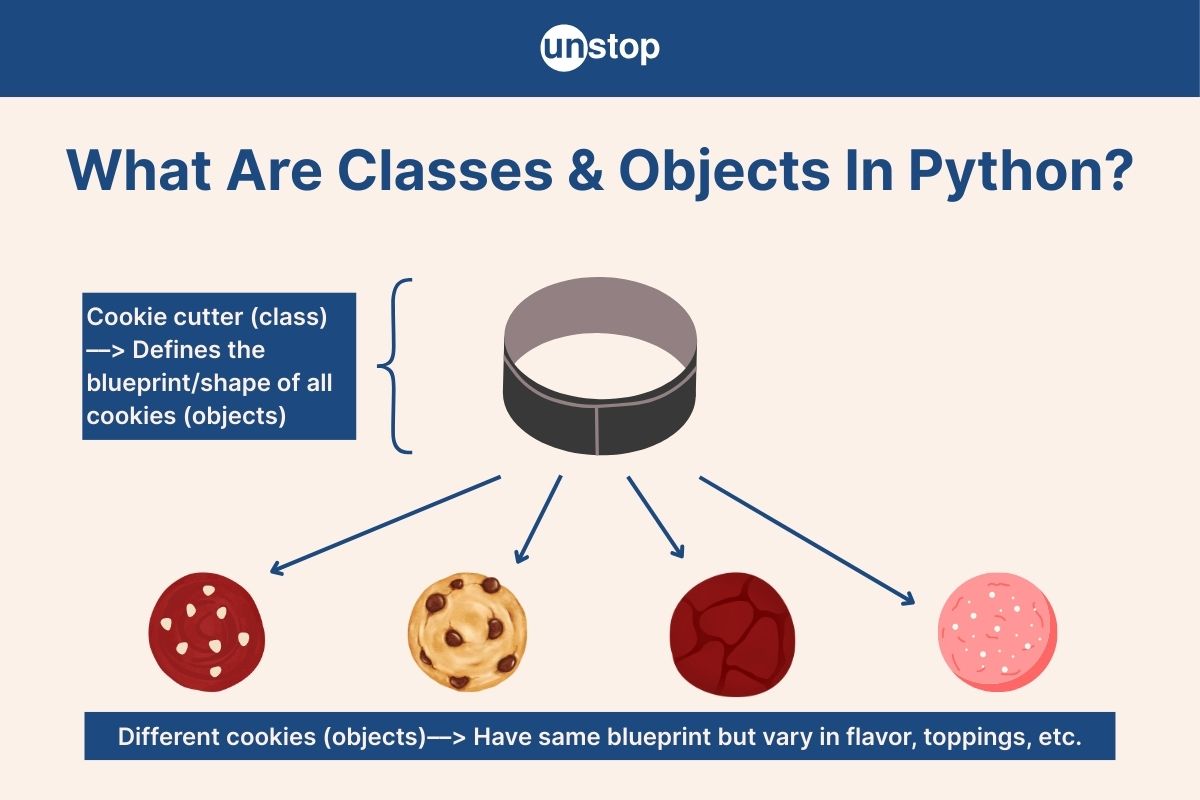
Python is an object-oriented programming (OOP) language, and at the heart of OOP lie classes and objects. A class is a blueprint for creating objects, allowing us to structure code efficiently, reduce redundancy, and build scalable applications. An object is an instance of a class– a concrete entity that holds data and behaviors defined by the class.
In this article, we’ll explore the concept of classes in Python, covering how to define them, their components, and how objects are created and interact with them. We’ll also explore the usage of classes and objects in Python classes, key OOP principles, real-world applications, and common pitfalls to avoid when designing classes in Python programs.
What Are Classes In Python?
A class in Python is a blueprint for creating objects. It defines a set of attributes (data) and methods (functions) that the objects created from the class will have.
Think of it as a template, just like a cookie cutter that shapes multiple cookies; a class allows us to create multiple objects with shared properties and behavior. In simple terms, a class is like a template, and the objects created from it are instances that follow its design. Now, let’s look at a few key features of Python classes.
Key Features of Classes in Python
- Encapsulation– Groups related data and behavior together.
- Reusability– Enables code reuse by defining once and creating multiple instances.
- Modularity– Helps structure large programs efficiently.
Real-Life Analogy
Imagine a car manufacturing blueprint. The blueprint defines features like color, engine type, and brand but doesn't create an actual car.
- When a car is built using that blueprint, it becomes an object of the Car class.
- Each car object may have different values for color or engine type, but all follow the same design.
This is how every object in Python is created from a class, making classes the backbone of object-oriented programming. Next, let’s see how to define a class in Python.
How To Create/Define Classes In Python?
In Python programming, a class is defined using the class keyword, followed by the class name and a colon. Inside the class, we define attributes (variables) and methods (functions) that describe its behavior.
Syntax For Defining Class In Python
class ClassName:
# Class attributes and methods go here
Here,
- The class keyword marks the beginning of a class definition whose name is given by the term ClasName. Note that this name should follow PascalCase (e.g., Student, Car, BankAccount).
- The indented body after the colon is the class body, which contains attributes, methods, object definitions, and more.
Example: Creating A Simple Class In Python
Continuing with our car manufacturing blueprint example above, let’s create a simple Python program example that translates it into code. Here, we will have a class Car with an attribute and a method.
Code Example:
            class Car:
    def __init__(self, brand):
        self.brand = brand # Instance attribute
    def show_brand(self):
        print("Car brand:", self.brand)

# Creating an object of the class
car1 = Car("Toyota")

# Calling the method
car1.show_brand()
Y2xhc3MgQ2FyOgogICAgZGVmIF9faW5pdF9fKHNlbGYsIGJyYW5kKToKICAgICAgICBzZWxmLmJyYW5kID0gYnJhbmQgIyBJbnN0YW5jZSBhdHRyaWJ1dGXCoAogICAgZGVmIHNob3dfYnJhbmQoc2VsZik6CiAgICAgICAgcHJpbnQoIkNhciBicmFuZDoiLCBzZWxmLmJyYW5kKQoKIyBDcmVhdGluZyBhbiBvYmplY3Qgb2YgdGhlIGNsYXNzwqAKY2FyMSA9IENhcigiVG95b3RhIinCoAoKIyBDYWxsaW5nIHRoZSBtZXRob2TCoApjYXIxLnNob3dfYnJhbmQoKQ==
Output:
Car brand: Toyota
Code Explanation:
In the simple Python code example:
- Defining the class: We use the class keyword (i.e., ‘class Car:’) to define the class with the name Car.
- Inside, we define a method __init__() that initializes the object with the brand attribute. In other languages, this is also referred to as the class constructor.
- We also define the function, show_brand() which displays the brand name using the print() function.
- Creating an object: Then, we create an object/ instance of the class with the car1 and use the Car(“Toyota”) notation to initialize its brand attribute.
- Then, we print the brand name by calling the show_brand() method on the object car1.
Note: If a class has no attributes or methods yet, you can use the pass statement to avoid syntax errors:
class EmptyClass:
pass # Placeholder for future implementation
Components Of Classes In Python
A class in Python consists of several key components that define its structure and behavior. Let’s break them down:
1. Attributes (Variables inside a Class): Attributes store data related to the class and its objects.
Types of Attributes:
- Instance Attributes – Belong to an object and are unique to each instance.
- Class Attributes – Shared among all objects of the class.
Example:
class Student:
school = "Unstop Academy" # Class attribute
def __init__(self, name, age):
self.name = name # Instance attribute
self.age = age # Instance attribute
Here, school is a class attribute (same for all students), and name and age are instance attributes (specific to each student).
2. Methods (Functions inside a Class): Methods define behavior for class objects or perform operations using them. They can modify or access attributes.
Example:
class Student:
def __init__(self, name):
self.name = name
def greet(self):
print(f"Hello, my name is {self.name}!")
Here, greet() is a method that prints a greeting.
3. The __init__() Method (Constructor)
The __init__() method is a special method used to initialize objects. It gets called automatically when an object is created.
Example:
class Student:
def __init__(self, name):
self.name = name
Here, the __init__() method ensures every student object has a name when created.
4. The self Parameter: This parameter represents the current object instance and allows access to instance attributes and methods.
This is how we define and instantiate classes in Python! We will discuss the __init__() method, object creation, self parameter, and class methods in detail in the later sections.
Naming Conventions For Classes In Python
Following consistent naming conventions makes your code readable, maintainable, and Pythonic. Here are the key guidelines:
1. Use PascalCase for Class Names: Class names should follow PascalCase (UpperCamelCase), where each word starts with an uppercase letter and there are no underscores.
|
✅ Correct |
❌ Incorrect |
|
class StudentProfile: |
class student_profile: # Uses snake_case (not recommended for class names) |
2. Avoid Built-in Keywords & Special Characters: Do not use Python's built-in keywords (e.g., class, int, list, etc.) or special characters in class names. In the incorrect example below, we use the list keyword, which signifies the Python list structures.
|
❌ Incorrect |
✅ Correct |
|
class list: # Overrides Python's built-in list type |
class CustomList: |
3. Use Singular Nouns for Class Names: Class names should usually be singular because each class represents a single blueprint for objects.
|
✅ Correct |
❌ Incorrect |
|
class Employee: |
class Employees: # Plural form (not ideal for class names) |
4. Prefix Abstract Base Classes with ABC (Optional but Recommended for Clarity): If creating an Abstract Base Class (ABC), prefix the name with "ABC" to indicate its purpose.
Example:
from abc import ABC
class ABCVehicle(ABC): # Abstract Base Class
#Class Body
5. Private Classes Should Start with an Underscore (_): In Python, a class name starting with an underscore indicates that it is intended for internal use only.
Example:
class _InternalHelper:
#Class Body
Quick Question!
What Is An Object In Python?
An object is an instance of a class. While a class acts as a blueprint, an object is a real-world entity created from that blueprint. Think of a class as a recipe for a cake 🍰 that lists the ingredients and steps to make a cake.
An object is the actual cake made using that recipe. You can make multiple cakes (objects) from the same recipe (class).
Key Characteristics Of Objects
- Objects store data (attributes) and behavior (methods).
- Multiple objects can be created from the same class, each with different attributes.
- Objects allow code reusability and modularity.
How To Create Objects In Python Classes?
In Python, creating an object (also referred to as instantiating a class) is simple–you call the class name as if it were a function. This automatically invokes the __init__() method (constructor) to initialize the object.
Syntax For Creating An Object In Python
object_name = ClassName(arguments)
Here,
- ClassName is the name of the class you are instantiating, i.e., the object belongs to that class.
- The arguments are the values passed to the __init__() method (if any) to assign to the attributes of the object.
We’ve already seen how to create an object in Python programs when describing how to create classes in the example (previous section). But let’s look at another Python program example to cement how to create objects.
Example: Creating Objects In Python
            class Student:
    def __init__(self, name, age): # Constructor
        self.name = name # Instance attribute
        self.age = age # Instance attribute

    def introduce(self):
        print(f"My name is {self.name}, and I am {self.age} years old.")

# Creating objects of the Student class
student1 = Student("Amit", 21)
student2 = Student("Priya", 22)

# Calling the introduce() method
student1.introduce()
student2.introduce()
Y2xhc3MgU3R1ZGVudDoKICAgIGRlZiBfX2luaXRfXyhzZWxmLCBuYW1lLCBhZ2UpOiAjIENvbnN0cnVjdG9yCiAgICAgICAgc2VsZi5uYW1lID0gbmFtZSAjIEluc3RhbmNlIGF0dHJpYnV0ZQogICAgICAgIHNlbGYuYWdlID0gYWdlICMgSW5zdGFuY2UgYXR0cmlidXRlCgogICAgZGVmIGludHJvZHVjZShzZWxmKToKICAgICAgICBwcmludChmIk15IG5hbWUgaXMge3NlbGYubmFtZX0sIGFuZCBJIGFtIHtzZWxmLmFnZX0geWVhcnMgb2xkLiIpCgojIENyZWF0aW5nIG9iamVjdHMgb2YgdGhlIFN0dWRlbnQgY2xhc3MKc3R1ZGVudDEgPSBTdHVkZW50KCJBbWl0IiwgMjEpCnN0dWRlbnQyID0gU3R1ZGVudCgiUHJpeWEiLCAyMikKCiMgQ2FsbGluZyB0aGUgaW50cm9kdWNlKCkgbWV0aG9kCnN0dWRlbnQxLmludHJvZHVjZSgpCnN0dWRlbnQyLmludHJvZHVjZSgp
Output:
My name is Amit, and I am 21 years old.
My name is Priya, and I am 22 years old.
Code Explanation:
In the Python code example, we define a class named Student.
- Class Definition: The class contains an __init__() method, whose purpose is to initialize two attributes, i.e., name and age. This shows that objects of the Student class can have these two attributes.
- It also contains an introduce() method (class method) that displays the student’s information using the f-strings method to format it as needed.
- Creation of Objects: In the main part, we create two objects of type Student (i.e., belonging to the Student class).
- We use the class name (Student) and the values we want to assign to the object attributes (arguments).
- For the first object, i.e., student1, we pass the values “Amit" and 21 as arguments.
- For the second object, i.e., student2, we pass the values "Priya" and 22 to instantiate the class object.
- Using Objects to Call Methods: Next, we call the introduce() method twice, i.e., once on each object.
- Here, we use the object name followed by the dot operator and then the method name.
Creating Multiple Objects In Python Classes
The process of creating multiple objects remains the same as creating a single object. You only have to repeat the syntax for every new object you want to create. As in the example above, we created two objects for the Student class.
The process of creating multiple objects for classes in Python is made simple using the __init__() method. However, it is still possible to create multiple objects/initialize the class in the absence of this method. We will discuss more on this in a later section.
Modifying & Deleting Objects In Python Classes
Once an object is created, we can modify its attributes dynamically or even delete attributes and objects when they are no longer needed. In this section, we will discuss how to make these modifications on objects and classes in Python programs with examples.
Modifying Object Attributes In Python Classes
Once an object has been created and you have assigned the initial values for its attributes, you can still modify any of the values by accessing the object and the respective attribute using the dot notation.
That is, you have to specify the object and attribute, say object1.attribute2, and then assign a new value as needed. The example Python program given below highlights how this can be done.
Code Example:
            class Student:
    def __init__(self, name, age):
        self.name = name
        self.age = age

    def introduce(self):
        print(f"My name is {self.name}, and I am {self.age} years old.")

# Creating an object
student1 = Student("Amit", 21)
student1.introduce()

# Modifying attributes
student1.age = 22
student1.introduce()
Y2xhc3MgU3R1ZGVudDoKICAgIGRlZiBfX2luaXRfXyhzZWxmLCBuYW1lLCBhZ2UpOgogICAgICAgIHNlbGYubmFtZSA9IG5hbWUKICAgICAgICBzZWxmLmFnZSA9IGFnZQoKICAgIGRlZiBpbnRyb2R1Y2Uoc2VsZik6CiAgICAgICAgcHJpbnQoZiJNeSBuYW1lIGlzIHtzZWxmLm5hbWV9LCBhbmQgSSBhbSB7c2VsZi5hZ2V9IHllYXJzIG9sZC4iKQoKIyBDcmVhdGluZyBhbiBvYmplY3QKc3R1ZGVudDEgPSBTdHVkZW50KCJBbWl0IiwgMjEpCnN0dWRlbnQxLmludHJvZHVjZSgpCgojIE1vZGlmeWluZyBhdHRyaWJ1dGVzCnN0dWRlbnQxLmFnZSA9IDIyCnN0dWRlbnQxLmludHJvZHVjZSgp
Output:
My name is Amit, and I am 21 years old.
My name is Amit, and I am 22 years old.
Code Explanation:
Just like in the main object example, we define a Student class with two attributes, an __init__() method and an introduce() method.
- Creating an object: Then, we create an object named student1 and initialize its attributes with the values name “Amit” and age 22.
- We then call the introduce() method to display the information.
- Modifying an attribute: After that, we modify the age attribute of the object, i.e., student1.age with the value 22.
- Then, we again call the introduce() method to print the student information. The output shows that the age attribute has been modified.
Adding New Attributes To An Object In Python Classes
Python allows adding attributes dynamically to an object even if they were not defined in the class. Note that this additional will affect only the respective object and not all objects. In the example below, we have illustrated how to add an attribute to an object after it was created.
Code Example:
            class Student:
    def __init__(self, name, age):
        self.name = name
      self.age = age

# Creating an object
student1 = Student("Amit", 21)

# Adding a new attribute dynamically
student1.city = "Delhi"

# Accessing the new attribute
print(student1.city)
Y2xhc3MgU3R1ZGVudDoKICAgIGRlZiBfX2luaXRfXyhzZWxmLCBuYW1lLCBhZ2UpOgogICAgICAgIHNlbGYubmFtZSA9IG5hbWUKICAgICAgc2VsZi5hZ2UgPSBhZ2UKCiMgQ3JlYXRpbmcgYW4gb2JqZWN0CnN0dWRlbnQxID0gU3R1ZGVudCgiQW1pdCIsIDIxKQoKIyBBZGRpbmcgYSBuZXcgYXR0cmlidXRlIGR5bmFtaWNhbGx5CnN0dWRlbnQxLmNpdHkgPSAiRGVsaGkiCgojIEFjY2Vzc2luZyB0aGUgbmV3IGF0dHJpYnV0ZQpwcmludChzdHVkZW50MS5jaXR5KQ==
Output:
Delhi
Code Explanation:
In this example Python code, we again define the student class, where each object can have two attributes: name and age.
- We create an object student1, with attribute values “Amit” and 21.
- The city attribute was not defined in the original class definition.
- We added it dynamically using the object name and dot operator, i.e., student1.city = "Delhi".
- Now, student1 has the city attribute, but other instances of Student will not have this attribute unless explicitly assigned.
Note: While Python allows this, adding attributes dynamically is not always a good practice, as it can lead to inconsistent object structures across instances.
Deleting An Attribute From An Object In Python Classes
You can remove an object's attribute using the del keyword. The example below highlights how this can be done.
Code Example:
            class Student:
    def __init__(self, name, age):
        self.name = name
      self.age = age

# Creating an object
student1 = Student("Amit", 21)

# Deleting an attribute
del student1.age

# Trying to access the deleted attribute will cause an error
print(student1.age)
Y2xhc3MgU3R1ZGVudDoKICAgIGRlZiBfX2luaXRfXyhzZWxmLCBuYW1lLCBhZ2UpOgogICAgICAgIHNlbGYubmFtZSA9IG5hbWUKICAgICAgc2VsZi5hZ2UgPSBhZ2UKCiMgQ3JlYXRpbmcgYW4gb2JqZWN0CnN0dWRlbnQxID0gU3R1ZGVudCgiQW1pdCIsIDIxKQoKIyBEZWxldGluZyBhbiBhdHRyaWJ1dGUKZGVsIHN0dWRlbnQxLmFnZQoKIyBUcnlpbmcgdG8gYWNjZXNzIHRoZSBkZWxldGVkIGF0dHJpYnV0ZSB3aWxsIGNhdXNlIGFuIGVycm9yCnByaW50KHN0dWRlbnQxLmFnZSk=
Output:
AttributeError: 'Student' object has no attribute 'age'
Code Explanation:
We continue with the Student class example. After creating the object student1, we delete one of its attributes as follows:
- We used del student1.age to remove the age attribute.
- After this, when we try to access student1.age, it results in an AttributeError.
- Note again that this affects only that object (here student1) and will not affect other class objects (if any).
Use Case: This is useful when you need to free memory or remove unnecessary attributes dynamically.
Deleting An Entire Object
Just like we deleted a single attribute of an object, we can use the del keyword to completely delete an object. The syntax for this will be: del object_name.
Code Example:
            class Student:
    def __init__(self, name, age):
        self.name = name
        self.age = age

# Creating an object
student1 = Student("Amit", 21)

# Deleting the entire object
del student1

# Trying to access the deleted object will cause an error
print(student1)
Y2xhc3MgU3R1ZGVudDoKICAgIGRlZiBfX2luaXRfXyhzZWxmLCBuYW1lLCBhZ2UpOgogICAgICAgIHNlbGYubmFtZSA9IG5hbWUKICAgICAgICBzZWxmLmFnZSA9IGFnZQoKIyBDcmVhdGluZyBhbiBvYmplY3QKc3R1ZGVudDEgPSBTdHVkZW50KCJBbWl0IiwgMjEpCgojIERlbGV0aW5nIHRoZSBlbnRpcmUgb2JqZWN0CmRlbCBzdHVkZW50MQoKIyBUcnlpbmcgdG8gYWNjZXNzIHRoZSBkZWxldGVkIG9iamVjdCB3aWxsIGNhdXNlIGFuIGVycm9yCnByaW50KHN0dWRlbnQxKQ==
Output:
NameError: name 'student1' is not defined
Code Explanation:
In the sample Python code, we continue with the student class and create an object student1.
- Then, we use del student1, which removes the object from memory.
- Accessing student1 after deletion raises a NameError because the variable no longer exists.
Quick Question!
The __init__() Method In Python Classes
The __init__() method is the constructor for classes in Python. It is a special method that gets called automatically when you create an object for a class and allows us to initialize the object’s attributes with specific values.
Think of it like checking into a hotel:
- You provide your name and ID at the reception.
- The hotel assigns you a room with your details.
- Every guest (object) gets their own room (unique attributes).
The __init__() method works the same way. It assigns initial values to object attributes when an object is created.
Syntax Of __init__()
class ClassName:
def __init__(self, attribute1, attribute2, ...):
self.attribute1 = value1
self.attribute2 = value2
Here, the method name must be __init__().
- The self parameter is always first, and it refers to the instance.
- Other parameters, i.e., attribute1, attribute2,... refer to the object attributes that the method will intialize.
- The values (value1, value2,...) refer to the values assigned to the respective attributes at the time of object creation.
Code Example:
            class Student:
    def __init__(self, name, age):
        self.name = name # Instance attribute
        self.age = age # Instance attribute

    def introduce(self):
        print(f"My name is {self.name}, and I am {self.age} years old.")

# Creating objects
student1 = Student("Amit", 21)
student2 = Student("Priya", 22)

# Calling the introduce() method
student1.introduce()
student2.introduce()
Y2xhc3MgU3R1ZGVudDoKICAgIGRlZiBfX2luaXRfXyhzZWxmLCBuYW1lLCBhZ2UpOgogICAgICAgIHNlbGYubmFtZSA9IG5hbWUgIyBJbnN0YW5jZSBhdHRyaWJ1dGUKICAgICAgICBzZWxmLmFnZSA9IGFnZSAjIEluc3RhbmNlIGF0dHJpYnV0ZQoKICAgIGRlZiBpbnRyb2R1Y2Uoc2VsZik6CiAgICAgICAgcHJpbnQoZiJNeSBuYW1lIGlzIHtzZWxmLm5hbWV9LCBhbmQgSSBhbSB7c2VsZi5hZ2V9IHllYXJzIG9sZC4iKQoKIyBDcmVhdGluZyBvYmplY3RzCnN0dWRlbnQxID0gU3R1ZGVudCgiQW1pdCIsIDIxKQpzdHVkZW50MiA9IFN0dWRlbnQoIlByaXlhIiwgMjIpCgojIENhbGxpbmcgdGhlIGludHJvZHVjZSgpIG1ldGhvZApzdHVkZW50MS5pbnRyb2R1Y2UoKQpzdHVkZW50Mi5pbnRyb2R1Y2UoKQ==
Output:
My name is Amit, and I am 21 years old.
My name is Priya, and I am 22 years old.
Code Explanation:
We once again define a Student class with an introduce() method, two attributes, and an __init__() method (constructor) that initializes the attribute when an object is created. Let’s see how this works:
- After the class definition, we create two objects of the Student class.
- For student1 we assing values “Amit” and 21 for the name and age attributes (respectively) and for student2 values “Priya” and 22.
- When we use the class name to create the objects, the __init__() method is called automatically.
- As shown in the method definition, this method assigns the attribute values behind the scenes.
- That is, self.name = name and self.age = age initialize attributes for each object.
- Each object gets its own unique values based on the arguments passed.
What Happens If We Don’t Use __init__()?
Without the __init__() method, we would have to set attributes manually every time an object is created. Here is what object creation would look like (from the example above) if we did not have an __init__() method in the class definition:
student1 = Student() # No __init__, so attributes are missing
student1.name = "Amit"
student1.age = 21
As is evident, using the __init__() method is more efficient than initializing every single attribute of every single object individually. With __init__(), attributes are automatically initialized, ensuring every object starts with valid data.
Default Values In The __init__() Method Of Python Classes
To avoid passing values manually every time, we can provide default values in __init__(). If no values are passed during object creation, these defaults are automatically assigned. However, if arguments are provided, they override the default values. The sample Python program below illustrates this feature of the method.
Code Example:
            class Student:
    def __init__(self, name="Unknown", age=18):
        self.name = name
        self.age = age
    def introduce(self):
        print(f"My name is {self.name}, and I am {self.age} years old.")

# Creating an object without passing arguments
student1 = Student()
student1.introduce()

# Creating an object with arguments
student2 = Student("Priya", 22)
student2.introduce()
Y2xhc3MgU3R1ZGVudDoKICAgIGRlZiBfX2luaXRfXyhzZWxmLCBuYW1lPSJVbmtub3duIiwgYWdlPTE4KToKICAgICAgICBzZWxmLm5hbWUgPSBuYW1lCiAgICAgICAgc2VsZi5hZ2UgPSBhZ2UKICAgIGRlZiBpbnRyb2R1Y2Uoc2VsZik6CiAgICAgICAgcHJpbnQoZiJNeSBuYW1lIGlzIHtzZWxmLm5hbWV9LCBhbmQgSSBhbSB7c2VsZi5hZ2V9IHllYXJzIG9sZC4iKQoKIyBDcmVhdGluZyBhbiBvYmplY3Qgd2l0aG91dCBwYXNzaW5nIGFyZ3VtZW50cwpzdHVkZW50MSA9IFN0dWRlbnQoKQpzdHVkZW50MS5pbnRyb2R1Y2UoKQoKIyBDcmVhdGluZyBhbiBvYmplY3Qgd2l0aCBhcmd1bWVudHMKc3R1ZGVudDIgPSBTdHVkZW50KCJQcml5YSIsIDIyKQpzdHVkZW50Mi5pbnRyb2R1Y2UoKQ==
Output:
My name is Unknown, and I am 18 years old.
My name is Priya, and I am 22 years old.
Code Explanation:
In the __init__() method, the name and age attributes have default values ("Unknown" and 18).
- If an object is created without arguments (student1), these default values are used.
- If an object is created with arguments (student2), the provided values override the defaults.
Why Use Default Values?
- They prevent errors when arguments are missing.
- They provide a fallback option, making the class more flexible and user-friendly.
Quick Question!
The __str__() Method In Python Classes
The __str__() method is a special method in Python that returns a string representation of an object. It is automatically called when you use the built-in functions print() or the str(). Without __str__(), if you use the print() function for displaying an object, it only returns an unreadable memory address, as shown in the example below.
Code Example:
            class Student:
    def __init__(self, name, age):
        self.name = name
      self.age = age

# Creating an object
student1 = Student("Amit", 21)

# Printing the object
print(student1)
Y2xhc3MgU3R1ZGVudDoKICAgIGRlZiBfX2luaXRfXyhzZWxmLCBuYW1lLCBhZ2UpOgogICAgICAgIHNlbGYubmFtZSA9IG5hbWUKICAgICAgc2VsZi5hZ2UgPSBhZ2UKCiMgQ3JlYXRpbmcgYW4gb2JqZWN0CnN0dWRlbnQxID0gU3R1ZGVudCgiQW1pdCIsIDIxKQoKIyBQcmludGluZyB0aGUgb2JqZWN0CnByaW50KHN0dWRlbnQxKQ==
Output:
<__main__.Student object at 0x7f9a5c5b7cd0>
This isn’t very useful, right? That’s where __str__() comes in! To return a readable representation of the object, define the __str__() method inside the class.
Code Example:
            class Student:
    def __init__(self, name, age):
        self.name = name
        self.age = age

    def __str__(self):
      return f"Student(name={self.name}, age={self.age})"

# Creating an object
student1 = Student("Amit", 21)

# Printing the object
print(student1)
Y2xhc3MgU3R1ZGVudDoKICAgIGRlZiBfX2luaXRfXyhzZWxmLCBuYW1lLCBhZ2UpOgogICAgICAgIHNlbGYubmFtZSA9IG5hbWUKICAgICAgICBzZWxmLmFnZSA9IGFnZQoKICAgIGRlZiBfX3N0cl9fKHNlbGYpOgogICAgICByZXR1cm4gZiJTdHVkZW50KG5hbWU9e3NlbGYubmFtZX0sIGFnZT17c2VsZi5hZ2V9KSIKCiMgQ3JlYXRpbmcgYW4gb2JqZWN0CnN0dWRlbnQxID0gU3R1ZGVudCgiQW1pdCIsIDIxKQoKIyBQcmludGluZyB0aGUgb2JqZWN0CnByaW50KHN0dWRlbnQxKQ==
Output:
Student(name=Amit, age=21)
Code Explanation:
In the example above, we continue with the Student class, but here, in addition to the __init__() method, we also define another method:
- The __str__() returns a formatted string representing the object.
- When we use the print() function, Python automatically calls the __str__() method, displaying a human-readable output instead of a memory address.
Using str() with __str__() In Classes In Python
As mentioned before, we can invoke the __str__() method by calling either the print() function or the built-in string function str(). Here is a snippet of the example above showing the use of str() instead of print():
student1 = Student("Amit", 21)
# Explicitly calling str()
student_str = str(student1)
print(student_str) # Output: Student(name=Amit, age=21)
Just like in the case of print(), behind the scenes, str(student1) is the same as student1.__str__().
The Role Of self Parameter In Python Classes
In Python, self is a reference to the current instance of a class. It’s always the first parameter in instance methods, though you don’t explicitly pass it when calling a method.
But why do we need self? Can’t Python just figure it out on its own? Not really.
Why Do We Need self?
Without the self parameter, Python wouldn’t know which object’s data/attributes to access or modify. It serves three key purposes:
- Accessing instance attributes: Each object (instance) has its own separate data. Using self ensures that methods refer to the correct object’s attributes.
- Modifying instance attributes: If we want to update an object’s attribute, we must use self, or else Python will think we’re creating a new local variable instead of modifying the instance attribute.
- Distinguishing instance variables from local variables: Variables inside a method without self are temporary (local to that method) and disappear once the method ends.
Example: How self Works In A Python Class
            class Student:
    def __init__(self, name, age):
        self.name = name # Assigning instance attributes
        self.age = age

    def display_info(self):
        print(f"Name: {self.name}, Age: {self.age}") # Accessing instance attributes

    def update_age(self, new_age):
        self.age = new_age # Modifying an instance attribute

# Creating an object
student1 = Student("Amit", 21)

# Accessing attributes
student1.display_info()

# Modifying an attribute using self
student1.update_age(22)
student1.display_info()
Y2xhc3MgU3R1ZGVudDoKICAgIGRlZiBfX2luaXRfXyhzZWxmLCBuYW1lLCBhZ2UpOgogICAgICAgIHNlbGYubmFtZSA9IG5hbWUgIyBBc3NpZ25pbmcgaW5zdGFuY2UgYXR0cmlidXRlc8KgCiAgICAgICAgc2VsZi5hZ2UgPSBhZ2UKCiAgICBkZWYgZGlzcGxheV9pbmZvKHNlbGYpOgogICAgICAgIHByaW50KGYiTmFtZToge3NlbGYubmFtZX0sIEFnZToge3NlbGYuYWdlfSIpICMgQWNjZXNzaW5nIGluc3RhbmNlIGF0dHJpYnV0ZXPCoMKgCgogICAgZGVmIHVwZGF0ZV9hZ2Uoc2VsZiwgbmV3X2FnZSk6CiAgICAgICAgc2VsZi5hZ2UgPSBuZXdfYWdlICMgTW9kaWZ5aW5nIGFuIGluc3RhbmNlIGF0dHJpYnV0ZcKgwqAKCiMgQ3JlYXRpbmcgYW4gb2JqZWN0wqAKc3R1ZGVudDEgPSBTdHVkZW50KCJBbWl0IiwgMjEpCgojIEFjY2Vzc2luZyBhdHRyaWJ1dGVzwqAKc3R1ZGVudDEuZGlzcGxheV9pbmZvKCkKCiMgTW9kaWZ5aW5nIGFuIGF0dHJpYnV0ZSB1c2luZyBzZWxmwqAKc3R1ZGVudDEudXBkYXRlX2FnZSgyMikKc3R1ZGVudDEuZGlzcGxheV9pbmZvKCk=
Output:
Name: Amit, Age: 21
Name: Amit, Age: 22
Code Example:
In the example, we define the Student class with an __init__() method, two class attributes (name and age) and two methods (display_info and update_age()).
- Using self in __init__(): The self.name = name and self.age = age assignments ensure the attributes belong to the instance (not just temporary variables).
- Accessing Attributes: The display_info() method prints values using self.name and self.age.
- When we call student1.display_info(), Python automatically passes student1 as self, allowing access to the correct attributes.
- Modifying Attributes: The update_age() method updates the age attribute of student1.
- Calling student1.update_age(22) updates self.age from 21 to 22, which persists for future method calls.
What Happens If We Remove self?
Let’s see what happens if we forget self:
            class Student:
    def __init__(name, age): # ❌ Missing self
        name.name = name # ❌ Incorrect
        name.age = age # ❌ Incorrect
student1 = Student("Amit", 21)
Y2xhc3MgU3R1ZGVudDoKICAgIGRlZiBfX2luaXRfXyhuYW1lLCBhZ2UpOiAjIOKdjCBNaXNzaW5nIHNlbGbCoAogICAgICAgIG5hbWUubmFtZSA9IG5hbWUgIyDinYwgSW5jb3JyZWN0wqAKICAgICAgICBuYW1lLmFnZSA9IGFnZSAjIOKdjCBJbmNvcnJlY3TCoMKgCnN0dWRlbnQxID0gU3R1ZGVudCgiQW1pdCIsIDIxKQ==
Output:
TypeError: __init__() missing 1 required positional argument: 'age'
Why does this happen?
- Without self, Python treats name as a regular parameter instead of a reference to the object.
- The assignments name.name = name and name.age = age don’t make sense because name is just a parameter, not an instance.
Key takeaway: The self parameter is essential for storing and accessing instance attributes correctly. Without it, Python treats variables as local to the method instead of belonging to an object.
Check out this amazing course to become the best version of the Python programmer you can be.
Different Methods In Classes In Python
A class method is a function inside a class that operates on the class’s objects. It defines behaviors like:
- Updating/modifying object attributes
- Performing calculations/operations
- Returning useful data
Main Types Of Class Methods In Python
Python has three main types of methods that are used inside a Python class:
|
Method Type |
Works On |
Requires self or cls? |
Purpose |
|
Instance Method |
Objects (instances) |
self |
Modify object attributes |
|
Class Method |
The class itself |
cls |
Modify class attributes |
|
Static Method |
Neither (independent) |
No |
Utility/helper functions |
Let’s explore each with examples.
Instance Methods In Python Classes
Instance methods work with individual objects (instances). They must include the self parameter, which refers to the specific object calling the method. These are the most commonly used class methods in Python programming.
Code Example:
            class Car:
    def __init__(self, brand, model, year):
        self.brand = brand
        self.model = model
        self.year = year
        self.speed = 0 # Initial speed

    def accelerate(self, amount):
        self.speed += amount
        print(f"{self.brand} {self.model} is now moving at {self.speed} km/h.")

# Creating an object
car1 = Car("Toyota", "Corolla", 2022)

# Calling an instance method
car1.accelerate(20)class Car:
    def __init__(self, brand, model, year):
        self.brand = brand
        self.model = model
        self.year = year
        self.speed = 0 # Initial speed

    def accelerate(self, amount):
        self.speed += amount
        print(f"{self.brand} {self.model} is now moving at {self.speed} km/h.")

# Creating an object
car1 = Car("Toyota", "Corolla", 2022)

# Calling an instance method
car1.accelerate(20)
Y2xhc3MgQ2FyOgogICAgZGVmIF9faW5pdF9fKHNlbGYsIGJyYW5kLCBtb2RlbCwgeWVhcik6CiAgICAgICAgc2VsZi5icmFuZCA9IGJyYW5kCiAgICAgICAgc2VsZi5tb2RlbCA9IG1vZGVsCiAgICAgICAgc2VsZi55ZWFyID0geWVhcgogICAgICAgIHNlbGYuc3BlZWQgPSAwICMgSW5pdGlhbCBzcGVlZAoKICAgIGRlZiBhY2NlbGVyYXRlKHNlbGYsIGFtb3VudCk6CiAgICAgICAgc2VsZi5zcGVlZCArPSBhbW91bnQKICAgICAgICBwcmludChmIntzZWxmLmJyYW5kfSB7c2VsZi5tb2RlbH0gaXMgbm93IG1vdmluZyBhdCB7c2VsZi5zcGVlZH0ga20vaC4iKQoKIyBDcmVhdGluZyBhbiBvYmplY3QKY2FyMSA9IENhcigiVG95b3RhIiwgIkNvcm9sbGEiLCAyMDIyKQoKIyBDYWxsaW5nIGFuIGluc3RhbmNlIG1ldGhvZApjYXIxLmFjY2VsZXJhdGUoMjApY2xhc3MgQ2FyOgogICAgZGVmIF9faW5pdF9fKHNlbGYsIGJyYW5kLCBtb2RlbCwgeWVhcik6CiAgICAgICAgc2VsZi5icmFuZCA9IGJyYW5kCiAgICAgICAgc2VsZi5tb2RlbCA9IG1vZGVsCiAgICAgICAgc2VsZi55ZWFyID0geWVhcgogICAgICAgIHNlbGYuc3BlZWQgPSAwICMgSW5pdGlhbCBzcGVlZAoKICAgIGRlZiBhY2NlbGVyYXRlKHNlbGYsIGFtb3VudCk6CiAgICAgICAgc2VsZi5zcGVlZCArPSBhbW91bnQKICAgICAgICBwcmludChmIntzZWxmLmJyYW5kfSB7c2VsZi5tb2RlbH0gaXMgbm93IG1vdmluZyBhdCB7c2VsZi5zcGVlZH0ga20vaC4iKQoKIyBDcmVhdGluZyBhbiBvYmplY3QKY2FyMSA9IENhcigiVG95b3RhIiwgIkNvcm9sbGEiLCAyMDIyKQoKIyBDYWxsaW5nIGFuIGluc3RhbmNlIG1ldGhvZApjYXIxLmFjY2VsZXJhdGUoMjAp
Output:
Toyota Corolla is now moving at 20 km/h.
Code Explanation:
In this example, we have defined one instance method, i.e., accelerate().
- When we call the function, accelerate(self, amount), it takes the amount as input and increases the car’s speed by that number.
- Inside the function definition, the expression self.speed += amount, modifies the specific object’s speed.
- Note that the car1.accelerate(20) call updates car1's speed, but not other objects.
Class Methods (Affect The Whole Class)
Class methods work at the class itself and not individual instances/objects of the class.
- We use the expression/decorator @classmethod when defining these method types.
- Instead of the self parameter, these methods take the cls parameter referring to the respective class.
- They operate on class attributes, which apply to all instances.
Code Example:
            class Car:
    wheels = 4 # Class attribute

    @classmethod #Class method
    def change_wheels(cls, new_wheel_count):
        cls.wheels = new_wheel_count

# Changing wheels for all cars
Car.change_wheels(6)
print(Car.wheels)
Y2xhc3MgQ2FyOgogICAgd2hlZWxzID0gNCAjIENsYXNzIGF0dHJpYnV0ZQoKICAgIEBjbGFzc21ldGhvZCAjQ2xhc3MgbWV0aG9kCiAgICBkZWYgY2hhbmdlX3doZWVscyhjbHMsIG5ld193aGVlbF9jb3VudCk6CiAgICAgICAgY2xzLndoZWVscyA9IG5ld193aGVlbF9jb3VudAoKIyBDaGFuZ2luZyB3aGVlbHMgZm9yIGFsbCBjYXJzCkNhci5jaGFuZ2Vfd2hlZWxzKDYpCnByaW50KENhci53aGVlbHMp
Output:
6
Code Explanation:
In this example, wheels is a class attribute shared across all instances.
- The change_wheels() method updates the value of the wheels attribute for all cars, not just one.
- When we call this method, i.e., Car.change_wheels(6), it changes the number of wheels for every car instance.
Static Methods In Python Classes
A static method is a function inside a class that doesn’t modify instance (self) or class (cls) attributes. Instead, it provides a utility function relevant to the class. We define static methods using the @staticmethod decorator. These methods:
- Belong to the class logically but don’t depend on its attributes.
- Cannot access or modify instance (self) or class (cls) attributes.
- They are useful for general calculations or independent operations related to the class.
Code Example:
            class Car:
    def __init__(self, brand, model, fuel_capacity):
        self.brand = brand
        self.model = model
        self.fuel_capacity = fuel_capacity # Fuel capacity in liters

    @staticmethod
    def convert_liters_to_gallons(liters):
        return liters * 0.264172 # Converts liters to gallons

# Using the static method
print(Car.convert_liters_to_gallons(50)) # Convert 50 liters to gallons
Y2xhc3MgQ2FyOgogICAgZGVmIF9faW5pdF9fKHNlbGYsIGJyYW5kLCBtb2RlbCwgZnVlbF9jYXBhY2l0eSk6CiAgICAgICAgc2VsZi5icmFuZCA9IGJyYW5kCiAgICAgICAgc2VsZi5tb2RlbCA9IG1vZGVsCiAgICAgICAgc2VsZi5mdWVsX2NhcGFjaXR5ID0gZnVlbF9jYXBhY2l0eSAjIEZ1ZWwgY2FwYWNpdHkgaW4gbGl0ZXJzCgogICAgQHN0YXRpY21ldGhvZAogICAgZGVmIGNvbnZlcnRfbGl0ZXJzX3RvX2dhbGxvbnMobGl0ZXJzKToKICAgICAgICByZXR1cm4gbGl0ZXJzICogMC4yNjQxNzIgIyBDb252ZXJ0cyBsaXRlcnMgdG8gZ2FsbG9ucwoKIyBVc2luZyB0aGUgc3RhdGljIG1ldGhvZApwcmludChDYXIuY29udmVydF9saXRlcnNfdG9fZ2FsbG9ucyg1MCkpICMgQ29udmVydCA1MCBsaXRlcnMgdG8gZ2FsbG9ucw==
Output:
13.2086
Why is convert_liters_to_gallons a static method?
- The conversion formula logically belongs in the Car class (since it’s fuel-related).
- But it doesn’t depend on any car’s attributes as it just takes an input (liters) and returns a value.
- It can be called using Car.convert_liters_to_gallons(50) without needing an object.
Instance Attributes vs. Class Attributes In Python Classes
Attributes in Python classes store data about objects. But not all attributes behave the same way. There are two types of attributes:
- Instance attributes belong to individual objects.
- Class attributes are shared across all objects of a class.
Think of it like this:
- Every student has their own name and roll number (instance attributes).
- But all students belong to the same school (class attribute).
Instance Vs. Class Attributes: Key Differences
The table below highlights the key difference between the two attributes of classes in Python. It is important to understand this to make the correct of classes as a concept.
|
Feature |
Instance Attribute |
Class Attribute |
|
Defined Inside |
__init__() |
Class body (outside __init__()) |
|
Accessed Using |
self.attribute |
ClassName.attribute or self.attribute |
|
Stored In |
Object’s memory |
Class’s memory (shared by all objects) |
|
Unique to Each Object? |
✅ Yes |
❌ No (shared across instances) |
|
Changes Affect? |
Only that object |
All instances of the class |
Example: Instance Vs. Class Attributes In Action
            class Student:
    school = "Greenwood High"  # Class attribute (shared)
    def __init__(self, name):
        self.name = name  # Instance attribute (unique)
# Creating two student objects
s1 = Student("Jeet")
s2 = Student("Jhanvi")

# Accessing instance attributes
print(s1.name) # Output: Jeet
print(s2.name) # Output: Jhanvi

# Accessing class attribute
print(s1.school) # Output: Greenwood High
print(s2.school) # Output: Greenwood High

# Modifying instance attribute (affects only s1)
s1.name = "Chirag"
print(s1.name) # Output: Chirag
print(s2.name) # Output: Jhanvi (unchanged)

# Modifying class attribute (affects all instances)
Student.school = "Blue Ridge School"
print(s1.school) # Output: Blue Ridge School
print(s2.school) # Output: Blue Ridge School
Y2xhc3MgU3R1ZGVudDoKwqAgwqAgc2Nob29sID0gIkdyZWVud29vZCBIaWdoIsKgICMgQ2xhc3MgYXR0cmlidXRlIChzaGFyZWQpCsKgIMKgIGRlZiBfX2luaXRfXyhzZWxmLCBuYW1lKToKwqAgwqAgwqAgwqAgc2VsZi5uYW1lID0gbmFtZcKgICMgSW5zdGFuY2UgYXR0cmlidXRlICh1bmlxdWUpCiMgQ3JlYXRpbmcgdHdvIHN0dWRlbnQgb2JqZWN0cwpzMSA9IFN0dWRlbnQoIkplZXQiKQpzMiA9IFN0dWRlbnQoIkpoYW52aSIpCgojIEFjY2Vzc2luZyBpbnN0YW5jZSBhdHRyaWJ1dGVzCnByaW50KHMxLm5hbWUpICMgT3V0cHV0OiBKZWV0CnByaW50KHMyLm5hbWUpICMgT3V0cHV0OiBKaGFudmkKCiMgQWNjZXNzaW5nIGNsYXNzIGF0dHJpYnV0ZQpwcmludChzMS5zY2hvb2wpICMgT3V0cHV0OiBHcmVlbndvb2QgSGlnaApwcmludChzMi5zY2hvb2wpICMgT3V0cHV0OiBHcmVlbndvb2QgSGlnaAoKIyBNb2RpZnlpbmcgaW5zdGFuY2UgYXR0cmlidXRlIChhZmZlY3RzIG9ubHkgczEpCnMxLm5hbWUgPSAiQ2hpcmFnIgpwcmludChzMS5uYW1lKSAjIE91dHB1dDogQ2hpcmFnCnByaW50KHMyLm5hbWUpICMgT3V0cHV0OiBKaGFudmkgKHVuY2hhbmdlZCkKCiMgTW9kaWZ5aW5nIGNsYXNzIGF0dHJpYnV0ZSAoYWZmZWN0cyBhbGwgaW5zdGFuY2VzKQpTdHVkZW50LnNjaG9vbCA9ICJCbHVlIFJpZGdlIFNjaG9vbCIKcHJpbnQoczEuc2Nob29sKSAjIE91dHB1dDogQmx1ZSBSaWRnZSBTY2hvb2wKcHJpbnQoczIuc2Nob29sKSAjIE91dHB1dDogQmx1ZSBSaWRnZSBTY2hvb2w=
Key Takeaways
- Instance attributes (name) → Different for each student.
- Class attribute (school) → Same for all students.
- Changing an instance attribute affects only that object.
- Changing a class attribute affects all instances.
Quick Question!
Object-Oriented Programming (OOP) Concepts In Python
Python follows the Object-Oriented Programming (OOP) paradigm, making code modular, reusable, and scalable. The four key OOP principles are:
1. Encapsulation: Bundles data and methods inside a class while restricting direct access to internal data.
- Instance variables & methods keep data within objects.
- Private attributes (__attribute) prevent external modification.
- Example: A Student class stores details, but marks (__marks) remain private.
2. Inheritance: Enables a new class (child) to inherit properties and methods from an existing class (parent).
- The child class automatically gets all attributes and methods from the parent.
- Objects of the child class can access both inherited and new attributes/methods.
- Example: A Car class is inherited by ElectricCar, reusing attributes like wheels.
3. Polymorphism: Allows the same method to behave differently based on the object.
- Different classes can define a common method that behaves uniquely.
- Achieved through method overriding (child class redefines parent method) and method overloading (same method, different parameters).
- Example: A speak() method behaves differently for Dog (Bark!) and Cat (Meow!).
4. Abstraction: Hides complex details and exposes only essential functionalities.
- Implemented using abstract classes (ABC Python module).
- Ensures objects can only call essential methods, keeping implementation hidden.
- Example: A Vehicle class defines move(), but Car and Bike implement it differently.
Looking for guidance? Find the perfect mentor from select experienced coding & software development experts here.
Practical Examples Of Classes & Objects In Python
Classes and objects form the foundation of Python programming, making code modular, reusable, and efficient. Let's look at three real-world use cases where classes help structure programs.
Student Management System 📚
Every university needs a system to store student records. Using a class, we can create student objects with attributes like name, roll number, and marks. This makes it easier to organize, access, and modify the information as needed.
Code Example:
            class Student:
    def __init__(self, name, roll_no, marks):
        self.name = name
        self.roll_no = roll_no
        self.marks = marks

    def display_info(self):
      print(f"Student: {self.name}, Roll No: {self.roll_no}, Marks: {self.marks}")

# Creating student objects
student1 = Student("Aarav", 101, 92)
student2 = Student("Ishita", 102, 88)

# Display student details
student1.display_info()
student2.display_info()
Y2xhc3MgU3R1ZGVudDoKICAgIGRlZiBfX2luaXRfXyhzZWxmLCBuYW1lLCByb2xsX25vLCBtYXJrcyk6CiAgICAgICAgc2VsZi5uYW1lID0gbmFtZQogICAgICAgIHNlbGYucm9sbF9ubyA9IHJvbGxfbm8KICAgICAgICBzZWxmLm1hcmtzID0gbWFya3MKCiAgICBkZWYgZGlzcGxheV9pbmZvKHNlbGYpOgogICAgICBwcmludChmIlN0dWRlbnQ6IHtzZWxmLm5hbWV9LCBSb2xsIE5vOiB7c2VsZi5yb2xsX25vfSwgTWFya3M6IHtzZWxmLm1hcmtzfSIpCgojIENyZWF0aW5nIHN0dWRlbnQgb2JqZWN0cwpzdHVkZW50MSA9IFN0dWRlbnQoIkFhcmF2IiwgMTAxLCA5MikKc3R1ZGVudDIgPSBTdHVkZW50KCJJc2hpdGEiLCAxMDIsIDg4KQoKIyBEaXNwbGF5IHN0dWRlbnQgZGV0YWlscwpzdHVkZW50MS5kaXNwbGF5X2luZm8oKQpzdHVkZW50Mi5kaXNwbGF5X2luZm8oKQ==
Output:
Student: Aarav, Roll No: 101, Marks: 92
Student: Ishita, Roll No: 102, Marks: 88
Code Explanation:
- We define a Student class with __init__() to initialize name, roll number, and marks.
- The display_info() method prints student details.
- We create two student objects and call display_info().
This approach makes it easy to manage multiple student records efficiently!
E-commerce Product Catalog 🛒
E-commerce platforms need to handle multiple products, each with different prices and stock. We can create a Product class to manage product details.
Code Example:
            class Product:
    def __init__(self, name, price, stock):
        self.name = name
        self.price = price
        self.stock = stock

    def purchase(self, quantity):
        if quantity <= self.stock:
            self.stock -= quantity
            print(f"Purchased {quantity} {self.name}(s). Remaining stock: {self.stock}")
        else:
            print("Not enough stock available.")

# Creating product objects
laptop = Product("Laptop", 60000, 10)
phone = Product("Smartphone", 25000, 5)

# Purchasing products
laptop.purchase(2)
phone.purchase(6)
Y2xhc3MgUHJvZHVjdDoKICAgIGRlZiBfX2luaXRfXyhzZWxmLCBuYW1lLCBwcmljZSwgc3RvY2spOgogICAgICAgIHNlbGYubmFtZSA9IG5hbWUKICAgICAgICBzZWxmLnByaWNlID0gcHJpY2UKICAgICAgICBzZWxmLnN0b2NrID0gc3RvY2sKCiAgICBkZWYgcHVyY2hhc2Uoc2VsZiwgcXVhbnRpdHkpOgogICAgICAgIGlmIHF1YW50aXR5IDw9IHNlbGYuc3RvY2s6CiAgICAgICAgICAgIHNlbGYuc3RvY2sgLT0gcXVhbnRpdHkKICAgICAgICAgICAgcHJpbnQoZiJQdXJjaGFzZWQge3F1YW50aXR5fSB7c2VsZi5uYW1lfShzKS4gUmVtYWluaW5nIHN0b2NrOiB7c2VsZi5zdG9ja30iKQogICAgICAgIGVsc2U6CiAgICAgICAgICAgIHByaW50KCJOb3QgZW5vdWdoIHN0b2NrIGF2YWlsYWJsZS4iKQoKIyBDcmVhdGluZyBwcm9kdWN0IG9iamVjdHMKbGFwdG9wID0gUHJvZHVjdCgiTGFwdG9wIiwgNjAwMDAsIDEwKQpwaG9uZSA9IFByb2R1Y3QoIlNtYXJ0cGhvbmUiLCAyNTAwMCwgNSkKCiMgUHVyY2hhc2luZyBwcm9kdWN0cwpsYXB0b3AucHVyY2hhc2UoMikKcGhvbmUucHVyY2hhc2UoNik=
Output:
Purchased 2 Laptop(s). Remaining stock: 8
Not enough stock available.
Code Explanation:
We create the Product class to store information about any product. Every single product can have attributes: name, price, stock/quantity.
- The purchase() method reduces stock when an item is bought.
- If the stock is insufficient, an error message is shown.
This structure is scalable and forms the base of real e-commerce systems!
Banking System (Account Management) 💰
Banks manage multiple customer accounts with features like deposits and withdrawals. We can model this using classes.
Code Example:
            class BankAccount:
    def __init__(self, account_holder, balance=0):
        self.account_holder = account_holder
        self.balance = balance

    def deposit(self, amount):
        self.balance += amount
        print(f"Deposited ₹{amount}. New Balance: ₹{self.balance}")

    def withdraw(self, amount):
        if amount <= self.balance:
            self.balance -= amount
            print(f"Withdrew ₹{amount}. Remaining Balance: ₹{self.balance}")
        else:
            print("Insufficient funds.")

# Creating bank account objects
account1 = BankAccount("Rohan", 5000)
account2 = BankAccount("Simran", 10000)

# Transactions
account1.deposit(2000)
account1.withdraw(3000)
account2.withdraw(12000)
Y2xhc3MgQmFua0FjY291bnQ6CiAgICBkZWYgX19pbml0X18oc2VsZiwgYWNjb3VudF9ob2xkZXIsIGJhbGFuY2U9MCk6CiAgICAgICAgc2VsZi5hY2NvdW50X2hvbGRlciA9IGFjY291bnRfaG9sZGVyCiAgICAgICAgc2VsZi5iYWxhbmNlID0gYmFsYW5jZQoKICAgIGRlZiBkZXBvc2l0KHNlbGYsIGFtb3VudCk6CiAgICAgICAgc2VsZi5iYWxhbmNlICs9IGFtb3VudAogICAgICAgIHByaW50KGYiRGVwb3NpdGVkIOKCuXthbW91bnR9LiBOZXcgQmFsYW5jZTog4oK5e3NlbGYuYmFsYW5jZX0iKQoKICAgIGRlZiB3aXRoZHJhdyhzZWxmLCBhbW91bnQpOgogICAgICAgIGlmIGFtb3VudCA8PSBzZWxmLmJhbGFuY2U6CiAgICAgICAgICAgIHNlbGYuYmFsYW5jZSAtPSBhbW91bnQKICAgICAgICAgICAgcHJpbnQoZiJXaXRoZHJldyDigrl7YW1vdW50fS4gUmVtYWluaW5nIEJhbGFuY2U6IOKCuXtzZWxmLmJhbGFuY2V9IikKICAgICAgICBlbHNlOgogICAgICAgICAgICBwcmludCgiSW5zdWZmaWNpZW50IGZ1bmRzLiIpCgojIENyZWF0aW5nIGJhbmsgYWNjb3VudCBvYmplY3RzCmFjY291bnQxID0gQmFua0FjY291bnQoIlJvaGFuIiwgNTAwMCkKYWNjb3VudDIgPSBCYW5rQWNjb3VudCgiU2ltcmFuIiwgMTAwMDApCgojIFRyYW5zYWN0aW9ucwphY2NvdW50MS5kZXBvc2l0KDIwMDApCmFjY291bnQxLndpdGhkcmF3KDMwMDApCmFjY291bnQyLndpdGhkcmF3KDEyMDAwKQ==
Output:
Deposited ₹2000. New Balance: ₹7000
Withdrew ₹3000. Remaining Balance: ₹4000
Insufficient funds.
Code Explanation:
- The BankAccount class stores account details.
- The deposit() method increases the balance.
- The withdraw() method checks if funds are available before withdrawing.
This is a simplified version of real banking systems, making transactions secure and manageable!
Why & When To Use Classes In Python Programs?
Python offers multiple ways to structure code—functions, lists, dictionaries, and classes. While functions work well for small scripts, classes become essential when dealing with complex, reusable, and scalable code.
Let’s break it down!
Why Use Classes In Python?
Classes provide:
- Code Organization & Reusability: Encapsulating data and behavior in a class makes the code modular and reusable.
- Scalability: Large projects benefit from structured classes rather than scattered functions.
- Encapsulation: Data hiding and restricting direct access to attributes make code more secure.
- DRY Principle (Don’t Repeat Yourself): Reduces redundancy by defining a class once and creating multiple objects from it.
- Flexibility: Objects can be dynamically modified without affecting other instances.
When Should You Use Classes?
Use classes when:
- Multiple entities share similar properties & behavior. Example: A Student class instead of storing details in separate dictionaries.
- You need to model real-world objects. Example: Cars, employees, bank accounts, products, etc.
- Your program requires state persistence. Example: Keeping track of users logged into a system.
- Data and related operations need to be grouped together. Example: An Invoice class that holds both customer details and billing calculations.
- You need inheritance & polymorphism for code extension. Example: A Vehicle class with subclasses like Car, Bike, and Truck.
When Not To Use Classes?
If the code is simple and doesn’t require object management, using functions or dictionaries might be better. For instance, if you just need to add two numbers, defining a Calculator class is overkill!
Ready to upskill your Python game? Dive deeper into actual problem statements and elevate your coding game with hands-on practice!
Common Pitfalls Of Using Classes In Python Programs
While classes in Python make code modular and reusable, poor design choices can lead to unnecessary complexity and inefficiencies. Here are some common pitfalls to avoid:
- Overcomplicating Simple Problems: Using classes when simple functions or data structures (like dictionaries) would suffice.
Fix: Use classes only when state management, encapsulation, or reusability is needed. - Misusing the self Parameter: Forgetting self in instance methods, leading to unbound method errors.
Fix: Always use self to access instance attributes inside methods. - Not Using the init() Method Properly: Forgetting to initialize attributes in __init__() and assigning them later.
Fix: Define all necessary attributes inside __init__() to ensure proper object initialization. - Using Class Attributes Instead of Instance Attributes: Accidentally defining attributes at the class level, causing all instances to share the same data.
Fix: Use self.attribute_name inside __init__() to create unique attributes for each instance. - Creating Large, Monolithic Classes: Packing too much functionality into a single class, making it hard to maintain.
Fix: Follow the Single Responsibility Principle (SRP)—each class should have one clear purpose. - Ignoring Encapsulation & Making Everything Public: Directly modifying object attributes from outside the class.
Fix: Use getter and setter methods or name attributes with a single underscore _attribute (protected) or double underscores __attribute (private). - Forgetting to Use Special Methods (__str__(), __repr__()): Printing objects gives unreadable output (e.g., <__main__.Car object at 0x000002>).
Fix: Implement __str__() to return a meaningful string representation of the object.
Conclusion
Classes and objects are fundamental to Python’s object-oriented programming (OOP) paradigm, allowing for structured, reusable, and scalable code.
- A class serves as a blueprint, while an object is an instance of that blueprint with unique attributes and behaviors.
- Using methods, including special methods like __init__() and __str__(), we can define how objects are initialized, modified, and represented.
- Understanding instance vs. class attributes, encapsulation, and method types is crucial for effective class design.
While Python classes add modularity and organization, overuse or poor structuring can lead to unnecessary complexity. By following best practices, you can write cleaner, more maintainable Python programs, whether for small scripts or large-scale applications.
Frequently Asked Questions
Q1. What is the difference between a class and an object in Python?
A class is a blueprint for creating objects, while an object is an instance of a class with its own unique attributes and behaviors.
Q2. Can a class exist without objects?
Yes! A class can exist without any objects, but it serves no practical purpose unless instantiated.
Q3. What happens if you don’t define an __init__() method?
Python will create objects with default attributes, but you’ll need to assign values manually. The __init__() method helps initialize objects automatically.
Q4. Is self a keyword in Python?
No, self is just a naming convention for referring to the instance of a class. You can rename it, but using self is standard practice.
Q5. What is the difference between __str__() and __repr__()?
- __str__() returns a user-friendly string representation of an object.
- __repr__() returns a detailed, developer-friendly representation for debugging.
Q6. When should I use instance attributes vs. class attributes?
- Use instance attributes when each object needs its own unique values.
- Use class attributes when all instances should share the same value (e.g., a constant).
Q7. Can We Change self to Something Else?
Technically, yes! The self is not a keyword, but just a parameter placeholder or a convention. You could rename it, as shown in the example below:
class Student:
def __init__(this, name, age): # Works, but avoid!
this.name = name
this.age = age
def display_info(this):
print(f"Name: {this.name}, Age: {this.age}")
Here, we use the word ‘this’ to fulfil the role of the self parameter. While it works, it’s unnecessary and makes your code less readable. It is better to stick to the convection when working with classes in Python programs.
You must also read the following:
- Python input() Function (+Input Casting & Handling With Examples)
- Python Libraries | Standard, Third-Party & More (Lists + Examples)
- Python Program To Convert Decimal To Binary, Octal And Hexadecimal
- Fix Indexerror (List Index Out Of Range) In Python +Code Examples
- Python Program To Convert Kilometers To Miles (+Detailed Examples)
Login to continue reading
And access exclusive content, personalized recommendations, and career-boosting opportunities.
Don't have an account? Sign up

Never miss an
Update





Top-Rated Practice by Students






Subscribe
to our newsletter






Comments
Add comment