


 Home
Home


HP Power Lab 3.0
Table of content:
- What Are SQL Keywords?
- Importance of SQL Keywords
- Common SQL Keywords with Descriptions
- Reserved Words in SQL
- Identifiers in SQL
- Complete SQL Keywords with Code Examples
- Conclusion
- Frequently Asked Questions (FAQs)

Keywords in SQL Explained: Complete Guide with Examples for Beginners
Learn SQL keywords like SELECT, WHERE, JOIN, and more. This beginner-friendly guide explains their use, syntax, and examples to help you master SQL querying.
 0 min read
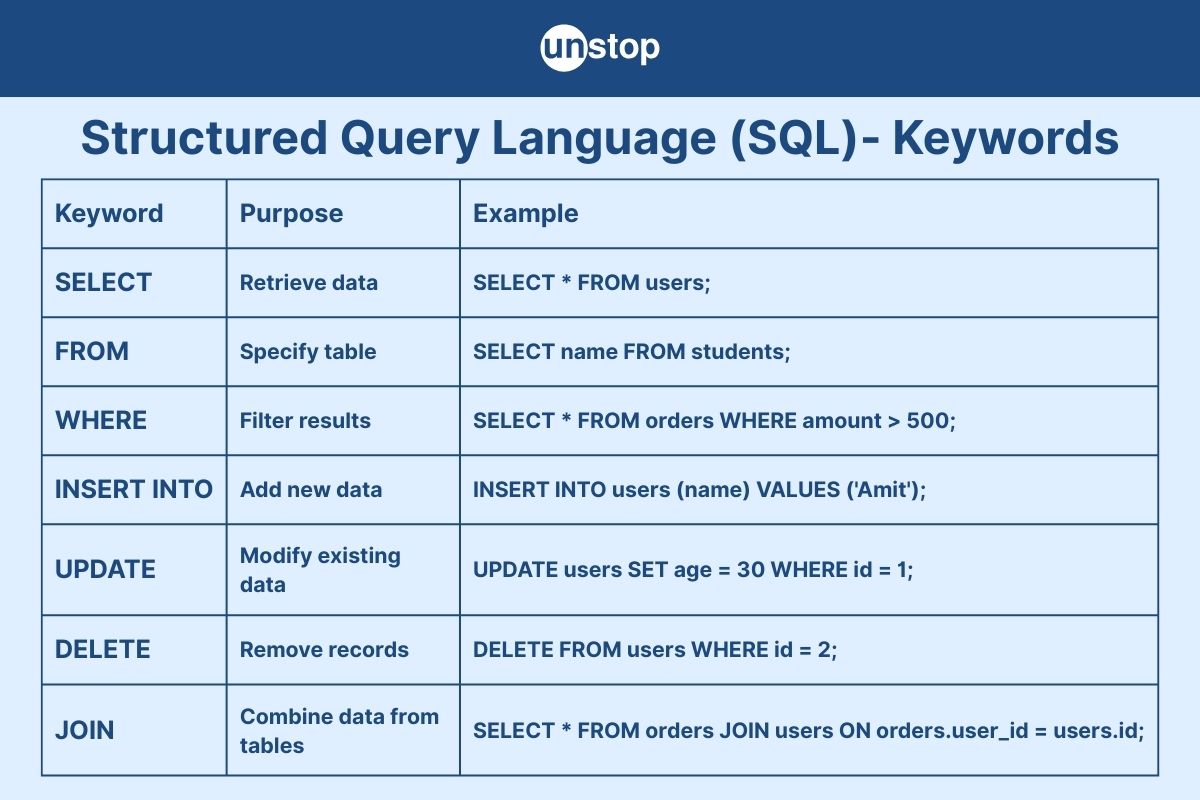
Structured Query Language (SQL) is the backbone of working with relational databases. Whether you’re retrieving data, modifying records, or managing access, you’ll find that SQL keywords are essential building blocks of any SQL query.
Understanding what SQL keywords are, how they’re used, and which ones are most common is crucial for anyone learning database programming or working with data.
What Are SQL Keywords?
SQL keywords are reserved words used to perform specific operations in SQL. These words have special meanings and cannot be used for other purposes, such as naming a column or table. They form the syntax of SQL commands and are used to interact with the database in various ways, like querying, updating, and managing data.
Think of SQL keywords as the "grammar" of SQL that define the structure and meaning of SQL statements.
Importance of SQL Keywords
- They define the structure of your SQL commands.
- They ensure consistency across databases and platforms.
- They help databases understand your instruction.s
- They are non-case-sensitive, meaning SELECT, select, and Select are all treated the same (though uppercase is the convention)
Common SQL Keywords with Descriptions
Here’s a list of some of the most commonly used SQL keywords and what they do:
|
Keyword |
Description |
|
SELECT |
Retrieves data from a database |
|
FROM |
Specifies the table to query |
|
WHERE |
Filters records based on conditions |
|
INSERT |
Adds new records to a table |
|
INTO |
Specifies where to insert data |
|
VALUES |
Defines the values to be inserted |
|
UPDATE |
Modifies existing data in a table |
|
SET |
Specifies columns and new values in an UPDATE |
|
DELETE |
Removes records from a table |
|
CREATE |
Creates new databases or tables |
|
DROP |
Deletes tables or databases |
|
ALTER |
Modifies existing tables (like adding columns) |
|
JOIN |
Combines rows from two or more tables |
|
GROUP BY |
Groups rows that share a property for aggregation |
|
ORDER BY |
Sorts query results |
|
HAVING |
Filters group-level results (used with GROUP BY) |
|
DISTINCT |
Removes duplicate records from results |
|
AS |
Renames columns or tables with an alias |
|
LIMIT |
Restricts the number of records returned (used in MySQL) |
Tips for Using SQL Keywords
- Always write SQL keywords in uppercase to distinguish them from table and column names.
- Avoid using keywords as column or table names. If needed, wrap them in backticks or brackets (e.g., SELECT `order` FROM table).
- Use SQL formatting tools or plugins to highlight keywords for readability.
Reserved Words in SQL
Reserved words are predefined keywords that SQL uses for commands and operations that are part of the language’s syntax. They have special meanings and should not be used for naming tables, columns, or other database objects.
Common Reserved Words in SQL (with Examples)
|
Reserved Word |
Purpose |
Example Usage |
|
SELECT |
Retrieves data |
SELECT * FROM Employees; |
|
FROM |
Specifies table |
SELECT Name FROM Employees; |
|
WHERE |
Filters records |
SELECT * FROM Employees WHERE Age > 30; |
|
INSERT |
Adds new data |
INSERT INTO Employees (Name) VALUES ('John'); |
|
UPDATE |
Modifies data |
UPDATE Employees SET Age = 28 WHERE Name = 'John'; |
|
DELETE |
Removes data |
DELETE FROM Employees WHERE ID = 1; |
|
CREATE |
Creates a database object |
CREATE TABLE Employees (ID INT, Name VARCHAR(50)); |
|
DROP |
Deletes an object |
DROP TABLE Employees; |
|
ALTER |
Modifies structure |
ALTER TABLE Employees ADD Salary INT; |
|
TABLE |
Refers to a table |
CREATE TABLE Products (...); |
|
AND / OR |
Combines conditions |
WHERE Age > 25 AND Department = 'HR' |
|
NOT |
Negates condition |
WHERE NOT (Age < 25) |
|
NULL |
Represents missing value |
WHERE Salary IS NULL |
|
JOIN |
Combines tables |
SELECT * FROM A JOIN B ON A.id = B.id; |
|
UNION |
Combines result sets |
SELECT Name FROM A UNION SELECT Name FROM B; |
|
AS |
Renames columns or tables |
SELECT Name AS EmployeeName FROM Employees; |
|
ORDER BY |
Sorts data |
SELECT * FROM Employees ORDER BY Age; |
|
GROUP BY |
Aggregates data |
SELECT Department, COUNT(*) FROM Employees GROUP BY Department; |
|
HAVING |
Filters groups |
HAVING COUNT(*) > 1; |
|
CASE |
Conditional logic |
SELECT Name, CASE WHEN Age > 30 THEN 'Senior' ELSE 'Junior' END FROM Employees; |
|
EXISTS |
Subquery check |
WHERE EXISTS (SELECT * FROM Projects WHERE Projects.EmpID = Employees.ID) |
|
IN |
Matches values in a list |
WHERE Department IN ('HR', 'IT') |
Identifiers in SQL
Identifiers in SQL are names used to identify database objects like tables, columns, constraints, databases, etc.
SQL Identifiers Table
|
Identifier Type |
Purpose |
Example Usage |
|
Table Name |
Names the table being created/queried |
SELECT * FROM employees; |
|
Column Name |
Refers to specific fields in a table |
SELECT name, salary FROM employees; |
|
Alias |
Temporary name for table/column |
SELECT name AS employee_name FROM employees; |
|
Constraint Name |
Names a rule on a table/column |
CONSTRAINT pk_emp PRIMARY KEY (id); |
|
Database Name |
Identifies the database in use |
USE company_db; |
|
Index Name |
Names an index created on a table |
CREATE INDEX idx_salary ON employees(salary); |
|
View Name |
Names a virtual table |
CREATE VIEW emp_view AS SELECT name, dept FROM employees; |
Identifiers must be unique within their scope, and if using reserved SQL keywords (like SELECT, ORDER, etc.) as identifiers, enclose them in double quotes or square brackets, depending on the SQL dialect.
Complete SQL Keywords with Code Examples
1. SELECT
By using the SQL keyword 'SELECT', you can retrieve data from a table.
SELECT first_name, last_name FROM employees;
2. FROM
By using the keyword 'FROM', you can specify the table from which to select or delete data.
SELECT * FROM customers;
3. WHERE
The keyword 'WHERE' helps you filter records based on a condition.
SELECT * FROM orders WHERE status = 'shipped';
4. INSERT INTO
The keyword 'INSERT INTO' adds new data to a table.
INSERT INTO products (product_name, price)
VALUES ('Laptop', 1200);
5. UPDATE
The keyword 'UPDATE' is used to modify existing data in a table.
UPDATE employees
SET salary = 50000
WHERE employee_id = 102;
6. DELETE
When removing records from a table, use the keyword 'DELETE. '
DELETE FROM customers
WHERE customer_id = 5;
7. CREATE TABLE
To create a new table in the database, use the keyword 'CREATE TABLE'.
CREATE TABLE books (
book_id INT PRIMARY KEY,
title VARCHAR(100),
author VARCHAR(100)
);
8. DROP TABLE
To delete a table and all its data, use the keyword 'DROP TABLE'.
DROP TABLE old_records;
9. ALTER TABLE
The keyword 'ALTER TABLE' is used to modify an existing table (adds columns, changes data types).
ALTER TABLE users
ADD COLUMN birthdate DATE;
10. JOIN (INNER, LEFT, RIGHT, FULL)
The keyword 'JOIN' is used to combine rows from two or more tables based on a related column.
SELECT employees.name, departments.dept_name
FROM employees
INNER JOIN departments ON employees.dept_id = departments.id;
11. GROUP BY
The keyword 'GROUP BY' is used to group rows that share the same value of the specified column(s).
SELECT department, COUNT(*)
FROM employees
GROUP BY department;
12. ORDER BY
When sorting the results in ascending or descending order, use the keyword 'ORDER BY'.
SELECT name, salary
FROM employees
ORDER BY salary DESC;
13. HAVING
The keyword 'HAVING' is used to filter group-level data (used with GROUP BY).
SELECT department, COUNT(*)
FROM employees
GROUP BY department
HAVING COUNT(*) > 10;
14. DISTINCT
To remove duplicate rows from the result, use the keyword 'DISTINCT'.
SELECT DISTINCT country FROM customers;
15. AS
The keyword 'AS' renames a column or table with an alias.
SELECT name AS full_name FROM users;
16. LIMIT (MySQL, PostgreSQL)
To limit the number of rows returned, use the keyword 'LIMIT'.
SELECT * FROM articles
LIMIT 5;
17. BETWEEN
To filter values within a specified range, use the keyword 'BETWEEN'.
SELECT * FROM orders
WHERE order_date BETWEEN '2024-01-01' AND '2024-12-31';
18. IN
The keyword 'IN' is used to match any value in a list.
SELECT * FROM users
WHERE country IN ('India', 'USA', 'Canada');
19. IS NULL / IS NOT NULL
The keywords 'IS NULL/IS NOT NULL' are used to check for NULL values.
SELECT * FROM students
WHERE email IS NULL;
20. UNION / UNION ALL
To combine results from two SELECT statements, use the keywords 'UNION/UNION ALL'.
SELECT name FROM teachers
UNION
SELECT name FROM students;
21. EXISTS
The keyword 'EXISTS' checks for the existence of rows in a subquery.
SELECT * FROM customers
WHERE EXISTS (
SELECT * FROM orders WHERE customers.id = orders.customer_id
);
22. CASE
The keyword 'CASE' is used to implement conditional logic.
SELECT name,
CASE
WHEN score >= 90 THEN 'A'
WHEN score >= 75 THEN 'B'
ELSE 'C'
END AS grade
FROM exams;
23. DEFAULT
To assign a default value to a column, use the keyword 'DEFAULT. '
CREATE TABLE products (
id INT,
name VARCHAR(50),
stock INT DEFAULT 0
);
24. PRIMARY KEY
The keyword 'PRIMARY KEY' uniquely identifies each record.
CREATE TABLE students (
id INT PRIMARY KEY,
name VARCHAR(100)
);
25. FOREIGN KEY
To establish a link between tables, use the keyword 'FOREIGN KEY'.
CREATE TABLE orders (
order_id INT,
customer_id INT,
FOREIGN KEY (customer_id) REFERENCES customers(id)
);
Standard & Accurate for General SQL
- Keywords like SELECT, INSERT, UPDATE, DELETE, WHERE, JOIN, GROUP BY, etc., are universal in most RDBMS.
- Data types like INT, VARCHAR, and DATE are standard.
- Logical structures (CASE, BETWEEN, IN, EXISTS) are accurate.
Best Practice Tip
When working on production or exam-level SQL:
- Always confirm the SQL dialect (MySQL, T-SQL, PL/SQL, etc.).
- Refer to the official documentation of the RDBMS you’re using.
Popular SQL-Based Database Systems
- MySQL
- PostgreSQL
- Microsoft SQL Server
- Oracle Database
- SQLite
Conclusion
SQL keywords are the building blocks of database operations, allowing users to retrieve, modify, manage, and analyze data efficiently. From querying with SELECT and filtering with WHERE to managing tables with CREATE and connecting data using JOIN, these reserved words form the core of SQL. Mastering them is essential for anyone looking to work with databases effectively.
Time for a Short Quiz
Frequently Asked Questions (FAQs)
1. What are SQL keywords?
SQL keywords are reserved words in SQL used to perform specific operations on databases, such as retrieving, inserting, updating, or deleting data. Examples include SELECT, FROM, WHERE, INSERT, and UPDATE.
2. Are SQL keywords case-sensitive?
No, SQL keywords are not case-sensitive. For example, SELECT, select, and SeLeCt are all treated the same. However, writing them in uppercase is a common convention for readability.
3. Can SQL keywords be used as table or column names?
Technically, yes, but it’s not recommended. If needed, you must enclose them in double quotes or square brackets (e.g., "SELECT" or [SELECT]), depending on the SQL dialect.
4. What’s the difference between WHERE and HAVING?
- WHERE filters rows before grouping (used with SELECT, UPDATE, DELETE).
- HAVING filters groups after grouping (used with GROUP BY).
5. What are the most commonly used SQL keywords?
Some of the most commonly used are:
SELECT, FROM, WHERE, INSERT, UPDATE, DELETE, JOIN, GROUP BY, ORDER BY.
Suggested reads:
Login to continue reading
And access exclusive content, personalized recommendations, and career-boosting opportunities.
Don't have an account? Sign up

Never miss an
Update




Top-Rated Practice by Students






Subscribe
to our newsletter






Comments
Add comment