


 Home
Home


HP Power Lab 3.0
Java Programming Language
- History Of Java Programming Langauge
- Infographic For History Of Java
- What’s In The Name | History Of Java
- Key Features Of Java
- Advantages And Disadvantages Of Java
- The Version History Of Java Langauge
- Conclusion
- Frequently Asked Questions
- What Is JDK?
- How To Download Java Development Kit (JDK) For Windows, MacOS, and Linux?
- Set Environment Variables In Java
- How To Install Java (JDK) On Windows 64-Bit Machine?
- How To Install Java (JDK) On Linux?
- How To Install Java (JDK) On macOS?
- How To Test Java Installation?
- How To Write Your First Java Program On Linux OS?
- Conclusion
- Frequently Asked Questions
- Java Programming Language | An Introduction
- 15 Key Features Of Java
- Write Once Run Anywhere (WORA) | Features Of Java
- Java Editions
- 5 New Features Of JAVA 8
- 5 New Features Of JAVA 11
- What Makes Java Popular?
- Conclusion
- Frequently Asked Questions
- What is Java?
- Advantages of Java
- Disadvantages of Java
- What Is Java Programming?
- Role Of Integrated Development Environments (IDEs) In Java Development
- 15 Best Java IDE For Developers
- In-Depth Comparison Table
- Conclusion
- Frequently Asked Questions
- Key Differences Between Java And Core Java
- What Is Java?
- What Is Core Java?
- Applications Of Java
- Applications Of Core Java
- When To Use Java?
- When To Use Core Java?
- Conclusion
- Frequently Asked Questions
- What Are Variables In Java Language?
- How To Declare Variables In Java Programs?
- How To Initialize Variables In Java?
- Naming Conventions For Variables In Java
- Types Of Variables In Java
- Local Variables In Java
- Instance Variables In Java
- Static Variables In Java
- Final Variables In Java
- Scope and Lifetime of Variables In Java
- Data Types Of Variables In Java (Primitive & Non-primitive)
- Java Variable Type Conversion & Type Casting
- Working With Variables In Java (Examples)
- Access Modifiers & Variables In Java
- Conclusion
- Frequently Asked Questions
- What Are Identifiers In Java?
- Syntax Rules For Identifiers In Java
- Valid Identifiers in Java
- Invalid Identifiers in Java
- Java Reserved Keywords
- Naming Conventions & Best Practices For Identifiers In Java
- What Is An Identifier Expected Error In Java?
- Reasons The Identifier Expected Error Occurs
- How To Fix/ Resolve Identifier Expected Errors In Java?
- Conclusion
- Frequently Asked Questions
- What Are Data Types In Java?
- Primitive Data Types In Java
- Non-Primitive Data Types In Java
- Key Differences Between Primitive And Non-Primitive Data Types In Java
- Conclusion
- Frequently Asked Questions
- What Are Operators In Java?
- Types Of Operators In Java
- Unary Operators In Java
- Arithmetic Operators In Java
- Assignment Operators In Java
- Relational Operators In Java
- Logical Operators In Java
- Bitwise Operators In Java
- Shift Operators In Java
- Increment & Decrement Operators In Java
- Ternary Operator In Java
- Instanceof Operator In Java
- Precedence & Associativity Of Java Operators
- Advantages & Disadvantages Of Operators In Java
- Conclusion
- Frequently Asked Questions
- What Is A Return Statement In Java?
- Use Cases Of Return Statements In Java
- Returning A Value From A Method In Java
- Returning A Class Object In Java
- Returning Void (No Value) In Java
- Advantages Of Using Return Statements In Java
- Limitations Of Using Return Statements In Java
- Conclusion
- Frequently Asked Questions
- What Are Keywords In Java?
- List Of Keywords In Java
- Detailed Overview Of Java Keywords With Examples
- What If When Keywords In Java Are Used As Variable Names?
- Difference Between Identifiers & Keywords In Java
- Conclusion
- Frequently Asked Questions
- What Is Abstract Keyword In Java?
- Use Of Abstract Keyword In Java
- Abstract Methods In Java
- Abstract Classes In Java
- Advantages Of Abstract Keyword In Java
- Disadvantages Of Abstract Keyword In Java
- Abstract Classes Vs. Interfaces In Java
- Real-World Applications Of Abstract Keyword
- Conclusion
- Frequently Asked Questions
- What Is throws Keyword In Java?
- How Does The throws Keyword Work?
- Throwing A Checked Exception Using throws In Java
- Throwing Multiple Exceptions Using throws In Java
- Throwing A Custom Exception Using throws In Java
- When To Use The throws Keyword In Java
- Difference Between throw and throws Keyword In Java
- Best Practices For Using The throws Keyword In Java
- Conclusion
- Frequently Asked Questions
- What Is The Volatile Keyword In Java?
- How Does Volatile Keyword In Java Work?
- Using Volatile Keyword In Java To Control Thread Execution
- Using Volatile Keyword In Java To Signal Between Multiple Threads
- Difference Between Synchronization And Volatile Keyword
- Common Mistakes And Best Practices While Using Volatile Keyword In Java
- Conclusion
- Frequently Asked Questions
- Understanding Super Keyword In Java
- Super Keyword In Java With Instance Variables
- Super Keyword In Java With Method Overriding
- Super Keyword In Java With Constructor Chaining
- Applications Of Super Keyword In Java
- Difference Between This And Super Keyword In Java
- Advantages Of Using Super Keyword In Java
- Limitations And Considerations Of Super Keyword In Java
- Conclusion
- Frequently Asked Questions
- Understanding This Keyword In Java
- Uses Of This Keyword In Java
- Using This Keyword For Referencing Instance Variables
- Using This Keyword For Invoking A Constructor
- Using This Keyword For Invoking A Method
- Using This Keyword With Getters And Setters
- Difference Between This And Super Keyword In Java
- Best Practices For Using This Keyword In Java
- Conclusion
- Frequently Asked Questions
- What Is new Keyword In Java?
- Uses Of The new Keyword In Java
- Memory Management With new Keyword In Java
- Example 1: Creating An Object Of A Class Using new Keyword In Java
- Example 2: Creating An Array Using The new Keyword In Java
- Best Practices For Using new Keyword In Java
- Conclusion
- Frequently Asked Questions
- What Is The Transient Keyword In Java?
- Real-Life Example Of The Transient Keyword In Java
- When To Use The Transient Keyword In Java
- Example 1: Effect Of Transient Keyword On Serialization In Java
- Example 2: Skipping Sensitive Data During Serialization With Transient Keyword In Java
- Using Transient With Final Keyword In Java
- Using Transient With Static Keyword
- Difference Between Transient And Volatile Keyword In Java
- Advantages And Disadvantages Of Transient Keyword In Java
- Conclusion
- Frequently Asked Questions
- What Is Static Keyword In Java?
- Characteristics Of Static Keyword In Java
- Static Variables In Java
- Static Method In Java
- Static Blocks In Java
- Static Classes In Java
- Static Variables Vs Instance Variables In Java
- Advantages Of Static Keyword In Java
- Disadvantages Of Static Keyword In Java
- Conclusion
- Frequently Asked Questions
- What Is A Static Method In Java?
- Use Cases Of Static Method In Java
- Using Static Method In Java To Create A Utility Class
- Using Static Method In Java To Implement The Singleton Design Pattern
- Difference Between Static And Instance Methods In Java
- Limitations Of Static Method In Java
- Conclusion
- Frequently Asked Questions
- Understanding Final Keyword In Java
- Final Variables In Java
- Final Methods In Java
- Final Classes In Java
- Difference Between Static And Final Keyword In Java
- Uses Of Final Keyword In Java
- Conclusion
- Frequently Asked Questions
- Key Difference Between final, finally, And finalize In Java
- What Is final Keyword In Java?
- What Is finally Keyword In Java?
- What Is finalize Keyword In Java?
- When To Use Which Keyword In Java?
- Conclusion
- Frequently Asked Questions
- Understanding The extends Keyword In Java?
- Use Of extends Keyword In Java
- Using Java extends To Implement Single Inheritance
- Using Java extends With Interfaces (Default Methods)
- Overriding Using extends Keyword In Java
- Difference Between extends And implements In Java
- Real World Applications Of Extends Keyword In Java
- Conclusion
- Frequently Asked Questions
- What Is Decision Making Statement In Java?
- If Statement In Java
- If-Else Statement In Java
- Else-If Ladder In Java
- Switch Statement In Java
- Ternary/Conditional Operator (?:) In Java
- Best Practices For Writing Decision Making Statements In Java
- Conclusion
- Frequently Asked Questions
- What Are Control Statements in Java?
- Decision-Making Control Statements In Java
- Looping Control Statements In Java
- Jump (Branching) Control Statements In Java
- Application Of Control Statements In Java
- Conclusion
- Frequently Asked Questions
- What Is The Break Statement In Java?
- Working Of The Break Statement In Java
- Using Java Break Statement With Loops
- Using Java Break Statement With Switch Statement
- Using Java Break Statement With Infinite Loops
- Common Pitfalls While Using Break Statements In Java
- Best Practices For Using The Break Statement In Java
- Conclusion
- Frequently Asked Questions
- What Is Switch Statement In Java?
- Working Of The Switch Statement In Java
- Example Of Switch Statement In Java
- Java Switch Statement With String
- Java Nested Switch Statements
- Java Enum In Switch Statement
- Java Wrapper Classes In Switch Statements
- Uses Of Switch Statement In Java
- Conclusion
- Frequently Asked Questions
- Syntax Of main() Method In Java
- public Specifier – Main Method In Java
- static Keyword – Main Method In Java
- void Return Type Of Main Method In Java
- The main Identifier – Main Method In Java
- String[] args In Main Method In Java
- The Role Of Java Virtual Machine (JVM)
- Running Java Programs Without The Main Method
- Variations In Declaration Of Main Method In Java
- Overloading The Main Method In Java
- Conclusion
- Frequently Asked Questions
- What Is Method Overriding In Java?
- Example Of Method Overriding In Java
- Ideal Use Cases Of Method Overriding In Java
- Rules For Method Overriding In Java
- Super Keyword & Method Overriding In Java
- Constructor & Method Overriding In Java
- Exception Handling In Method Overriding In Java
- Access Modifiers In Method Overriding In Java
- Advantages & Disadvantages Of Method Overriding In Java
- Difference Between Method Overloading Vs. Method Overriding In Java
- Conclusion
- Frequently Asked Questions
- What Is Method Overloading In Java?
- Different Ways Of Method Overloading In Java
- Overloading The main() Method In Java
- Type Promotion & Method Overloading In Java
- Null Error & Method Overloading In Java
- Advantages Of Method Overloading In Java
- Disadvantages Of Method Overloading In Java
- Conclusion
- Frequently Asked Questions
- Difference Between Overloading And Overriding In Java (Comparison Table)
- What Is Method Overloading In Java?
- What Is Method Overriding In Java?
- Key Differences Between Overloading & Overriding In Java Explained
- Difference Between Overloading And Overriding In Java Code Example
- Conclusion
- Frequently Asked Questions
- What Is A One-Dimensional Array In Java?
- Key Characteristics Of One-Dimensional Arrays In Java
- Declaration Of One-Dimensional Array In Java
- Initialization Of One-Dimensional Array In Java
- Common Operations On One-Dimensional Array In Java
- Advantages Of One-Dimensional Arrays In Java
- Disadvantages Of One-Dimensional Arrays In Java
- Conclusion
- Frequently Asked Questions
- What Is A Multidimensional Array In Java?
- Difference Between Single-Dimensional And Multidimensional Arrays In Java
- Declaring Multidimensional Arrays In Java
- Initializing Multidimensional Arrays In Java
- Accessing And Manipulating Elements In Multidimensional Arrays In Java
- Working Of Multidimensional Arrays With Jagged Arrays In Java
- Why Use Multidimensional Arrays In Java?
- Limitations Of Multidimensional Arrays In Java
- Conclusion
- Frequently Asked Questions
- What Are Jagged Arrays In Java?
- Comparison With Regular Multi-Dimensional Arrays
- Declaring Jagged Arrays In Java
- Initialization Of Jagged Arrays In Java
- Printing Elements Of A Jagged Array In Java
- Accessing And Modifying Elements Of A Jagged Array In Java
- Advantages Of Jagged Arrays In Java
- Disadvantages Of Jagged Arrays In Java
- Conclusion
- Frequently Asked Questions
- What Is Array Of Objects In Java?
- Declare And Initialize An Array Of Object In Java
- Example Of An Array Of Objects In Java
- Sorting An Array Of Objects In Java
- Passing Arrays Of Objects To Methods In Java
- Returning Arrays Of Objects From Methods In Java
- Advantages Of Arrays Of Objects In Java
- Disadvantages Of Arrays Of Objects In Java
- Conclusion
- Frequently Asked Questions
- What Is A Dynamic Array In Java?
- Why Use Dynamic Array In Java?
- What Is The Size And Capacity Of A Dynamic Array In Java?
- How To Create A Dynamic Array In Java?
- Managing Dynamic Data Input In Java
- Storing And Processing Real-Time Data In Java
- Use Cases Of Dynamic Arrays In Java
- Conclusion
- Frequently Asked Questions
- Why Return An Array In Java?
- How To Return An Array In Java
- Example 1: Returning An Array Of First N Squares
- Example 2: Doubling the Values of an Array
- Common Scenarios For Returning Arrays In Java
- Points To Remember When Returning Arrays In Java
- Conclusion
- Frequently Asked Questions
- Understanding ArrayList In Java
- Differences Between Arrays And ArrayList In Java
- Returning An ArrayList In Java
- Common Use Cases For Returning An ArrayList In Java
- Pitfalls To Avoid When Returning An ArrayList In Java
- Conclusion
- Frequently Asked Questions
- What Is A Thread In Java?
- Thread Vs Process
- What is a Thread Life Cycle In Java?
- What Are Thread Priorities?
- Creating Threads In Java
- Java Thread Methods
- Commonly Used Constructors In Thread Class
- Thread Synchronization In Java
- Common Challenges Faced While Using Threads In Java
- Best Practices For Using Threads In Java
- Real-World Applications Of Threads In Java
- Conclusion
- Frequently Asked Questions
- Understanding Multithreading In Java
- Methods Of Multithreading In Java (Examples)
- Difference Between Multithreading And Multitasking In Java
- Handling Exceptions In Multithreading
- Best Practices For Multithreading In Java
- Real-World Use Cases of Multithreading In Java
- Conclusion
- Frequently Asked Questions
- What Is Thread Priority In Java?
- Built-In Thread Priority Constants In Java
- Thread Priority: Setter & Getter Methods
- Limitations Of Thread Priority In Java
- Best Practices For Using Thread Priority In Java
- Conclusion
- Frequently Asked Questions
- What Is Thread Synchronization In Java?
- The Need For Thread Synchronization In Java
- Types Of Thread Synchronization In Java
- Mutual Exclusion In Thread Synchronization In Java
- Coordination Synchronization (Thread Communication) In Java
- Advantages Of Thread Synchronization In Java
- Disadvantages Of Thread Synchronization In Java
- Alternatives To Synchronization In Java
- Deadlock And Thread Synchronization In Java
- Real-World Use Cases Of Thread Synchronization In Java
- Conclusion
- Frequently Asked Questions
- What Is A Daemon Thread In Java?
- User Threads Vs. Daemon Threads In Java
- Methods For Daemon Threads In The Thread Class
- Creating Daemon Threads In Java
- Checking The Daemon Status Of A Thread
- Exceptions In Daemon Threads
- Limitations Of Daemon Threads In Java
- Practical Applications Of Daemon Threads In Java
- Common Mistakes To Avoid When Working With Daemon Threads In Java
- Conclusion
- Frequently Asked Questions
- Why Do Threads Need To Communicate?
- Understanding Inter Thread Communication In Java
- The wait() Method In Inter-Thread Communication
- The notify() Method In Inter-Thread Communication
- The notifyAll() Method In Inter-Thread Communication
- Difference Between wait() And sleep() Methods In Java
- Best Practices For Inter Thread Communication In Java
- Conclusion
- Frequently Asked Questions
- Understanding The Factorial Concept
- Approaches To Implementing Factorial In Java
- Find Factorial In Java Using Iterative Approach (Using a Loop)
- Find Factorial In Java Using Recursive Approach
- Complexity Analysis Of Factorial Programs In Java
- Applications Of Factorial Program In Java
- Conclusion
- Frequently Asked Questions
- Understanding The Leap Year Concept
- Approach To Check A Leap Year In Java
- Alternative Approach To Check A Leap Year In Java
- Conclusion
- Frequently Asked Questions
- What Is The Difference Between JDK, JRE, and JVM?
- What Is JVM (Java Virtual Machine)?
- What Is JRE (Java Runtime Environment)?
- What Is JDK (Java Development Kit)?
- Understanding The Difference Between JDK, JRE, And JVM
- Comparison Table For Difference Between JDK, JRE, And JVM
- Conclusion
- Frequently Asked Questions
- Difference Between Abstraction And Encapsulation In Java
- Understanding Abstraction In Java
- Understanding Encapsulation In Java
- When To Use Abstraction And Encapsulation?
- Conclusion
- Frequently Asked Questions
- Differences Between Abstract Class And Interface In Java
- What Is An Abstract Class In Java?
- What Is An Interface In Java?
- When To Use An Abstract Class?
- When To Use Interface?
- Compatibility Between Abstract Class And Interface In Java
- Conclusion
- Frequently Asked Questions
- Error Vs. Exception In Java
- What Is Error In Java?
- What Is Exception In Java?
- Best Practices For Handling Exceptions In Java
- Why Errors Should Not Be Handled In Java?
- Conclusion
- Frequently Asked Questions
- Key Differences: Java Vs. JavaScript
- What Is Java?
- What Is JavaScript?
- Difference Between Java And JavaScript Explained
- Conclusion
- Frequently Asked Questions
- Brief Introduction To C++
- Brief Introduction To Java
- Difference Between C++ and Java
- Overview & Features Of C++ Language
- Overview & Features of Java Language
- Example of C++ and Java Program
- Key Difference Between C++ And Java Explained
- Similarities Between Java Vs. C++
- Conclusion
- Frequently Asked Questions
- Test Your Skills: Quiz Time
- Basic Java interview questions and answers
- Intermediate Java interview questions and answers
- Advanced Java interview questions and answers
- Difference between core Java and advanced Java
- Important Core Java Questions
- Tips for Preparing for Core Java

Control Statements In Java | Types & Applications (+Code Examples)
Control statements in Java manage the flow of program execution. They include decision-making (if-else, switch), looping (for, while, do-while), and branching (break, continue, return) constructs.
 0 min read
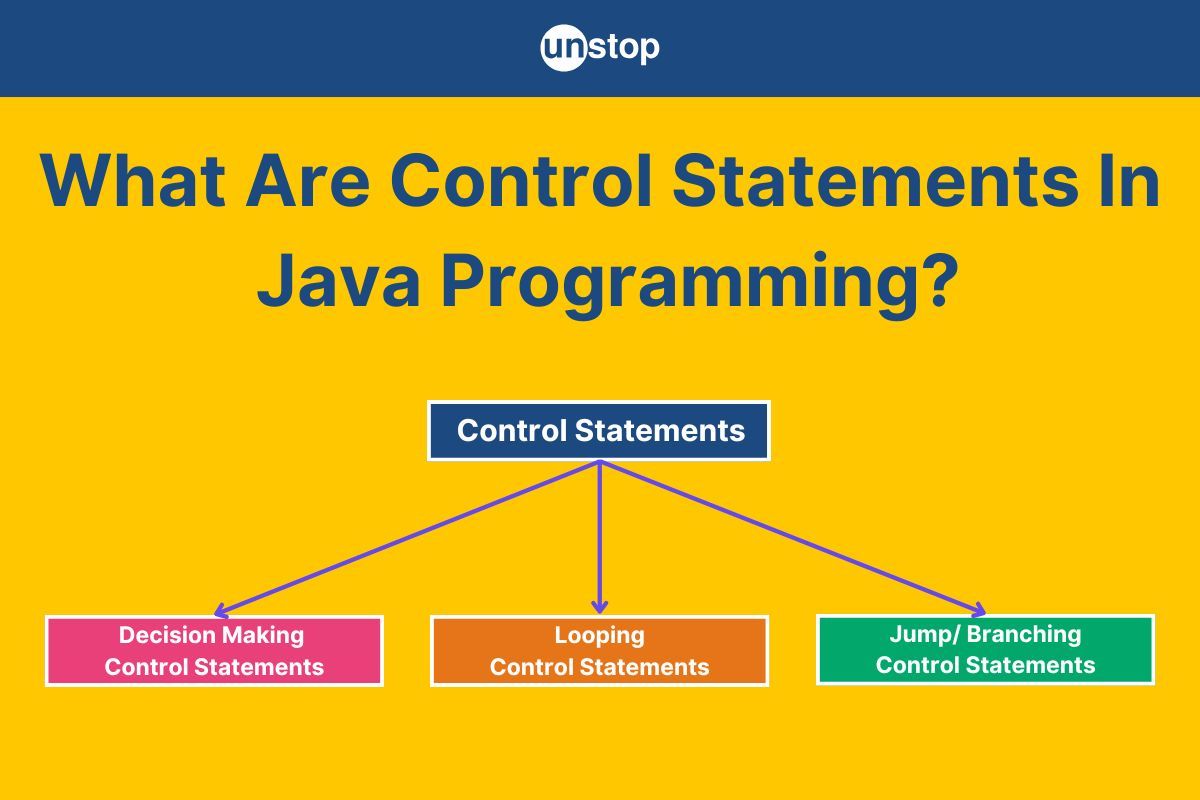
Control statements in Java are the backbone of decision-making and flow control within a program. They enable us to dictate how the program executes, allowing it to respond dynamically to various conditions. By using control statements, we can direct the program's execution path, either through decisions, loops, or jumps, making our applications more robust and versatile.
In this article, we’ll explore the different types of control statements in Java, including decision-making statements like if, else, and switch, looping constructs such as for, while, and do-while, and jump statements like break, continue, and return. Each section will explore their syntax, use cases, and practical examples to help you master the art of controlling program flow in Java effectively.
What Are Control Statements in Java?
Control statements in Java programming are the building blocks of any program that dictate the flow of execution. They enable us to control how, when, and under what conditions different parts of the program are executed. By utilizing control statements, we can make decisions, repeat actions, or execute specific parts of the code based on certain conditions.
Types Of Control Structures In Java
Control statements in Java can be categorized into three main types:
- Decision-Making Statements
- It allows the program to choose between different paths based on a condition.
- Examples: if, if-else, if-else-if, switch
- Looping Statements
- It enables the program to execute a block of code multiple times as long as a condition is met.
- Examples: for, while, do-while
- Jump/Branching Statements
- It controls the flow by altering the normal sequence of execution.
- Examples: break, continue, return
Real-Life Example
Let’s relate control statements in Java to something we do daily, i.e. planning your morning routine:
- Decision-Making (if-else): You wake up and check the time-
- If it’s early, you decide to make a full breakfast.
- Else, you grab a quick snack to avoid being late.
- Looping (for/while): You prepare your lunch-
- You repeatedly pack items (sandwich, fruit, drink) until your lunchbox is full.
- Branching (break/continue): While walking to work, you meet a friend-
- If you’re running late, you quickly say goodbye and continue walking.
- If you’re early, you stop to chat (break your walk briefly).
Now that we have understood how the control statements in Java work, let's discuss their types in detail in the sections ahead.
Explore this amazing course and master all the key concepts of Java programming effortlessly!
Decision-Making Control Statements In Java
Decision-making statements in Java allow the program to choose a path of execution based on conditions. They enable conditional logic, where different blocks of code are executed depending on whether certain conditions are true or false.
Types of Decision-Making Statements in Java
- If Statement: Executes a block of code if the condition evaluates to true.
- If-else Statement: Executes one block of code if the condition is true, and another block if the condition is false.
- If-else-if Ladder: Checks multiple conditions in sequence; the first true condition's block is executed.
- Switch Statement: Allows execution of different blocks of code based on the value of a single variable or expression.
Let’s imagine you're deciding what to wear based on the weather and temperature-
Code Example:
            public class DecisionMakingExample {

    public static void main(String[] args) {

        String weather = "sunny"; // Possible values: "sunny", "rainy", "cloudy"
        int temperature = 25;    // Temperature in degrees Celsius

        if (weather.equals("rainy")) {
            if (temperature < 20) {
                System.out.println("Wear a raincoat and carry an umbrella.");
            } else {
                System.out.println("Carry an umbrella and wear light clothing.");
            }
        } else if (weather.equals("sunny")) {
            if (temperature > 30) {
                System.out.println("Wear light clothing and sunglasses.");
            } else {
                System.out.println("Wear casual clothing and sunglasses.");
            }
        } else if (weather.equals("cloudy")) {
            System.out.println("Carry a jacket just in case.");
        } else {
            System.out.println("Weather unknown, dress comfortably!");
        }

        // Using switch for additional advice
        switch (weather) {
            case "sunny":
                System.out.println("Don't forget sunscreen!");
                break;
            case "rainy":
                System.out.println("Avoid slippery paths.");
                break;
            case "cloudy":
                System.out.println("Keep an eye on the sky for rain.");
                break;
            default:
                System.out.println("Stay prepared for any situation.");
        }
    }
}
cHVibGljIGNsYXNzIERlY2lzaW9uTWFraW5nRXhhbXBsZSB7CgogICAgcHVibGljIHN0YXRpYyB2b2lkIG1haW4oU3RyaW5nW10gYXJncykgewoKICAgICAgICBTdHJpbmcgd2VhdGhlciA9ICJzdW5ueSI7IC8vIFBvc3NpYmxlIHZhbHVlczogInN1bm55IiwgInJhaW55IiwgImNsb3VkeSIKICAgICAgICBpbnQgdGVtcGVyYXR1cmUgPSAyNTsgICAgLy8gVGVtcGVyYXR1cmUgaW4gZGVncmVlcyBDZWxzaXVzCgogICAgICAgIGlmICh3ZWF0aGVyLmVxdWFscygicmFpbnkiKSkgewogICAgICAgICAgICBpZiAodGVtcGVyYXR1cmUgPCAyMCkgewogICAgICAgICAgICAgICAgU3lzdGVtLm91dC5wcmludGxuKCJXZWFyIGEgcmFpbmNvYXQgYW5kIGNhcnJ5IGFuIHVtYnJlbGxhLiIpOwogICAgICAgICAgICB9IGVsc2UgewogICAgICAgICAgICAgICAgU3lzdGVtLm91dC5wcmludGxuKCJDYXJyeSBhbiB1bWJyZWxsYSBhbmQgd2VhciBsaWdodCBjbG90aGluZy4iKTsKICAgICAgICAgICAgfQogICAgICAgIH0gZWxzZSBpZiAod2VhdGhlci5lcXVhbHMoInN1bm55IikpIHsKICAgICAgICAgICAgaWYgKHRlbXBlcmF0dXJlID4gMzApIHsKICAgICAgICAgICAgICAgIFN5c3RlbS5vdXQucHJpbnRsbigiV2VhciBsaWdodCBjbG90aGluZyBhbmQgc3VuZ2xhc3Nlcy4iKTsKICAgICAgICAgICAgfSBlbHNlIHsKICAgICAgICAgICAgICAgIFN5c3RlbS5vdXQucHJpbnRsbigiV2VhciBjYXN1YWwgY2xvdGhpbmcgYW5kIHN1bmdsYXNzZXMuIik7CiAgICAgICAgICAgIH0KICAgICAgICB9IGVsc2UgaWYgKHdlYXRoZXIuZXF1YWxzKCJjbG91ZHkiKSkgewogICAgICAgICAgICBTeXN0ZW0ub3V0LnByaW50bG4oIkNhcnJ5IGEgamFja2V0IGp1c3QgaW4gY2FzZS4iKTsKICAgICAgICB9IGVsc2UgewogICAgICAgICAgICBTeXN0ZW0ub3V0LnByaW50bG4oIldlYXRoZXIgdW5rbm93biwgZHJlc3MgY29tZm9ydGFibHkhIik7CiAgICAgICAgfQoKICAgICAgICAvLyBVc2luZyBzd2l0Y2ggZm9yIGFkZGl0aW9uYWwgYWR2aWNlCiAgICAgICAgc3dpdGNoICh3ZWF0aGVyKSB7CiAgICAgICAgICAgIGNhc2UgInN1bm55IjoKICAgICAgICAgICAgICAgIFN5c3RlbS5vdXQucHJpbnRsbigiRG9uJ3QgZm9yZ2V0IHN1bnNjcmVlbiEiKTsKICAgICAgICAgICAgICAgIGJyZWFrOwogICAgICAgICAgICBjYXNlICJyYWlueSI6CiAgICAgICAgICAgICAgICBTeXN0ZW0ub3V0LnByaW50bG4oIkF2b2lkIHNsaXBwZXJ5IHBhdGhzLiIpOwogICAgICAgICAgICAgICAgYnJlYWs7CiAgICAgICAgICAgIGNhc2UgImNsb3VkeSI6CiAgICAgICAgICAgICAgICBTeXN0ZW0ub3V0LnByaW50bG4oIktlZXAgYW4gZXllIG9uIHRoZSBza3kgZm9yIHJhaW4uIik7CiAgICAgICAgICAgICAgICBicmVhazsKICAgICAgICAgICAgZGVmYXVsdDoKICAgICAgICAgICAgICAgIFN5c3RlbS5vdXQucHJpbnRsbigiU3RheSBwcmVwYXJlZCBmb3IgYW55IHNpdHVhdGlvbi4iKTsKICAgICAgICB9CiAgICB9Cn0K
Output (set code file name as DecisionMakingExample.java):
Wear casual clothing and sunglasses.
Don't forget sunscreen!
Explanation:
In the above code example-
- First, we define a class DecisionMakingExample, which contains the main() method. This is where our program starts execution.
- Inside the main() method, we declare and initialize two variables:
- First, weather is a String variable with a value of "sunny", representing current weather conditions. It can take values such as "sunny", "rainy", or "cloudy".
- Second, temperature is an int variable set to 25, representing the temperature in degrees Celsius.
- We then use an if-else structure to handle decision-making based on the weather and temperature values. If weather equals "rainy", we further check the temperature:
- If the temperature is less than 20, we print the message "Wear a raincoat and carry an umbrella.", indicating the need for both warm and rain-protective gear.
- Otherwise, if the temperature is 20 or higher, we print "Carry an umbrella and wear light clothing.", suggesting lighter attire while still preparing for rain.
- If weather equals "sunny", we again evaluate the temperature:
- If the temperature is greater than 30, we print "Wear light clothing and sunglasses.", highlighting the need to stay cool in hot weather.
- Otherwise, for temperatures 30 or below, we print "Wear casual clothing and sunglasses.", as the weather is sunny but not extremely hot.
- If weather equals "cloudy", we print "Carry a jacket just in case.", anticipating the possibility of cooler or unpredictable weather.
- If weather doesn’t match any of these values, we print "Weather unknown, dress comfortably!", a default fallback message for unknown conditions.
- After the if-else structure, we use a switch statement to provide additional advice based solely on the weather:
- For "sunny", we print "Don't forget sunscreen!", a reminder to protect ourselves from UV rays.
- For "rainy", we print "Avoid slippery paths.", encouraging safety during wet conditions.
- For "cloudy", we print "Keep an eye on the sky for rain.", suggesting vigilance for potential rain.
- For any other value of weather, the default case prints "Stay prepared for any situation.", a general advice statement for uncertain conditions.
Looping Control Statements In Java
Looping control statements in Java are used to execute a block of code repeatedly, as long as a specified condition is met. These statements are essential for automating repetitive tasks, processing data, or iterating through collections.
Types Of Looping Control Statements In Java
The different types of looping control statements in java are:
- For Loop: It is used when the number of iterations is known beforehand. It’s syntax is as follows:
for (initialization; condition; update) {
// Code block to be executed
}
- While Loop: It executes a block of code as long as the condition remains true. The condition is checked before each iteration. It’s syntax is as follows:
while (condition) {
// Code block to be executed
}
- Do-while Loop: Similar to the while loop, but the code block is executed at least once, as the condition is checked after execution. It’s syntax is as follows:
do {
// Code block to be executed
} while (condition);
Let’s demonstrate all three types of loops by calculating the sum of the first n natural numbers-
Code Example:
            public class LoopingExample {

    public static void main(String[] args) {

        int n = 5; // Sum of first 5 natural numbers

        // Using for loop
        int sumFor = 0;
        for (int i = 1; i <= n; i++) {
            sumFor += i;
        }
        System.out.println("Sum using for loop: " + sumFor);

        // Using while loop
        int sumWhile = 0, i = 1;
        while (i <= n) {
            sumWhile += i;
            i++;
        }
        System.out.println("Sum using while loop: " + sumWhile);

        // Using do-while loop
        int sumDoWhile = 0, j = 1;
        do {
            sumDoWhile += j;
            j++;
        } while (j <= n);
        System.out.println("Sum using do-while loop: " + sumDoWhile);
    }
}
cHVibGljIGNsYXNzIExvb3BpbmdFeGFtcGxlIHsKCiAgICBwdWJsaWMgc3RhdGljIHZvaWQgbWFpbihTdHJpbmdbXSBhcmdzKSB7CgogICAgICAgIGludCBuID0gNTsgLy8gU3VtIG9mIGZpcnN0IDUgbmF0dXJhbCBudW1iZXJzCgogICAgICAgIC8vIFVzaW5nIGZvciBsb29wCiAgICAgICAgaW50IHN1bUZvciA9IDA7CiAgICAgICAgZm9yIChpbnQgaSA9IDE7IGkgPD0gbjsgaSsrKSB7CiAgICAgICAgICAgIHN1bUZvciArPSBpOwogICAgICAgIH0KICAgICAgICBTeXN0ZW0ub3V0LnByaW50bG4oIlN1bSB1c2luZyBmb3IgbG9vcDogIiArIHN1bUZvcik7CgogICAgICAgIC8vIFVzaW5nIHdoaWxlIGxvb3AKICAgICAgICBpbnQgc3VtV2hpbGUgPSAwLCBpID0gMTsKICAgICAgICB3aGlsZSAoaSA8PSBuKSB7CiAgICAgICAgICAgIHN1bVdoaWxlICs9IGk7CiAgICAgICAgICAgIGkrKzsKICAgICAgICB9CiAgICAgICAgU3lzdGVtLm91dC5wcmludGxuKCJTdW0gdXNpbmcgd2hpbGUgbG9vcDogIiArIHN1bVdoaWxlKTsKCiAgICAgICAgLy8gVXNpbmcgZG8td2hpbGUgbG9vcAogICAgICAgIGludCBzdW1Eb1doaWxlID0gMCwgaiA9IDE7CiAgICAgICAgZG8gewogICAgICAgICAgICBzdW1Eb1doaWxlICs9IGo7CiAgICAgICAgICAgIGorKzsKICAgICAgICB9IHdoaWxlIChqIDw9IG4pOwogICAgICAgIFN5c3RlbS5vdXQucHJpbnRsbigiU3VtIHVzaW5nIGRvLXdoaWxlIGxvb3A6ICIgKyBzdW1Eb1doaWxlKTsKICAgIH0KfQo=
Output (set code file name as LoopingExample.java):
Sum using for loop: 15
Sum using while loop: 15
Sum using do-while loop: 15
Explanation:
In the above code example-
- We start by defining a class LoopingExample, which contains the main() method. This is where the execution of our program begins.
- Inside the main() method, we declare and initialize an integer variable n with the value 5. This represents the number of natural numbers we want to sum, i.e., 1 + 2 + 3 + 4 + 5.
- We calculate the sum using three different loops: a for loop, a while loop, and a do-while loop.
- First, we use the for loop:
- We initialize an integer variable sumFor to 0 to store the running total of the sum.
- The loop starts with i = 1 and runs while i is less than or equal to n. In each iteration, we add i to sumFor and increment i.
- When the loop completes, sumFor contains the total sum of the first 5 natural numbers.
- We then print the result with the message "Sum using for loop: ", followed by the value of sumFor.
- Next, we use the while loop:
- We initialize an integer variable sumWhile to 0 to store the running total and a separate variable i to 1 to act as the loop counter.
- The loop continues to execute as long as i is less than or equal to n. Inside the loop, we add i to sumWhile and increment i by 1.
- After the loop finishes, sumWhile holds the total sum.
- We print the result with the message "Sum using while loop: ", followed by the value of sumWhile.
- Finally, we use the do-while loop:
- We initialize another variable sumDoWhile to 0 for the running total and a loop counter j to 1.
- Unlike the while loop, the do-while loop ensures that the body of the loop executes at least once, even if the condition is false.
- Inside the loop, we add j to sumDoWhile and increment j by 1. The loop condition is checked after each iteration and continues as long as j is less than or equal to n.
- When the loop ends, sumDoWhile contains the total sum.
- We print the result with the message "Sum using do-while loop: ", followed by the value of sumDoWhile.
Sharpen your coding skills with Unstop's 100-Day Coding Sprint and compete now for a top spot on the leaderboard!
Jump (Branching) Control Statements In Java
Jump or branching control statements in Java are used to alter the flow of execution by transferring control to another part of the program. These statements can either skip the rest of the current iteration, exit a loop, or terminate the method entirely. They are crucial for controlling program flow dynamically based on conditions.
Types Of Jump/Branching Control Statements In Java:
- Break Statement: It is used to exit a loop or a switch statement prematurely. Stops the execution of the current loop and proceeds to the next statement after the loop.
- Example Use Case: Exit a loop when a specific condition is met.
- Continue Statement: It skips the rest of the code in the current iteration and proceeds with the next iteration of the loop.
- Example Use Case: Skip processing for specific conditions within a loop.
- Return Statement: It exits from the current method and optionally returns a value to the method caller.
- Example Use Case: Stop execution in a method once a result is determined.
Let’s combine these branching statements in a program that processes a list of numbers-
Code Example:
            public class BranchingExample {

    public static void main(String[] args) {

        int[] numbers = {1, 2, 3, 4, 5, -1, 6, 7}; // Example array

        System.out.println("Processing numbers:");

        for (int num : numbers) {

            if (num < 0) {
                System.out.println("Negative number encountered, stopping processing.");
                break; // Exit the loop if a negative number is found
            }

            if (num % 2 == 0) {
                System.out.println(num + " is even, skipping further operations.");
                continue; // Skip further processing for even numbers
            }

            System.out.println("Processing " + num);
        }

        System.out.println("Sum of first positive numbers:");
        int sum = calculateSum(numbers);
        System.out.println("Result: " + sum);
    }

    // Method to calculate sum of positive numbers until a negative number is encountered
    public static int calculateSum(int[] numbers) {
        int sum = 0;
        for (int num : numbers) {
            if (num < 0) {
                return sum; // Return the sum immediately if a negative number is found
            }
            sum += num;
        }
        return sum; // Return the sum of all numbers if no negative number is found
    }
}
cHVibGljIGNsYXNzIEJyYW5jaGluZ0V4YW1wbGUgewoKICAgIHB1YmxpYyBzdGF0aWMgdm9pZCBtYWluKFN0cmluZ1tdIGFyZ3MpIHsKCiAgICAgICAgaW50W10gbnVtYmVycyA9IHsxLCAyLCAzLCA0LCA1LCAtMSwgNiwgN307IC8vIEV4YW1wbGUgYXJyYXkKCiAgICAgICAgU3lzdGVtLm91dC5wcmludGxuKCJQcm9jZXNzaW5nIG51bWJlcnM6Iik7CgogICAgICAgIGZvciAoaW50IG51bSA6IG51bWJlcnMpIHsKCiAgICAgICAgICAgIGlmIChudW0gPCAwKSB7CiAgICAgICAgICAgICAgICBTeXN0ZW0ub3V0LnByaW50bG4oIk5lZ2F0aXZlIG51bWJlciBlbmNvdW50ZXJlZCwgc3RvcHBpbmcgcHJvY2Vzc2luZy4iKTsKICAgICAgICAgICAgICAgIGJyZWFrOyAvLyBFeGl0IHRoZSBsb29wIGlmIGEgbmVnYXRpdmUgbnVtYmVyIGlzIGZvdW5kCiAgICAgICAgICAgIH0KCiAgICAgICAgICAgIGlmIChudW0gJSAyID09IDApIHsKICAgICAgICAgICAgICAgIFN5c3RlbS5vdXQucHJpbnRsbihudW0gKyAiIGlzIGV2ZW4sIHNraXBwaW5nIGZ1cnRoZXIgb3BlcmF0aW9ucy4iKTsKICAgICAgICAgICAgICAgIGNvbnRpbnVlOyAvLyBTa2lwIGZ1cnRoZXIgcHJvY2Vzc2luZyBmb3IgZXZlbiBudW1iZXJzCiAgICAgICAgICAgIH0KCiAgICAgICAgICAgIFN5c3RlbS5vdXQucHJpbnRsbigiUHJvY2Vzc2luZyAiICsgbnVtKTsKICAgICAgICB9CgogICAgICAgIFN5c3RlbS5vdXQucHJpbnRsbigiU3VtIG9mIGZpcnN0IHBvc2l0aXZlIG51bWJlcnM6Iik7CiAgICAgICAgaW50IHN1bSA9IGNhbGN1bGF0ZVN1bShudW1iZXJzKTsKICAgICAgICBTeXN0ZW0ub3V0LnByaW50bG4oIlJlc3VsdDogIiArIHN1bSk7CiAgICB9CgogICAgLy8gTWV0aG9kIHRvIGNhbGN1bGF0ZSBzdW0gb2YgcG9zaXRpdmUgbnVtYmVycyB1bnRpbCBhIG5lZ2F0aXZlIG51bWJlciBpcyBlbmNvdW50ZXJlZAogICAgcHVibGljIHN0YXRpYyBpbnQgY2FsY3VsYXRlU3VtKGludFtdIG51bWJlcnMpIHsKICAgICAgICBpbnQgc3VtID0gMDsKICAgICAgICBmb3IgKGludCBudW0gOiBudW1iZXJzKSB7CiAgICAgICAgICAgIGlmIChudW0gPCAwKSB7CiAgICAgICAgICAgICAgICByZXR1cm4gc3VtOyAvLyBSZXR1cm4gdGhlIHN1bSBpbW1lZGlhdGVseSBpZiBhIG5lZ2F0aXZlIG51bWJlciBpcyBmb3VuZAogICAgICAgICAgICB9CiAgICAgICAgICAgIHN1bSArPSBudW07CiAgICAgICAgfQogICAgICAgIHJldHVybiBzdW07IC8vIFJldHVybiB0aGUgc3VtIG9mIGFsbCBudW1iZXJzIGlmIG5vIG5lZ2F0aXZlIG51bWJlciBpcyBmb3VuZAogICAgfQp9Cg==
Output (set code file name as BranchingExample.java):
Processing numbers:
Processing 1
2 is even, skipping further operations.
Processing 3
4 is even, skipping further operations.
Processing 5
Negative number encountered, stopping processing.
Sum of first positive numbers:
Result: 15
Explanation:
In the above code example-
- We define a class BranchingExample with a main() method, where the program execution starts.
- Inside the main() method, we initialize an array numbers with a mix of positive integers and one negative number (-1). This array serves as the input for processing.
- We start processing the numbers using a for-each loop that iterates over each element in the numbers array:
- First, we check if the current number (num) is negative using if (num < 0). If true, we print a message indicating that a negative number has been encountered and stop the loop using the break statement. This ensures no further numbers are processed after a negative value.
- If the number is even, determined by the condition num % 2 == 0, we print a message stating that it is even and skip further processing for that iteration using the continue statement. The loop moves to the next number in the array without executing the remaining code for the current iteration.
- For all other cases (odd and non-negative numbers), we print a message stating that the number is being processed. This is where the actual processing logic would go.
- After completing the loop, we move on to calculate the sum of the positive numbers in the array until a negative number is encountered.
- We call the method calculateSum(numbers) and print the result with the message "Sum of first positive numbers:". The calculateSum method works as follows:
- We initialize a variable sum to 0 to store the running total of positive numbers.
- We use a for-each loop to iterate through the numbers array.
- If a negative number is found (num < 0), we immediately return the current sum using the return statement, stopping further calculations.
- For each positive number, we add it to sum. If no negative number is encountered, the loop completes, and the method returns the total sum of all the numbers in the array.
- The combined logic in the main() method and calculateSum ensures we efficiently process the numbers and handle cases like encountering negative numbers or skipping specific conditions (e.g., even numbers).
Are you looking for someone to answer all your programming-related queries? Let's find the perfect mentor here.
Application Of Control Statements In Java
Here are some key applications of control statements in Java:
- User Authentication and Authorization: Control statements like if-else are used in authentication systems to verify user credentials. When users enter their credentials, the system checks if the input matches the stored values. If the credentials are valid, the user is granted access; otherwise, they are denied access. For Example-
if (enteredUsername.equals(storedUsername) && enteredPassword.equals(storedPassword)) {
System.out.println("Login successful.");
} else {
System.out.println("Invalid credentials.");
}
- Menu-Driven Programs: Control statements such as switch are used in menu-driven applications where users choose from a set of predefined options. The program executes specific code depending on the user's selection. For Example-
switch (choice) {
case 1: // Addition
break;
case 2: // Subtraction
break;
default:
System.out.println("Invalid choice");
}
- Input Validation: Loops and conditional statements (like while and if) are used to ensure that the user's input meets certain criteria. For example, if the user enters a non-positive number, the system will keep asking until a valid number is entered. For Example-
while (true) {
if (number > 0) {
break;
} else {
System.out.println("Enter a positive number.");
}
}
- Looping through Data (Arrays, Lists): Control statements like for loops are used to iterate through arrays or lists to process or display each element. This is useful in situations like summing values in an array or processing a list of items. For Example-
for (int i = 0; i < numbers.length; i++) {
sum += numbers[i]; // Summing array elements
}
- Search Algorithms: Control statements such as for and if are used in search algorithms (like linear search). The program checks each element in the array or list to find the target value and stops once it is found. For Example-
if (numbers[i] == searchValue) {
found = true;
break; // Exit the loop if the value is found
}
- Game Loops: In game development, loops (especially while loops) are used to continuously update the game state, process user inputs, and display changes until the user chooses to quit the game. For Example-
while (gameRunning) {
if (choice == 1) { // User chooses to play
playGame();
} else if (choice == 2) { // User chooses to quit
gameRunning = false;
}
}
- Billing or Payment Systems: Control statements like if-else are used to apply conditional logic in systems that calculate prices. For example, a discount might be applied based on the total amount, using a simple if condition to check the purchase total. For Example-
if (totalAmount > 200) {
discount = 0.1; // 10% discount for large orders
}
finalAmount = totalAmount - (totalAmount * discount);
- Data Processing (Filtering Data): Control statements such as for loops combined with if conditions are used to filter data based on specific criteria. This is common in applications that need to process large datasets and extract relevant information. For Example-
for (int num : numbers) {
if (num % 2 == 0) {
System.out.println(num); // Print even numbers
}
}
Conclusion
In Java, control statements are crucial building blocks that empower developers to manage the flow of execution within a program. From making decisions with if-else and switch, to controlling repetition through loops (for, while), to handling errors with try-catch, these statements provide flexibility, responsiveness, and efficiency in application development. They enable the program to make dynamic choices, validate user input, process data, and manage exceptions gracefully.
Whether it's for controlling the flow of execution, optimizing performance, or creating interactive and adaptable applications, control statements are essential for writing effective, reliable, and maintainable Java programs. Understanding and utilizing them proficiently is key to mastering Java programming and solving complex problems in real-world applications.
Frequently Asked Questions
Q. Why are control statements important for flow control in Java?
Control statements are fundamental to managing the flow of execution in a program. Without them, the program would execute instructions sequentially without making any decisions or repeating tasks, making it highly inflexible and inefficient. In Java, control statements like if-else, loops, and switch allow the program to:
- Make decisions based on certain conditions.
- Repeat operations multiple times when necessary.
- Skip or jump over code blocks, which makes the program more dynamic.
For example, using an if statement helps a program check whether a condition is met (like if a user is logged in), and if the condition is true, it can take a specific action (like granting access). Similarly, loops allow repetitive actions, and break or continue statements control loop behavior, improving efficiency by minimizing unnecessary steps.
- What is the difference between if and switch statements in Java?
- If statement: The if statement is used to execute a block of code if a specified condition is true. It can be used for checking multiple conditions with if-else and else-if.
- Use case: When you have conditions that aren't limited to a specific set of discrete values (like comparing ranges or multiple variables).
- Switch statement: The switch statement is used to execute one of many possible code blocks based on the value of a single expression. It is typically used when you need to test a variable against multiple possible constant values.
- Use case: When you have a fixed set of possible values for a single variable, and you want a more readable and efficient way of handling them.
For Example:
// if statement
if (score > 90) {
System.out.println("Excellent");
} else if (score > 80) {
System.out.println("Good");
} else {
System.out.println("Needs Improvement");
}// switch statement
switch (day) {
case 1:
System.out.println("Monday");
break;
case 2:
System.out.println("Tuesday");
break;
default:
System.out.println("Invalid Day");
}
Q. What is the purpose of break and continue statements in Java?
- Break statement: The break statement is used to immediately exit from a loop or switch statement. It is typically used when a certain condition is met and there's no need to continue further iterations.
- Use case: Exiting from a loop early when a condition is satisfied (e.g., search for an element in a list and break out of the loop once found).
- Continue statement: The continue statement skips the current iteration of a loop and proceeds with the next iteration. It’s useful when you want to skip over certain steps in a loop.
- Use case: Skipping even numbers in a loop, or continuing a loop when a certain condition isn't met.
Q. How do looping control statements enhance the flexibility of Java programs?
Looping control statements in Java (for, while, and do-while) enhance the flexibility and efficiency of a program by enabling repetitive tasks to be automated. Rather than writing the same code repeatedly, loops allow you to execute a block of code multiple times based on a condition or a set number of iterations.
- Efficiency: Loops reduce redundancy and save lines of code. For example, if you need to perform an operation on each element of a list or array, a loop allows you to iterate through all elements without manually specifying each one.
- Flexibility: Java provides different types of loops, each suited for different situations:
- for loop: Ideal when you know the exact number of iterations.
- while loop: Useful when the number of iterations is unknown and depends on a condition.
- do-while loop: Ensures that the loop body executes at least once, regardless of the condition.
This flexibility is key when processing data, handling user input, or implementing repeated tasks within the program.
Q. How does the do-while loop differ from the while loop in Java?
The do-while loop and while loop in Java both perform repeated actions, but they differ in their execution behavior:
- while loop: The condition is evaluated before each iteration. If the condition is false initially, the body of the loop may not execute at all. This makes it suitable for situations where you want to repeat an action as long as a condition holds true, but the loop should not execute if the condition is false at the outset.
- do-while loop: The condition is evaluated after each iteration. This guarantees that the body of the loop is executed at least once, even if the condition is false from the start. It’s useful when the loop body must be executed at least once, regardless of the condition (e.g., prompting the user for input until they provide a valid answer).
In summary, choose a while loop when the condition needs to be checked before execution and a do-while loop when at least one iteration of the loop is required before evaluating the condition.
Q. How do nested control statements work in Java?
Nested control statements in Java occur when one control statement (like a loop or an if statement) is placed inside another control statement. These are commonly used in situations where a decision depends on multiple conditions or when loops need to perform tasks within other loops.
- Nested if statements: These are used when there are multiple conditions that need to be checked in a hierarchical manner. For example, checking if a number is both positive and even can be handled by nesting an if statement inside another if statement.
- Nested loops: This is used when a task involves performing repeated actions on data structures like 2D arrays or matrices. For example, to iterate through a matrix, a for loop can be nested inside another for loop.
While nesting control statements can provide more powerful logic, it's important to be cautious of creating deeply nested structures, as they can make the code difficult to read and maintain.
With this, we conclude our discussion on the control statements in Java programming language. Here are a few other topics that you might be interested in reading:
- Throws Keyword In Java | Syntax, Working, Uses & More (+Examples)
- Final, Finally & Finalize In Java | 15+ Differences With Examples
- Volatile Keyword In Java | Syntax, Working, Uses & More (+Examples)
- Super Keyword In Java | Definition, Applications & More (+Examples)
- How To Find GCD Of Two Numbers In Java? All Methods With Examples
- How To Find LCM Of Two Numbers In Java? Simplified With Examples
Login to continue reading
And access exclusive content, personalized recommendations, and career-boosting opportunities.
Don't have an account? Sign up

Never miss an
Update




Top-Rated Practice by Students





Subscribe
to our newsletter






Comments
Add comment