


 Home
Home


Asian Paints Alchemy 2026
Table of content:
- What Is String Array In Java?
- Characteristics Of String Arrays In Java
- Declaring And Initializing String Arrays In Java
- Iterating Over String Arrays In Java
- Searching In A String Array In Java
- Sorting A String Array In Java
- Advantages Of String Arrays In Java
- Disadvantages Of String Arrays In Java
- Conclusion
- Frequently Asked Questions

String Array In Java | Create, Operations & More (+Code Examples)
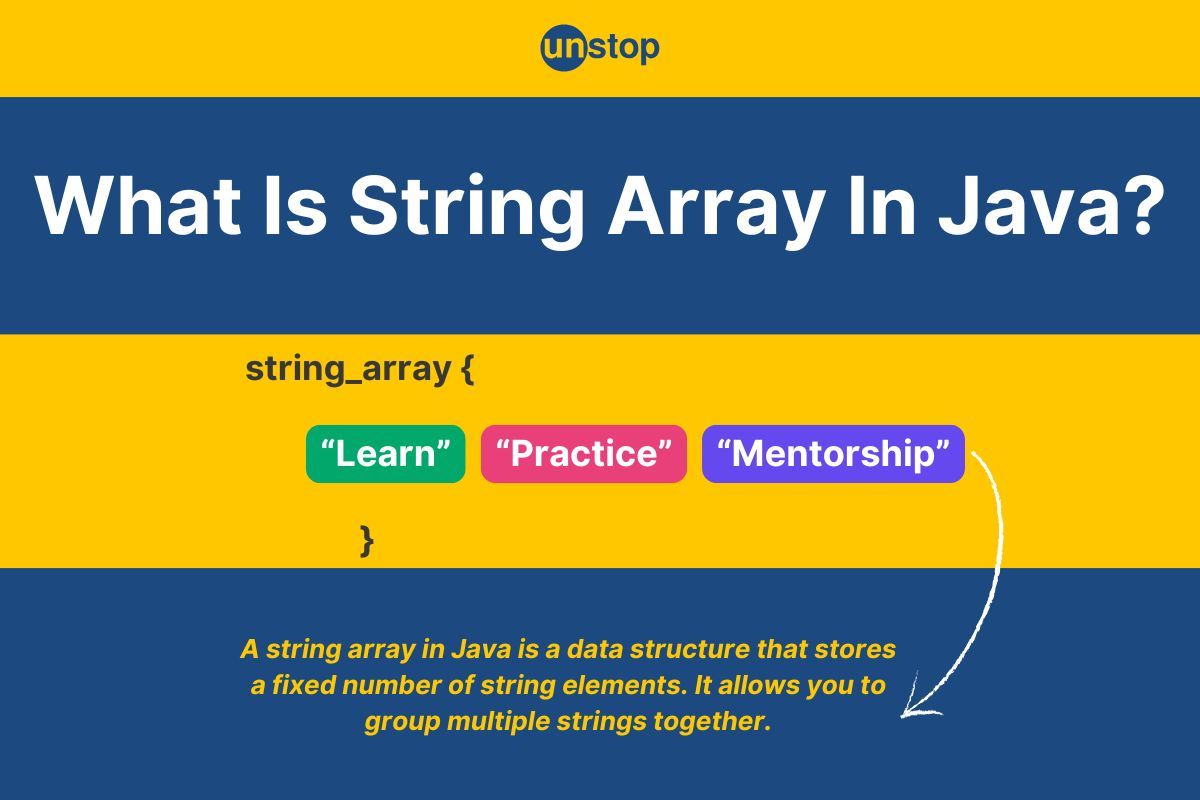
A string array in Java is a collection of strings stored in contiguous memory locations. It has a fixed size and allows storing multiple string values that can be accessed using indices starting from 0.
 0 min read
Imagine you’re organizing a collection of your favorite books, songs, or movies. Each item has a name, and you need a way to store and manage all these names efficiently. In Java, string arrays are like your digital bookshelf, allowing you to group and organize strings in a structured way.
In this article, we'll explore what string arrays are, how to declare and initialize them, and the operations you can perform on them, like accessing, modifying, or iterating through the elements. Whether you're a beginner or looking to strengthen your basics, this guide will provide a clear and practical understanding of string arrays in Java.
What Is String Array In Java?
A string array in Java programming is a collection of strings, stored together in a single data structure. Each string in the array can be accessed using an index, starting from 0. Think of it as a container where each slot holds a string value, and you can refer to each string by its position in the array.
Real-Life Analogy:
Imagine a mailbox system in an apartment building. Each mailbox (like an index in the array) is numbered, and inside each box, there might be a letter (the string).
- If you want to retrieve a specific letter, you go to the mailbox with that number.
- Similarly, in a string array, you use the index to access a specific string.
Characteristics Of String Arrays In Java
Some of the important characteristics of string arrays in Java are:
- Fixed Size: The size of a string array is determined when it is created and cannot be changed afterward. This means the number of elements it can hold is predefined.
- Homogeneous Data: A string array stores elements of the same type, specifically String. It cannot store other types like integers or objects of other classes.
- Indexed Access: Elements in the array can be accessed using an index, starting from 0. The last element is at index length - 1.
- Default Values: When a string array is created but not initialized with specific values, all elements are automatically assigned the default value null.
- Immutable Elements: Each element in a string array is a reference to an immutable String object. The strings themselves cannot be changed, but the references in the array can be updated.
- Part of Java’s Object-Oriented Model: A string array is an object in Java. It can use methods from the Object class, such as toString() and equals().
- Supports Iteration: String arrays can be iterated over using loops, such as for, for-each, or while.
- Multidimensional Arrays: String arrays can be one-dimensional or multidimensional, allowing for more complex data structures like grids or tables of strings.
- Efficient Access and Modification: String arrays provide constant-time access (O(1)) to elements when their index is known, making them efficient for retrieval and updates.
- Compatibility with Methods: String arrays can be passed as arguments to methods and returned as results, making them versatile for data handling.
Declaring And Initializing String Arrays In Java
Working with string arrays in Java begins with their declaration and initialization, which are fundamental steps for creating and managing collections of strings:
1. Declaring A String Array
When declaring a string array, we specify its type (String[]) and optionally provide a name for the variable.
Syntax:
String[] arrayName;
Here:
- String[]: Specifies the type of the array (an array of strings).
- arrayName: The name of the variable referencing the array.
2. Initializing A String Array
After declaration, a string array must be initialized to allocate memory and optionally assign values. This can be done in several ways:
- Using new Keyword (Fixed Size): We create an array with a specific size and initialize its elements later.
Syntax:
arrayName = new String[size];
Here:
- new: Allocates memory for the array.
- String: Specifies the type of elements.
- size: The number of elements the array can hold.
- Using an Array Literal (Direct Initialization): We initialize and assign values at the same time.
Syntax:
String[] arrayName = {"value1", "value2", "value3"};
Here:
- Curly braces {}: Enclose the list of string values.
- Values: Individual strings, separated by commas.
Code Example:
            public class StringArrayExample {

    public static void main(String[] args) {

        // Declaring and initializing using the new keyword
        String[] fruits = new String[3];
        fruits[0] = "Apple";
        fruits[1] = "Banana";
        fruits[2] = "Cherry";

        // Declaring and initializing using array literals
        String[] colors = {"Red", "Blue", "Green"};

        // Printing the arrays
        System.out.println("Fruits:");
        for (String fruit : fruits) {
            System.out.println(fruit);
        }

        System.out.println("\nColors:");
        for (String color : colors) {
            System.out.println(color);
        }
    }
}
cHVibGljIGNsYXNzIFN0cmluZ0FycmF5RXhhbXBsZSB7CgogICAgcHVibGljIHN0YXRpYyB2b2lkIG1haW4oU3RyaW5nW10gYXJncykgewoKICAgICAgICAvLyBEZWNsYXJpbmcgYW5kIGluaXRpYWxpemluZyB1c2luZyB0aGUgbmV3IGtleXdvcmQKICAgICAgICBTdHJpbmdbXSBmcnVpdHMgPSBuZXcgU3RyaW5nWzNdOwogICAgICAgIGZydWl0c1swXSA9ICJBcHBsZSI7CiAgICAgICAgZnJ1aXRzWzFdID0gIkJhbmFuYSI7CiAgICAgICAgZnJ1aXRzWzJdID0gIkNoZXJyeSI7CgogICAgICAgIC8vIERlY2xhcmluZyBhbmQgaW5pdGlhbGl6aW5nIHVzaW5nIGFycmF5IGxpdGVyYWxzCiAgICAgICAgU3RyaW5nW10gY29sb3JzID0geyJSZWQiLCAiQmx1ZSIsICJHcmVlbiJ9OwoKICAgICAgICAvLyBQcmludGluZyB0aGUgYXJyYXlzCiAgICAgICAgU3lzdGVtLm91dC5wcmludGxuKCJGcnVpdHM6Iik7CiAgICAgICAgZm9yIChTdHJpbmcgZnJ1aXQgOiBmcnVpdHMpIHsKICAgICAgICAgICAgU3lzdGVtLm91dC5wcmludGxuKGZydWl0KTsKICAgICAgICB9CgogICAgICAgIFN5c3RlbS5vdXQucHJpbnRsbigiXG5Db2xvcnM6Iik7CiAgICAgICAgZm9yIChTdHJpbmcgY29sb3IgOiBjb2xvcnMpIHsKICAgICAgICAgICAgU3lzdGVtLm91dC5wcmludGxuKGNvbG9yKTsKICAgICAgICB9CiAgICB9Cn0K
Output (set code file name as StringArrayExample.java):
Fruits:
Apple
Banana
CherryColors:
Red
Blue
Green
Explanation:
In the above code example-
- We start by declaring a class named StringArrayExample with a main method, which serves as the entry point of the program.
- In the first array declaration, we use the new keyword to create a String array named fruits of size 3. This means the array can hold three elements.
- We populate the fruits array by assigning specific values: "Apple" to the first index, "Banana" to the second, and "Cherry" to the third.
- Next, we declare and initialize another array, colors, directly using array literals. This approach is more concise and allows us to specify the elements, "Red," "Blue," and "Green," during declaration.
- To display the contents of the fruits array, we use an enhanced for loop. This loop iterates through each element of the array and prints it.
- After printing the fruits array, we do the same for the colors array, again using an enhanced for loop to iterate through and print its elements.
- Finally, the output shows the names of fruits followed by the colors, demonstrating how to handle and print string arrays in Java.
Explore this amazing course and master all the key concepts of Java programming effortlessly!
Iterating Over String Arrays In Java
Iterating over string arrays in Java allows us to access and manipulate each element in the array. Java provides several ways to loop through the elements of an array. The most common ways are using traditional for loops, enhanced for loops, and while loops. Each method offers a different approach to traversing the array and performing operations on its elements.
1. Using A Traditional for Loop
The traditional for loop uses an index to iterate through the array. It's ideal when you need access to both the index and the array elements.
Syntax:
for (int i = 0; i < array.length; i++) {
System.out.println(array[i]);
}
Here:
- i: The index variable, starting from 0.
- array.length: The length of the array (number of elements).
2. Using An Enhanced for Loop (For-each Loop)
The enhanced for loop provides a simpler and cleaner syntax for iterating over arrays when you don’t need the index. It directly accesses the elements in the array.
Syntax:
for (String element : array) {
System.out.println(element);
}
Here:
- String element: The variable representing each element in the array.
- array: The string array being iterated.
3. Using A while Loop
A while loop can also be used to iterate over an array by maintaining an index and checking the condition explicitly.
Syntax:
int i = 0;
while (i < array.length) {
System.out.println(array[i]);
i++;
}
Here's an example demonstrating all three methods of iterating over a string array in Java-
Code Example:
            public class StringArrayIteration {

    public static void main(String[] args) {

        // Declaring and initializing a string array
        String[] animals = {"Cat", "Dog", "Elephant", "Lion", "Tiger"};

        // Using a traditional for loop
        System.out.println("Using traditional for loop:");
        for (int i = 0; i < animals.length; i++) {
            System.out.println(animals[i]);
        }

        // Using an enhanced for loop
        System.out.println("\nUsing enhanced for loop:");
        for (String animal : animals) {
            System.out.println(animal);
        }

        // Using a while loop
        System.out.println("\nUsing while loop:");
        int i = 0;
        while (i < animals.length) {
            System.out.println(animals[i]);
            i++;
        }
    }
}
cHVibGljIGNsYXNzIFN0cmluZ0FycmF5SXRlcmF0aW9uIHsKCiAgICBwdWJsaWMgc3RhdGljIHZvaWQgbWFpbihTdHJpbmdbXSBhcmdzKSB7CgogICAgICAgIC8vIERlY2xhcmluZyBhbmQgaW5pdGlhbGl6aW5nIGEgc3RyaW5nIGFycmF5CiAgICAgICAgU3RyaW5nW10gYW5pbWFscyA9IHsiQ2F0IiwgIkRvZyIsICJFbGVwaGFudCIsICJMaW9uIiwgIlRpZ2VyIn07CgogICAgICAgIC8vIFVzaW5nIGEgdHJhZGl0aW9uYWwgZm9yIGxvb3AKICAgICAgICBTeXN0ZW0ub3V0LnByaW50bG4oIlVzaW5nIHRyYWRpdGlvbmFsIGZvciBsb29wOiIpOwogICAgICAgIGZvciAoaW50IGkgPSAwOyBpIDwgYW5pbWFscy5sZW5ndGg7IGkrKykgewogICAgICAgICAgICBTeXN0ZW0ub3V0LnByaW50bG4oYW5pbWFsc1tpXSk7CiAgICAgICAgfQoKICAgICAgICAvLyBVc2luZyBhbiBlbmhhbmNlZCBmb3IgbG9vcAogICAgICAgIFN5c3RlbS5vdXQucHJpbnRsbigiXG5Vc2luZyBlbmhhbmNlZCBmb3IgbG9vcDoiKTsKICAgICAgICBmb3IgKFN0cmluZyBhbmltYWwgOiBhbmltYWxzKSB7CiAgICAgICAgICAgIFN5c3RlbS5vdXQucHJpbnRsbihhbmltYWwpOwogICAgICAgIH0KCiAgICAgICAgLy8gVXNpbmcgYSB3aGlsZSBsb29wCiAgICAgICAgU3lzdGVtLm91dC5wcmludGxuKCJcblVzaW5nIHdoaWxlIGxvb3A6Iik7CiAgICAgICAgaW50IGkgPSAwOwogICAgICAgIHdoaWxlIChpIDwgYW5pbWFscy5sZW5ndGgpIHsKICAgICAgICAgICAgU3lzdGVtLm91dC5wcmludGxuKGFuaW1hbHNbaV0pOwogICAgICAgICAgICBpKys7CiAgICAgICAgfQogICAgfQp9Cg==
Output (set code file name as StringArrayIteration.java):
Using traditional for loop:
Cat
Dog
Elephant
Lion
TigerUsing enhanced for loop:
Cat
Dog
Elephant
Lion
TigerUsing while loop:
Cat
Dog
Elephant
Lion
Tiger
Explanation:
In the above code example-
- We begin by declaring a class named StringArrayIteration with a main method, which is the starting point of the program.
- We declare and initialize a String array named animals, containing the elements "Cat," "Dog," "Elephant," "Lion," and "Tiger."
- To iterate through and print the elements of the animals array, we first use a traditional for loop. In this loop, we set an index variable i to 0 and run the loop while i is less than the length of the array. In each iteration, we access and print the element at the ith index.
- After that, we demonstrate an enhanced for loop, which simplifies the process of iterating through arrays. In this loop, the array element is directly assigned to the variable animal, and we print each animal in the array.
- Lastly, we use a while loop to achieve the same result. We initialize an index variable i to 0 and loop as long as i is less than the length of the array. Inside the loop, we print the current element and increment i to move to the next element.
- The program shows three different methods of iterating through and printing elements from a string array in Java.
Searching In A String Array In Java
Searching in a string array is the process of looking for a specific element (or multiple elements) within an array. Java offers various techniques to search for strings, such as linear search and using built-in methods like Arrays.binarySearch().
Linear search is the most straightforward method to find a specific element in an array. In linear search, we iterate over each element of the array and compare it with the target string. If a match is found, we return the index of the element; otherwise, we continue checking the rest of the array.
Syntax:
for (int i = 0; i < array.length; i++) {
if (array[i].equals(target)) {
// Element found
}
}
Here, we compare each element with the target string using .equals() method because String is an object, and we need to check their values.
Let’s now look at an example demonstrating linear search in a string array-
Code Example-
            public class LinearSearchExample {

    public static void main(String[] args) {

        // Declaring and initializing a string array
        String[] animals = {"Cat", "Dog", "Elephant", "Lion", "Tiger"};

        // Target string to search for
        String target = "Lion";

        // Linear search to find the target in the array
        boolean found = false; // To track if the target is found
        for (int i = 0; i < animals.length; i++) {
            if (animals[i].equals(target)) {
                found = true;
                System.out.println(target + " found at index " + i);
                break; // Exit the loop once the target is found
            }
        }

        // If not found
        if (!found) {
            System.out.println(target + " not found in the array.");
        }
    }
}
cHVibGljIGNsYXNzIExpbmVhclNlYXJjaEV4YW1wbGUgewoKICAgIHB1YmxpYyBzdGF0aWMgdm9pZCBtYWluKFN0cmluZ1tdIGFyZ3MpIHsKCiAgICAgICAgLy8gRGVjbGFyaW5nIGFuZCBpbml0aWFsaXppbmcgYSBzdHJpbmcgYXJyYXkKICAgICAgICBTdHJpbmdbXSBhbmltYWxzID0geyJDYXQiLCAiRG9nIiwgIkVsZXBoYW50IiwgIkxpb24iLCAiVGlnZXIifTsKCiAgICAgICAgLy8gVGFyZ2V0IHN0cmluZyB0byBzZWFyY2ggZm9yCiAgICAgICAgU3RyaW5nIHRhcmdldCA9ICJMaW9uIjsKCiAgICAgICAgLy8gTGluZWFyIHNlYXJjaCB0byBmaW5kIHRoZSB0YXJnZXQgaW4gdGhlIGFycmF5CiAgICAgICAgYm9vbGVhbiBmb3VuZCA9IGZhbHNlOyAvLyBUbyB0cmFjayBpZiB0aGUgdGFyZ2V0IGlzIGZvdW5kCiAgICAgICAgZm9yIChpbnQgaSA9IDA7IGkgPCBhbmltYWxzLmxlbmd0aDsgaSsrKSB7CiAgICAgICAgICAgIGlmIChhbmltYWxzW2ldLmVxdWFscyh0YXJnZXQpKSB7CiAgICAgICAgICAgICAgICBmb3VuZCA9IHRydWU7CiAgICAgICAgICAgICAgICBTeXN0ZW0ub3V0LnByaW50bG4odGFyZ2V0ICsgIiBmb3VuZCBhdCBpbmRleCAiICsgaSk7CiAgICAgICAgICAgICAgICBicmVhazsgLy8gRXhpdCB0aGUgbG9vcCBvbmNlIHRoZSB0YXJnZXQgaXMgZm91bmQKICAgICAgICAgICAgfQogICAgICAgIH0KCiAgICAgICAgLy8gSWYgbm90IGZvdW5kCiAgICAgICAgaWYgKCFmb3VuZCkgewogICAgICAgICAgICBTeXN0ZW0ub3V0LnByaW50bG4odGFyZ2V0ICsgIiBub3QgZm91bmQgaW4gdGhlIGFycmF5LiIpOwogICAgICAgIH0KICAgIH0KfQo=
Output (set code file name as LinearSearchExample.java):
Lion found at index 3
Explanation:
In the above code example-
- We start by declaring a class named LinearSearchExample with a main method, which serves as the entry point for the program.
- Inside the main method, we declare and initialize a String array called animals, containing the elements "Cat," "Dog," "Elephant," "Lion," and "Tiger."
- We define a target string, target, with the value "Lion," which we aim to search for in the array.
- To perform a linear search, we initialize a boolean variable found to false to track whether the target is found.
- We then use a traditional for loop to iterate through the array. In each iteration, we compare the current element (animals[i]) with the target using the equals() method.
- If the target is found, we set found to true, print the index at which the target was found, and use the break statement to exit the loop early.
- If the loop finishes without finding the target, we check the found variable. If it remains false, we print a message indicating that the target was not found in the array.
- This program demonstrates how to implement a simple linear search to locate a target value in a string array.
Sharpen your coding skills with Unstop's 100-Day Coding Sprint and compete now for a top spot on the leaderboard!
Sorting A String Array In Java
Sorting a string array in Java allows you to arrange the elements in a specific order, such as alphabetical (ascending) or reverse alphabetical (descending) order. Sorting can be done using various methods, but the most common and efficient approach is to use the built-in methods provided by Java, such as Arrays.sort() for ascending order and custom methods for descending order.
1. Using Arrays.sort() for Ascending Order
The simplest way to sort a string array in Java is by using the Arrays.sort() method. This method sorts the array in lexicographical (alphabetical) order, meaning that the strings are arranged as they would appear in a dictionary.
Syntax:
Arrays.sort(array);
Here, array represents the string array to be sorted.
Note: By default, Arrays.sort() arranges the strings in ascending order based on their natural ordering (alphabetical for strings).
2. Sorting In Descending Order
If you want to sort the string array in descending order, you can use the Arrays.sort() method in combination with Collections.reverseOrder() or by writing a custom comparator.
Syntax:
Arrays.sort(array, Collections.reverseOrder());
Here, Collections.reverseOrder() provides a comparator that reverses the order of the natural sorting. Thus, it will sort the array in reverse alphabetical order.
Let’s look at an example demonstrating sorting a string array in both ascending and descending order-
Code Example:
            import java.util.Arrays;
import java.util.Collections;

public class StringArraySorting {

    public static void main(String[] args) {

        // Declaring and initializing a string array
        String[] animals = {"Cat", "Dog", "Elephant", "Lion", "Tiger"};

        // Sorting in ascending order
        Arrays.sort(animals);
        System.out.println("Sorted in Ascending Order:");
        for (String animal : animals) {
            System.out.println(animal);
        }

        // Sorting in descending order using Collections.reverseOrder
        Arrays.sort(animals, Collections.reverseOrder());
        System.out.println("\nSorted in Descending Order:");
        for (String animal : animals) {
            System.out.println(animal);
        }
    }
}
aW1wb3J0IGphdmEudXRpbC5BcnJheXM7CmltcG9ydCBqYXZhLnV0aWwuQ29sbGVjdGlvbnM7CgpwdWJsaWMgY2xhc3MgU3RyaW5nQXJyYXlTb3J0aW5nIHsKCiAgICBwdWJsaWMgc3RhdGljIHZvaWQgbWFpbihTdHJpbmdbXSBhcmdzKSB7CgogICAgICAgIC8vIERlY2xhcmluZyBhbmQgaW5pdGlhbGl6aW5nIGEgc3RyaW5nIGFycmF5CiAgICAgICAgU3RyaW5nW10gYW5pbWFscyA9IHsiQ2F0IiwgIkRvZyIsICJFbGVwaGFudCIsICJMaW9uIiwgIlRpZ2VyIn07CgogICAgICAgIC8vIFNvcnRpbmcgaW4gYXNjZW5kaW5nIG9yZGVyCiAgICAgICAgQXJyYXlzLnNvcnQoYW5pbWFscyk7CiAgICAgICAgU3lzdGVtLm91dC5wcmludGxuKCJTb3J0ZWQgaW4gQXNjZW5kaW5nIE9yZGVyOiIpOwogICAgICAgIGZvciAoU3RyaW5nIGFuaW1hbCA6IGFuaW1hbHMpIHsKICAgICAgICAgICAgU3lzdGVtLm91dC5wcmludGxuKGFuaW1hbCk7CiAgICAgICAgfQoKICAgICAgICAvLyBTb3J0aW5nIGluIGRlc2NlbmRpbmcgb3JkZXIgdXNpbmcgQ29sbGVjdGlvbnMucmV2ZXJzZU9yZGVyCiAgICAgICAgQXJyYXlzLnNvcnQoYW5pbWFscywgQ29sbGVjdGlvbnMucmV2ZXJzZU9yZGVyKCkpOwogICAgICAgIFN5c3RlbS5vdXQucHJpbnRsbigiXG5Tb3J0ZWQgaW4gRGVzY2VuZGluZyBPcmRlcjoiKTsKICAgICAgICBmb3IgKFN0cmluZyBhbmltYWwgOiBhbmltYWxzKSB7CiAgICAgICAgICAgIFN5c3RlbS5vdXQucHJpbnRsbihhbmltYWwpOwogICAgICAgIH0KICAgIH0KfQo=
Output (set code file name as StringArraySorting.java):
Sorted in Ascending Order:
Cat
Dog
Elephant
Lion
TigerSorted in Descending Order:
Tiger
Lion
Elephant
Dog
Cat
Explanation:
In the above code example-
- We begin by declaring a class named StringArraySorting with a main method, which acts as the entry point for the program.
- Inside the main method, we declare and initialize a String array called animals, containing the elements "Cat," "Dog," "Elephant," "Lion," and "Tiger."
- To sort the array in ascending order, we use Arrays.sort(animals), which sorts the array in lexicographical (alphabetical) order. After sorting, we print the array's elements using an enhanced for loop to display the sorted order.
- Next, we sort the array in descending order using Arrays.sort(animals, Collections.reverseOrder()). The reverseOrder() method from the Collections class is used to sort the array in reverse order. We then print the elements of the array after sorting in descending order.
- The program demonstrates two sorting techniques for a string array: one for ascending order and another for descending order, showcasing the use of the Arrays.sort() method along with Collections.reverseOrder().
Advantages Of String Arrays In Java
Some important advantages of string arrays in Java are:
- Fixed Size and Direct Access: Once a string array is declared, its size is fixed, meaning you can directly access any element using its index. This allows for efficient access and manipulation of elements, especially when you know the number of strings beforehand. Example: If you have a string array of days, you can directly access days[2] to get "Wednesday".
- Memory Efficiency: Arrays are contiguous in memory, which makes them efficient in terms of memory usage. Strings are stored as references, so only the reference to the string is stored in the array, not the entire string content. Example: A string array of 1000 elements consumes much less memory compared to storing individual string objects.
- Simplicity: String arrays are simple to use, especially when the number of elements is known. The basic operations like declaring, initializing, and iterating over the array are easy to understand and implement. Example: If you're storing a list of months, a string array is simple and effective.
- Performance: Because of their fixed size and direct access via indices, string arrays provide constant-time performance (O(1)) for accessing elements, making them highly efficient for lookup operations. Example: Accessing any month in the array (e.g., months[5]) happens in constant time.
- Compatibility with Other Java APIs: Java provides several built-in utilities that work well with arrays, such as Arrays.sort() for sorting and Arrays.binarySearch() for searching, making it easier to perform common operations on string arrays. Example: Sorting a string array of names is straightforward with Arrays.sort().
Disadvantages Of String Arrays In Java
Some common disadvantages of string arrays in Java are:
- Fixed Size: Once a string array is created, its size cannot be changed. If you need to add or remove elements dynamically, you would need to create a new array, which can be inefficient in certain cases. Example: If you need to add a new month to your months[] array, you would need to create a larger array and copy the existing elements into it.
- No Built-in Resizing: Unlike ArrayList, arrays in Java do not automatically resize when you add more elements. This means that if the array becomes full, you must manually create a new array with a larger size and copy the elements over. Example: If your string array exceeds its initial size, you will have to handle resizing manually, which can lead to extra overhead.
- Lack of Advanced Operations: String arrays only provide basic operations like accessing elements by index. For more advanced operations (such as adding/removing elements, finding an element's index, etc.), you would need to manually implement these functionalities or use classes like ArrayList which offer more flexibility. Example: If you want to remove an element from the middle of the array, you would need to manually shift elements, unlike ArrayList where you can use remove().
- No Type Safety for Large Data Sets: If you're working with a large dataset of strings and need to ensure that only strings are added to the array, the type-safety of arrays is limited compared to more advanced data structures like ArrayList<String>. You have to manage type consistency manually. Example: If you mix data types in an array, it can lead to runtime errors, while ArrayList provides better type enforcement.
- Limited Functionality Compared to Collections Framework: The functionality of arrays is limited compared to more advanced collections in Java, such as ArrayList or HashSet. These collections provide methods for adding, removing, and querying elements without manually resizing or handling array boundaries. Example: In an ArrayList<String>, you can easily perform operations like add(), remove(), and contains(), which are more cumbersome with a string array.
Are you looking for someone to answer all your programming-related queries? Let's find the perfect mentor here.
Conclusion
String arrays in Java are a simple and efficient way to store multiple strings. They provide quick access to elements and are memory efficient, making them a good choice when the number of strings is fixed. However, their size cannot be changed once defined, and they lack the flexibility of more advanced data structures like ArrayList.
While string arrays are great for small, static collections of data, you might prefer other collections when you need to frequently add or remove elements. Understanding when to use string arrays versus other options will help you write more effective Java programs.
Frequently Asked Questions
Q. What is a string array in Java?
A string array in Java is a data structure that stores a fixed number of string elements. It allows you to group multiple strings together, making it easier to manage and access them using an index.
Q. Can the size of a string array be changed after initialization?
No, the size of a string array in Java is fixed once it is initialized. If you need to change the size, you must create a new array with the desired size and copy the existing elements into it.
Q. What is the difference between a string array and an ArrayList<String> in Java?
Here are the key differences:
|
Feature |
String Array |
ArrayList<String> |
|
Size |
Fixed size after initialization. |
Dynamic size; grows or shrinks automatically. |
|
Memory Efficiency |
More memory efficient for fixed-size collections. |
Slightly less memory efficient due to internal resizing and overhead. |
|
Access Time |
Constant time (O(1)) for accessing elements. |
Constant time (O(1)) for accessing elements. |
|
Resizing |
Does not support resizing; needs manual creation of a new array. |
Automatically resizes as elements are added or removed. |
|
Type Safety |
Type-safe, but no built-in methods for modifying size or adding/removing elements. |
Provides built-in methods like add(), remove(), and clear() for easier management. |
|
Ease of Use |
Simpler, but lacks dynamic functionality. |
More flexible and easier to manage with built-in methods. |
|
Performance |
Slightly better performance for fixed collections, as it has no overhead of dynamic resizing. |
Slightly less efficient due to resizing and internal array management. |
|
Use Case |
Best for fixed, known-sized collections of strings. |
Best for dynamic collections of strings where elements may change frequently. |
|
Example |
String[] fruits = {"Apple", "Banana", "Cherry"}; |
ArrayList<String> fruits = new ArrayList<>(); fruits.add("Apple"); |
Q. What happens if you try to access an index outside the bounds of a string array in Java?
In Java, arrays are zero-indexed, meaning that the first element of an array is accessed at index 0. If you attempt to access an index that is either less than 0 or greater than or equal to the length of the array, a **ArrayIndexOutOfBoundsException** will be thrown at runtime. For example-
String[] fruits = {"Apple", "Banana", "Cherry"};
System.out.println(fruits[3]); // This will throw ArrayIndexOutOfBoundsException
In the example above, attempting to access fruits[3] causes an exception because the array fruits only has indices 0, 1, and 2.
Q. How can I sort a string array in Java?
You can sort a string array using Arrays.sort() method. By default, it sorts the array in ascending order (alphabetically):
Arrays.sort(arrayName);
With this, we conclude our discussion on string arrays in Java programming. Here are a few other topics that you might be interested in reading:
- Convert String To Date In Java | 3 Different Ways With Examples
- Final, Finally & Finalize In Java | 15+ Differences With Examples
- Super Keyword In Java | Definition, Applications & More (+Examples)
- How To Find LCM Of Two Numbers In Java? Simplified With Examples
- How To Find GCD Of Two Numbers In Java? All Methods With Examples
- Volatile Keyword In Java | Syntax, Working, Uses & More (+Examples)
Login to continue reading
And access exclusive content, personalized recommendations, and career-boosting opportunities.
Don't have an account? Sign up

Never miss an
Update




Top-Rated Practice by Students






Subscribe
to our newsletter






Comments
Add comment