


 Home
Home




Asian Paints Alchemy 2026
Table of content:
- What Is An Array?
- What Is A String Array In C?
- How To Declare A String Array In C?
- Initialization Of Array of Strings In C
- Working of Array of Strings in C
- Invalid Operations On String Array In C
- Functions Of Strings
- Array Of Pointers To Strings
- Conclusion
- Frequently Asked Questions

String Array In C | Declare, Use, Manipulate & More (+Examples)
A string array, also referred to as an array of strings in C, is a two-dimensional array that contains strings as elements. These data structures are useful when working with textual data.
 0 min read
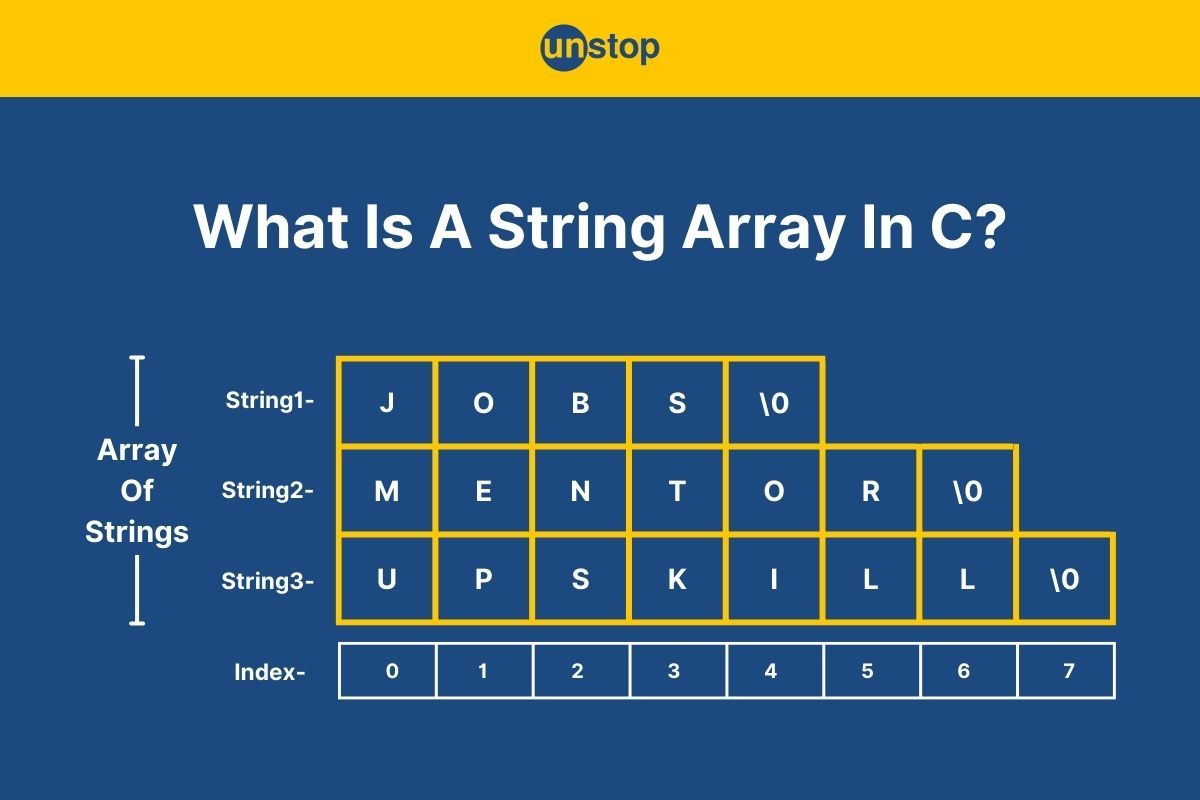
In the C programming language, an array is a collection of elements of similar data types stored in contiguous memory locations. On the other hand, a string is a collection of characters or a sequence/ array of characters, like letters and numbers. In this sense, an array of strings in C can be referred to as a collection of arrays of characters. To better understand the concept of string arrays in C, let's consider an example. Say there is a big box that contains a series of smaller boxes, and each of these smaller boxes is made up of a sequence of alphabets/ characters.
Here, the smaller box represents an array of characters (character blocks), i.e., strings, and the big box represents an array of strings. In this article, we will elaborate on how to declare and initialize a string array in C, its implementation, string functions and their uses, and more with the help of proper examples. So let's get started!
What Is An Array?
An array in a C program is like a group of data elements stored sequentially. It is one of the simplest derived data types in C, which can contain elements of primitive data types such as integer, float, character, and so on. The simplest form of an array in programming is a one-dimensional array (a linear array) of integer elements only.
Syntax Of One-Dimensional Array:
data_type array_name[size_of_array]
Here,
- data _type refers to the type of data/ value we store inside the array.
- array_name refers to the name you give to the respective array.
- square brackets [ ] indicate that the element is an array
- size_of_array refers to the length/ number of elements in the array.
Note that all the elements in an array must be of the same data type. For example, in an integer array, the elements will be of integer data type. Similarly, a string is an array of character types since it is made up of characters.
Array Indexing
The index of an element of an array represents the position at which the element is placed. In other words, it is the sequence number using which we can identify the position of an element and also access it. It is important to note that the array Indexing always starts with 0 and not 1, so for an array of size n, the last element has the index arr[n-1]. For example:
arr[0]=1;
arr[1]=2;
arr[2]=3;
..and so on.
Now that we know what one-dimensional arrays are let's move on to discuss what a 2D array of characters, i.e., an array of strings, is in C programming and how to use it when writing C programs.
To know more about arrays, read- Arrays In C | Declare, Initialize, Manipulate & More (+Code Examples)
What Is A String Array In C?
As we've mentioned, a string is a collection of characters, typically defined as a one-dimensional character array. A string array is then an array consisting of string elements. It can also be defined as an array of arrays containing characters or a 2-D array of characters.
- Every element in the first dimension of an array of strings is a string (i.e., an array of characters).
- There can be multiple such strings contributing to the tabular structure of an array of strings in C programming.
- These 2D character arrays make it easier to store, manage, and manipulate multiple strings/ vast data.
Irrespective of which name you use to identify a string array in C, they are an integral part of programming. Note that a string/ character array and, hence, an array of strings in C always ends in a null character (i.e., \0). Now, let's take a look at the general syntax of an array of strings, followed by the ways to declare and initialize them in C, for a deeper understanding of the concept.
Syntax For String Array In C
char array_name[count][size];
Here,
- The char is the data type of the elements contained in the two-dimensional array or array of strings in C language.
- The term array_name refers to the identifier/ name given to the string array you are creating.
- Dimensions of the two-dimensional character array/ string are given by count and size, where the count is the number of strings inside the array, and size is the maximum length of these strings.
How To Declare A String Array In C?
There are two commonly used ways of declaring a string array in C programming language. These are:
- Using 2D dimensional notation of the string array
- Using an array of pointers to strings.
We will discuss both these methods with the help of examples in the sections ahead.
Declare String Array In C Using 2D-Dimensions
We already know that a string array is a 2-dimensional character array. Hence, we can declare an array of strings in C using the 2D dimension notation. That is, we can just specify the number of strings and the maximum length of strings contained in the string array to declare it.
- This method is useful when the maximum size of an array is known, or the array of strings should not exceed a particular size.
- When an array of strings is declared using its dimensions, a block of memory of that same dimension is reserved in memory for the name of the array declared, which remains empty till the array is initialized.
Dimensions of a single-dimensional array are always enclosed in square brackets []. So, for a 2D array of strings, we will have two square brackets signifying the 2 dimensions. The first dimension signifies the maximum number of strings the string can contain, and the second dimension signifies the maximum length of each string in that array.
Syntax For String Array In C Using 2D Notation:
char string_array[number_of_strings][maximum_length];
The syntax is the same as the one mentioned above. Here,
- The name of the string array is given by string_array, and its elements are of the char (character) type.
- The array of strings can contain strings given by number_of_strings of length given by maximum_length.
Let's look at a C code example that uses this method to declare an array of strings.
Code Example:
CODE SNIPPET IS HEREI2luY2x1ZGUgPHN0ZGlvLmg+CiNpbmNsdWRlIDxzdHJpbmcuaD4KCmludCBtYWluKCkgewovLyBEZWNsYXJlIGFuIGFycmF5IG9mIHN0cmluZ3MKY2hhciBVbnN0b3BbM11bMjBdOyAvLyBBcnJheSBvZiAzIHN0cmluZ3MsIGVhY2ggd2l0aCBhIG1heGltdW0gbGVuZ3RoIG9mIDE5IGNoYXJhY3RlcnMKCi8vIEluaXRpYWxpemUgdGhlIHN0cmluZ3MgaW4gc2VwYXJhdGUgbGluZXMKc3RyY3B5KFVuc3RvcFswXSwgIkpvYnMiKTsKc3RyY3B5KFVuc3RvcFsxXSwgIkludGVybnNoaXBzIik7CnN0cmNweShVbnN0b3BbMl0sICJNZW50b3JzaGlwcyIpOwoKLy8gUHJpbnQgdGhlIGluaXRpYWxpemVkIHN0cmluZ3MKZm9yIChpbnQgaSA9IDA7IGkgPCAzOyArK2kpIHsKcHJpbnRmKCJTdHJpbmcgJWQ6ICVzXG4iLCBpICsgMSwgVW5zdG9wW2ldKTsKfQoKcmV0dXJuIDA7Cn0=
Output:
String 1: Jobs
String 2: Internships
String 3: Mentorships
Explanation:
We begin the simple C program by including the essential header files, i.e., <stdio.h> for input/ output operations and <string.h> for string operations.
- We then initiate the main() function, which is the entry point for the program's execution.
- Inside main(), we declare a string array called Unstop, which contains 3 strings of size (maximum length) of 19 characters, plus one null character.
- As mentioned in the code comment, initialize the string array using the strcpy() function and index numbers. We will discuss this function in detail in a later section.
- After that, we use a for loop to print the elements of the string array to the console. Inside the loop-
- The control variable i determines the position of elements of the string array, which begins from 0 and goes on till it is less than 3.
- In every iteration, the printf() function displays the string at the respective index position.
- Here the %d and %s format specifiers indicate interger and string values, respectively. And the newline escape sequence (\n) shifts the cursor to the next line before a new iteration.
- After every iteration, the value of i is incremented by 1.
- The loop, on completion, prints all the elements of the string array as shown in the output above.
- Finally, the program is closed using the return 0 statement, indicating successful completion without any errors.
Declaration Of String Array In C Using Pointers
The second most commonly used method to declare an array of strings in C programming is the use of pointers. In this method, an array of pointers to strings is declared, with each pointer pointing to the memory location of the first character of the string. This method provides a flexible way to manage and manipulate strings.
Syntax To Declare Array of Strings In C Using Pointers:
char *array_name[size];
Here,
- The term char indicates the data type of elements stored in the array of string, whose name is array_name.
- The asterisk (*) symbol indicates that the array contains pointers.
- The number of strings (and hence pointers) in the string array is given by size.
The primary difference between the two declaration methods is that a pointer to a string is constant and cannot be modified. Let's look at an example to better understand this method.
Code Example:
CODE SNIPPET IS HEREI2luY2x1ZGU8c3RkaW8uaD4KI2luY2x1ZGU8c3RyaW5nLmg+CgppbnQgbWFpbigpewoKY2hhciAqVW5zdG9wWzNdOwoKVW5zdG9wWzBdPSAiVXBza2lsbCI7ClVuc3RvcFsxXT0gIkNvbXBldGUiOwpVbnN0b3BbMl09ICJHZXQgSGlyZWQhIjsKCmZvcihpbnQgaT0wO2k8MztpKyspewpwcmludGYoIiVzXG4iLCooVW5zdG9wK2kpKTsKfQoKcmV0dXJuIDA7Cn0=
Output:
Upskill
Compete
Get Hired!
Explanation:
In the sample C program-
- We include the essential libraries and begin the main() function.
- Inside main(), we declare an array of pointers pointing to strings called Unstop, which can have three elements. Note that the array has not been initiated yet.
- Next, we initialize the elements of the string array using index numbers and the double quotes method of string declaration.
- Now, each element of the character/ string array Unstop points to the first character of a string.
- Then, we use a for loop to print the elements of array. The loop contains a printf() statement wherein we access the array elements using the indirection/ dereferencing operator (*).
- Finally, the program is closed using the return 0 statement.
Initialization Of Array of Strings In C
In C, initializing a string array involves declaring a two-dimensional array where each row represents a string. The array is specified with the char data type, and the first dimension denotes the number of strings, while the second dimension determines the maximum length of each string (considering the null terminator). The methods to initialize a string array in C include:
- Initializer lists with string literals or character literals inside another list.
- Manual assignment with functions like strcpy.
- Using loops with scanf() for user input.
The use of initializer lists is the most commonly used method to initialize a string array, irrespective of the method of declaration. An initializer list, as is evident by the name, refers to a list of elements separated by the comma operator inside curly braces {}. It is used to initialize the elements of a list, array, and similar elements. We can declare and initialize an array of strings in C programs simultaneously, i.e., in a single statement, by using these lists.
It is used when the programmer defines the dimensions and initializes the values at the same time, and no values are required. The syntax for this is as follows:
char string_array[][]={"string1", "string2", "string3",......, "stringN"};
Here, the data type of elements (i.e., strings) in the string array of the name string_array is given by char. The square brackets contain the dimensions, and the terms string1, string2, etc., represent the elements of the string array.
Alternatively, we can also use character arrays to initialize an array of strings. That is, instead of writing strings inside the initializer list, we can include a list of characters that make up the string. For example:
char string_array[][]= {{'s', 't', 'r', 'i', 'n', 'g', '1', '\0'}, {'s', 't', 'r', 'i', 'n', 'g', '2', '\0'}, {'s', 't', 'r', 'i', 'n', 'g', '3', '\0'}, ......., {'s', 't', 'r', 'i', 'n', 'g', 'N', '\0'}};
Aside from the initializer lists, the inbuilt string method strcpy() is also commonly used to initialize a string array in C. This library method copies the character array from the source to the destination. For example:
// Manually assigning characters
char arrayOfStrings[3][20];
strcpy(arrayOfStrings[0], "First");
strcpy(arrayOfStrings[1], "Second");
strcpy(arrayOfStrings[2], "Third");
In this example, the strcpy() method copies the string value inside double quotes (i.e., source) to the respective element position of the string array, i.e., the destination arrayOfStrings[i][j].
Code Example:
CODE SNIPPET IS HEREI2luY2x1ZGUgPHN0ZGlvLmg+CiNpbmNsdWRlIDxzdHJpbmcuaD4KCmludCBtYWluKCl7CmNoYXIgVW5zdG9wWzNdWzhdID0geyJKb2JzIiwgIkNvdXJzZXMiLCAiTWVudG9ycyJ9OwoKLy8gUHJpbnQgdGhlIGluaXRpYWxpemVkIHN0cmluZ3MKZm9yIChpbnQgaSA9IDA7IGkgPCAzOyArK2kpIHsKcHJpbnRmKCJTdHJpbmcgJWQ6ICVzXG4iLCBpICsgMSwgVW5zdG9wW2ldKTsKfQoKY2hhciBVbnN0b3AyWzNdWzhdID0ge3snSicsJ28nLCdiJywncycsJ1wwJ30sIHsnQycsJ28nLCd1JywncicsJ3MnLCdlJywncycsJ1wwJ30sIHsnTScsJ2UnLCduJywndCcsJ28nLCdyJywncycsJ1wwJ319OwoKZm9yIChpbnQgaSA9IDA7IGkgPCAzOyBpKyspewpmb3IgKGludCBqID0gMDsgaiA8IDg7IGorKyl7CnByaW50ZigiJWMgIixVbnN0b3AyW2ldW2pdKTt9CnByaW50ZigiXG4iKTsKfQoKY2hhciBVbnN0b3BwYWJsZVszXVsxMl07CnN0cmNweShVbnN0b3BwYWJsZVswXSwgIkxlYXJuaW5nIik7CnN0cmNweShVbnN0b3BwYWJsZVsxXSwgIlVwc2tpbGxpbmciKTsKc3RyY3B5KFVuc3RvcHBhYmxlWzJdLCAiTmV0d29ya2luZyIpOwoKCmZvciAoaW50IGk9MDsgaTwzOyBpKyspewpwcmludGYoIkVsZW1lbnQgJWQgaXM6ICVzXG4iLCBpKzEsIFVuc3RvcHBhYmxlW2ldKTsKfQoKcmV0dXJuIDA7Cn0=
Output:
String 1: Jobs
String 2: Courses
String 3: Mentors
J o b s
C o u r s e s
M e n t o r s
Element 1 is: Learning
Element 2 is: Upskilling
Element 3 is: Networking
Explanation:
In this example C code, we have used initializer lists and the strcpy() method to initialize the string array.
- We begin by including essential header files and then initiate the main() function.
- Inside main(), we declare a string array Unstop, which can contain 3 strings of character size 8 each. We initialize it using the initializer list, which contains string literals as elements.
- Then, we use a printf() statement inside a for loop to print the elements to the console.
- Next, we declare another string array, Unstop2, and initialize it with the same elements as before. But in this case, the main initializer list contains lists with character literals that make up the string.
- Just like before, we print the elements of the initialized string array to the console using for loop and printf().
- Then, we declare a third string array, Unstoppable, which can contain 3 strings of max 12 characters.
- To initialize this string array, we use the strcpy() method with the index number for array elements. Then, we print them on the console.
- Finally, the program terminates with a return 0 statement.
Working of Array of Strings in C
The working mechanism of a string array in C is as follows:
Step 1- Declaration: In C, you must first declare an array of strings as a two-dimensional array of characters. The size of the array is determined by the maximum number of strings (MAX_STRINGS) and the maximum length of each string (MAX_LENGTH).
Example: char stringsArray[MAX_STRINGS][MAX_LENGTH];
Step 2- Initialization: Next, you must assign values to individual strings using methods like initializer list or string assignment functions like strcpy. This involves copying a string literal or another string into the allocated space for each string in the array.
Step 3- Accessing Strings: You can then access and manipulate the string array elements using the array indices. For example, use the printf() function to display the contents of individual strings.
Example: printf("First string: %s\n", stringsArray[0]);
Step 4- Looping Through Strings: Alternatively, you can use looping statements to iterate through the array of strings. This is useful when you want to perform operations on each string in the array.
Example: for (int i = 0; i < MAX_STRINGS; i++) {
printf("String %d: %s\n", i, stringsArray[i]);
}
Step 5- Inputting Strings: This is an alternative to step 2, where you can use input functions like fgets() or scanf() to get user input for strings. Make sure to specify the maximum length to prevent buffer overflow.
Example: printf("Enter a string: ");
fgets(stringsArray[2], MAX_LENGTH, stdin);
Step 6- String Manipulation: Once you have initialized string elements, you can employ standard string manipulation functions like strlen, strcpy, strcmp, etc. These functions allow you to find the length of a string, copy one string to another, compare strings, and more.
Step 7- Dynamic Memory Allocation: If the number of strings or their lengths are not known at compile time in C progrmming, you must use dynamic memory allocation with malloc(). This allows you to allocate memory on the heap. For example:
char** dynamicStringsArray = (char**)malloc(MAX_STRINGS * sizeof(char*));
for (int i = 0; i < MAX_STRINGS; i++) {
dynamicStringsArray[i] = (char*)malloc(MAX_LENGTH * sizeof(char));
}
Step 8- Freeing Memory (If Dynamically Allocated): Always release dynamically allocated memory using the free function. This is important to prevent memory leaks. For example:
for (int i = 0; i < MAX_STRINGS; i++) {
free(dynamicStringsArray[i]);
}
free(dynamicStringsArray);
Let's understand the above mechanism through the help of an example:
Code Example:
CODE SNIPPET IS HEREI2luY2x1ZGUgPHN0ZGlvLmg+CiNpbmNsdWRlIDxzdGRsaWIuaD4KI2luY2x1ZGUgPHN0cmluZy5oPgoKI2RlZmluZSBNQVhfU1RSSU5HUyAzCiNkZWZpbmUgTUFYX0xFTkdUSCAyMAoKaW50IG1haW4oKSB7Ci8vIERlY2xhcmF0aW9uIGFuZCBJbml0aWFsaXphdGlvbgpjaGFyIHN0cmluZ3NBcnJheVtNQVhfU1RSSU5HU11bTUFYX0xFTkdUSF0gPSB7CiJGaXJzdCBzdHJpbmciLAoiU2Vjb25kIHN0cmluZyIsCiJUaGlyZCBzdHJpbmciCn07CgovLyBBY2Nlc3NpbmcgYW5kIERpc3BsYXlpbmcgU3RyaW5ncwpwcmludGYoIkFjY2Vzc2luZyBhbmQgRGlzcGxheWluZyBTdHJpbmdzOlxuIik7CmZvciAoaW50IGkgPSAwOyBpIDwgTUFYX1NUUklOR1M7IGkrKykgewpwcmludGYoIlN0cmluZyAlZDogJXNcbiIsIGksIHN0cmluZ3NBcnJheVtpXSk7Cn0KCi8vIElucHV0dGluZyBhIFN0cmluZwpwcmludGYoIlxuRW50ZXIgYSBuZXcgc3RyaW5nOiAiKTsKZmdldHMoc3RyaW5nc0FycmF5WzJdLCBNQVhfTEVOR1RILCBzdGRpbik7CgovLyBTdHJpbmcgTWFuaXB1bGF0aW9uCmludCBsZW5ndGggPSBzdHJsZW4oc3RyaW5nc0FycmF5WzBdKTsKcHJpbnRmKCJcbkxlbmd0aCBvZiB0aGUgZmlyc3Qgc3RyaW5nOiAlZFxuIiwgbGVuZ3RoKTsKCi8vIER5bmFtaWMgTWVtb3J5IEFsbG9jYXRpb24gKE9wdGlvbmFsKQpjaGFyKiogZHluYW1pY1N0cmluZ3NBcnJheSA9IChjaGFyKiopbWFsbG9jKE1BWF9TVFJJTkdTICogc2l6ZW9mKGNoYXIqKSk7CmZvciAoaW50IGkgPSAwOyBpIDwgTUFYX1NUUklOR1M7IGkrKykgewpkeW5hbWljU3RyaW5nc0FycmF5W2ldID0gKGNoYXIqKW1hbGxvYyhNQVhfTEVOR1RIICogc2l6ZW9mKGNoYXIpKTsKfQoKLy8gRnJlZWluZyBNZW1vcnkgKElmIER5bmFtaWNhbGx5IEFsbG9jYXRlZCkKZm9yIChpbnQgaSA9IDA7IGkgPCBNQVhfU1RSSU5HUzsgaSsrKSB7CmZyZWUoZHluYW1pY1N0cmluZ3NBcnJheVtpXSk7Cn0KZnJlZShkeW5hbWljU3RyaW5nc0FycmF5KTsKCnJldHVybiAwOwp9
Output:
Accessing and Displaying Strings:
String 0: First string
String 1: Second string
String 2: Third string
Enter a new string: 12
Length of the first string: 12
Explanation:
In the C code example above-
- We begin by defining macros MAX_STRINGS and MAX_LENGTH to represent the maximum number of strings and the maximum length of each string, respectively.
- Then, we declare a two-dimensional character array stringsArray and initialize it with three strings of a maximum length of 20 characters, using the initializer list method.
- Next, we use a for loop with a printf() statement to display the string elements inside the string array to the console.
- In the loop, the control variable determines the position of the string in the array, which goes up to MAX_LENGTH and is incremented after every iteration.
- After that, we prompt the user to input a new string value, which is read using the fgets() function and stored in the third sting of stringsArray, i.e., stringsArray[2]. We display the same in the output window.
- Next, we demonstrate string manipulation by finding and printing the length of the first string in the array by using the strlen() function followed by a printf() statement.
- Then, we use the malloc() function to dynamically allocate memory to create an array of pointers (dynamicStringsArray), and each pointer is allocated memory for a string of a maximum length of 20 characters.
- The dynamically allocated memory is freed using the free() function in a loop for each string and then for the array of pointers.
- Finally, the main function returns 0 to indicate successful program execution.
Invalid Operations On String Array In C
Certain operations on string arrays are invalid, i.e., throw errors during execution. In this section, we shall discuss some of those common mistakes and how to work around them.
1. Buffer Overflow With strcat() Or strcpy():
Using strcat() or strcpy() functions without ensuring sufficient space in the destination array can lead to a buffer overflow. This happens when the destination array is not large enough to accommodate the concatenated or copied string. Buffer overflow can overwrite adjacent memory, causing undefined behavior and potential security vulnerabilities.
Code Example:
CODE SNIPPET IS HEREI2luY2x1ZGUgPHN0ZGlvLmg+CiNpbmNsdWRlIDxzdHJpbmcuaD4KCmludCBtYWluKCkgewpjaGFyIGFycmF5MVsxMF0gPSAiSGVsbG8iOwpjaGFyIGFycmF5MlsxMF0gPSAiV29ybGQiOwoKc3RyY2F0KGFycmF5MSwgYXJyYXkyKTsgLy8gUG90ZW50aWFsIGJ1ZmZlciBvdmVyZmxvdwoKcHJpbnRmKCJDb25jYXRlbmF0ZWQgU3RyaW5nOiAlc1xuIiwgYXJyYXkxKTsKcmV0dXJuIDA7Cn0=
In this example, if the size of array1 is not large enough to hold the concatenated result, it may overwrite adjacent memory, leading to undefined behavior.
2. Comparison With Equality Relational Operator (==):
Directly using the equality relational operator (==) to compare arrays of characters will compare their memory addresses, not their contents. This can lead to errors in execution or inconsistent output. To solve this issue, you can compare the content of strings by using functions like strcmp().
Code Example:
CODE SNIPPET IS HEREI2luY2x1ZGUgPHN0ZGlvLmg+CgppbnQgbWFpbigpIHsKY2hhciBhcnJheTFbXSA9ICJIZWxsbyI7CmNoYXIgYXJyYXkyW10gPSAiSGVsbG8iOwoKaWYgKGFycmF5MSA9PSBhcnJheTIpIHsKLy8gVGhpcyBjb25kaXRpb24gd2lsbCBhbHdheXMgYmUgZmFsc2UKcHJpbnRmKCJBcnJheXMgYXJlIGVxdWFsLlxuIik7Cn0gZWxzZSB7CnByaW50ZigiQXJyYXlzIGFyZSBub3QgZXF1YWwuXG4iKTsKfQoKcmV0dXJuIDA7Cn0=
To correctly compare the content of strings, you should use the strcmp() function as follows:
if (strcmp(array1, array2) == 0) {
// Arrays are equal
printf("Arrays are equal.\n");
} else {
printf("Arrays are not equal.\n");
}
3. Modification Of String Constants:
Attempting to modify a string literal (constant) directly is invalid in the case of string arrays in C. This is because string literals are typically stored in read-only memory, and modifying them can lead to undefined behavior.
Code Example:
CODE SNIPPET IS HEREI2luY2x1ZGUgPHN0ZGlvLmg+CgppbnQgbWFpbigpIHsKY2hhciAqaW1tdXRhYmxlU3RyaW5nID0gIkhlbGxvIjsKCi8vIFRoZSBmb2xsb3dpbmcgbGluZSB3aWxsIHJlc3VsdCBpbiB1bmRlZmluZWQgYmVoYXZpb3IKaW1tdXRhYmxlU3RyaW5nWzBdID0gJ04nOwoKcmV0dXJuIDA7Cn0KCi8vIE91dHB1dDogU2VnbWVudGF0aW9uIGZhdWx0
In this example, trying to modify a character in immutableString will lead to undefined behavior because string literals are usually stored in read-only memory. If modification is necessary, use an array of characters or dynamically allocate memory.
Check this out- Boosting Career Opportunities For Engineers Through E-School Competitions
Functions Of Strings
There are several standard library functions that we can use to perform various operations on strings and, consequently, a string array in C. These string handling functions are contained in the <string.h> header file. We have listed some of the most commonly used string functions in the table below and will discuss them in this section.
|
Function |
Purpose |
|
strcat() |
Concatenates or joins one string at the end of another string |
|
strlen() |
Returns the length of the string |
|
strcmp() |
Compares two strings |
|
strrev() |
Reverses a string |
|
strcpy() |
Copies one string into another string, removing its existing elements |
1. The strcat() Function
This function takes only two strings as arguments and concatenates a copy of the second string at the end of the first string while the second string itself remains unchanged. This means that all characters in the second string are added after the characters in the first string. No character in the second string is changed.
Code Example:
CODE SNIPPET IS HEREI2luY2x1ZGU8c3RkaW8uaD4KI2luY2x1ZGU8c3RyaW5nLmg+CgppbnQgbWFpbigpewoKY2hhciBzdHIxW10gPSAiSGVsbG8gIjsKY2hhciBzdHIyW10gPSAiV29ybGQhIjsKCgpzdHJjYXQgKCBzdHIxLCBzdHIyICkgOwpwcmludGYgKCAiXG5Db25jYXRlbmF0ZWQgU3RyaW5nIDogJXMiLCBzdHIxICkgOwoKcmV0dXJuIDA7Cn0=
Output:
Concatenated String : Hello World!
Explanation:
In this example-
- We declare and initialize two string variables, str1 and str2, in the main() function, with the values Hello and World! respectively.
- Then, we use the strcat() function to join str2 after str1, where str1 is the first argument and str2 is the second argument.
- Using the printf() function, we print the concatenated string to the console.
Complexity: O(n+m) where n and m are the length of the strings.
Also read- Hello World Program In C | How To Write, Compile & Run (+Examples)
2. The strlen() Function
A strlen() function takes a single string as an argument and returns the length of the string as an integer value. Since strings are null-terminated, it is important to note that the null character (‘\0’) at the end of the string is not counted in the length.
Code Example:
CODE SNIPPET IS HEREI2luY2x1ZGU8c3RkaW8uaD4KI2luY2x1ZGU8c3RyaW5nLmg+CgppbnQgbWFpbigpewoKY2hhciBzdHJpbmcxW10gPSAiVW5zdG9wcGFibGUhIjsKcHJpbnRmKCJUaGUgbGVuZ3RoIG9mIHRoZSBzdHJpbmcgaXM6ICVsZCIsIHN0cmxlbihzdHJpbmcxKSk7CgpyZXR1cm4gMDsKfQ==
Output:
The length of the string is: 12
Explanation:
We begin by including the standard header files <stdio.h> and <string.h> for input/ output and strings functions, respectively.
- In the main() function, we initialize a string variable string1 with the value- Unstoppable!
- Next, we use the strlen() function inside a printf() statement to calculate the length of parameter string1 and display it to the console.
- The strlen() function calculates the length, which is then inserted in the formatted string inside printf().
Complexity: O(1) since only the value of the length of the string is returned
3. The strcmp() Function
The strcmp() function takes two strings as arguments and compares them character by character. It returns an integer value signifying whether the strings are the same or different. In that-
- A return of 0 signifies both strings are the same.
- Any non-zero value signifies there is a mismatch. In other words, this value signifies the difference in ASCII values between the first mismatching character on the strings.
Code Example:
CODE SNIPPET IS HEREI2luY2x1ZGU8c3RkaW8uaD4KI2luY2x1ZGU8c3RyaW5nLmg+CgppbnQgbWFpbigpewoKY2hhciBzdHIxW10gPSAiVW5zdG9wcGFibGUhIjsKY2hhciBzdHIyW109IkJlVW5zdG9wcGFibGUhIjsKCnByaW50ZigiQ29tcGFyaW5nIHN0cjEgd2l0aCBpdHNlbGY6ICVkXG4iLHN0cmNtcChzdHIxLCJVbnN0b3BwYWJsZSEiKSk7CnByaW50ZigiQ29tcGFyaW5nIHN0cjEgd2l0aCBzdHIyOiAlZCIsc3RyY21wKHN0cjEsc3RyMikpOwoKcmV0dXJuIDA7Cn0=
Output:
Comparing str1 with itself: 0
Comparing str1 with str2: 19
Explanation:
We declare and initialize two string variables in the main() function, i.e., str1 with the value Unstoppable! and str2 with the value BeUnstoppable!.
- Then, we use the strcmp() function to compare the first string with itself. This is inside a printf() statement, which displays the result to the console.
- Since both the strings are the same, the outcome of the comparison is 0.
- Again, we use the strcmp() function, but we compare str1 with str2. Since both the strings are different, the outcome is a non-zero value.
- The printf() statement, which contains the strcmp() function with arguments str1 and str2, prints this outcome.
Complexity: O(n) where n is the minimum of the two string lengths.
4. The strrev() Function
The strrev() function takes only one string as an argument and reverses that string character by character. The result of the strrev() function is printed as a string using the %s format specifier.
Code Example:
CODE SNIPPET IS HEREI2luY2x1ZGU8c3RkaW8uaD4KI2luY2x1ZGU8c3RyaW5nLmg+CgppbnQgbWFpbigpewoKY2hhciBzdHJbXSA9ICJQcm9ncmFtbWluZyIgOwpwcmludGYoIkdpdmVuIHN0cmluZzogJXNcbiIsc3RyKTsKcHJpbnRmKCJSZXZlcnNlIG9mIHRoZSBzdHJpbmc6ICVzXG4iLHN0cnJldihzdHIpKTsKCnJldHVybiAwOwp9
Output:
Given string: Programming
Reverse of the string: gnimmargorP
Explanation:
- In the main() function, we initialize the string variable str with the value Programming using the double quotes method.
- We then print this string to the console using a printf() statement.
- Next, we pass str as an argument to the strrev() function, used inside the printf() function. This calculates and prints the reversed string to the console.
- Finally, the program completes execution with a return of 0.
Complexity: O(n) where n is the length of the string
Note: Strrev() function is a deprecated function in C, which is why all C compilers do not support it and may throw an error.
5. The strcpy() Function
The strcpy() takes two strings as arguments and copies the second argument into the first one. By this, we mean that the first argument(a string) is completely replaced with the second argument and carries its characters after being passed through the function.
Code Example:
CODE SNIPPET IS HEREI2luY2x1ZGU8c3RkaW8uaD4KI2luY2x1ZGU8c3RyaW5nLmg+CgppbnQgbWFpbigpewoKY2hhciBzdHIxW10gPSAiUGxheWdyb3VuZCI7CmNoYXIgc3RyMlsxNV09Ik9wcG9ydHVuaXRpZXMiOwoKcHJpbnRmKCJzdHIxOiAlc1xuIixzdHIxKTsKcHJpbnRmKCJzdHIyOiAlc1xuIixzdHIyKTsKCnN0cmNweShzdHIxLHN0cjIpOwpwcmludGYoIlRoZSBzdHIxIGFmdGVyIGNvcHlpbmc6ICVzIixzdHIxKTsKCnJldHVybiAwOwp9
Output:
str1: Playground
str2: Opportunities
The str1 after copying: Opportunities
Explanation:
- In the main() function, we initialize two string variables, str1 and str2, with values Playground and Opportunities, respectively.
- We then print both the strings using the printf() function with %s format specifier and newline escape sequence.
- Next, we pass both the strings in the strcpy() function, where str1 is the first argument, and str2 is the second argument.
- As a result, the contents of str2 are completely copied into str1, replacing all its characters.
- Then, we print the replaced str1 using the printf() statement.
Complexity: O(n), where n is the length of the copied string.
Array Of Pointers To Strings
An array of pointers to strings in C is a data structure where each array element is a pointer pointing to the beginning of a string, i.e., its first character. Strings are represented as arrays of characters, and by using an array of pointers, we can efficiently manage a collection of strings with varying lengths. This structure allows for dynamic manipulation and access to individual strings within the array of strings.
Syntax:
The syntax involves declaring an array of pointers, where each pointer is initialized to point to a string.
const char *array_name[number_of_strings] = {
"string1",
"string2",
// ... (additional strings)
};
Here,
- The const char * declares each element as a pointer to a constant character (string) of a string array whose name is given by array_name.
- The term number_of_strings is the number of strings in the array.
- The curly braces {} make up the initializer list. Each string is enclosed in double quotes and separated by commas within the curly braces.
Let's take a look at an example that shows the implementation of this concept.
Code Example:
CODE SNIPPET IS HEREI2luY2x1ZGUgPHN0ZGlvLmg+CgppbnQgbWFpbigpIHsKY29uc3QgY2hhciAqc3RyaW5nc1tdID0gewoiSGVsbG8iLAoiQXJyYXkiLAoib2YiLAoiUG9pbnRlcnMiLAoidG8iLAoiU3RyaW5ncyIKfTsKCmZvciAoaW50IGkgPSAwOyBpIDwgNjsgKytpKSB7CnByaW50ZigiJXMgIiwgc3RyaW5nc1tpXSk7Cn0KCnJldHVybiAwOwp9
Output:
Hello Array of Pointers to Strings
Explanation:
In the above code,
- We declare an array named strings. This array comprises pointers to constant characters, essentially forming an array of strings. We further initialize the array with six strings.
- Next, a for loop iterates through the elements of the array starting from 0 to 5.
- Within the loop, each string is printed using the printf() function. The %s format specifier is employed to print strings using the pointers in the array.
- The loop ensures that each string is separated by a space during printing.
- Finally, the program returns 0, indicating successful execution.
Conclusion
In conclusion, a string array in C is a fundamental and versatile construct that helps us handle textual data. Defined as arrays of characters with a null terminator, they allow for the storage, manipulation, and processing of strings/ textual data. There are two common ways to declare an array of strings in C, i.e., the two-dimensional notation method and the pointers method.
We can initialize a string array by using initializer lists, string method strcpy(), and loops with input methods for user-generated values. The <string.h> header file provides us with a set of functions tailored for string handling and manipulation, which can also be used on string arrays in C. However, there are a few invalid methods that one must be mindful of when working with these arrays. Mastering these concepts not only enhances code readability and maintainability but also lays the groundwork for more advanced programming tasks involving data manipulation and analysis.
Also read- 100+ Top C Interview Questions With Answers (2024)
Frequently Asked Questions
Q. What is a character array in C?
In C, a character array is a data structure that holds a sequence of characters stored in contiguous memory locations. It is essentially a collection of characters arranged in a linear fashion, with each character occupying one memory location. Character arrays are also commonly referred to as strings.
Another way to define character arrays is to refer to them as null-terminated strings, i.e., they end in a special character called the null terminator ('\0'). This allows C functions that operate on strings to determine the length of the string and avoid reading beyond the intended data. Below is an example of a character array in C.
Code Example:
CODE SNIPPET IS HEREI2luY2x1ZGUgPHN0ZGlvLmg+CgppbnQgbWFpbigpIHsKY2hhciBncmVldGluZ1s2XSA9IHsnSCcsICdlJywgJ2wnLCAnbCcsICdvJywgJ1wwJ307CgpwcmludGYoIkdyZWV0aW5nOiAlc1xuIiwgZ3JlZXRpbmcpOwoKcmV0dXJuIDA7Cn0=
Output:
Greeting: Hello
Explanation:
In this example, the greeting is a character array that holds the string "Hello," and the null terminator ('\0') is explicitly included to mark the end of the string. The %s format specifier is used in printf to print the entire string.
Q. How to pass a string in C to functions?
Passing a string in C to functions is typically done using pointers, as strings are represented as arrays of characters. Here are the steps to pass a string to a function in C:
- Using Pointers: Declare the function with a parameter that is a pointer to characters (char *). This allows you to pass the memory address of the first character of the string.
- Passing the String: When calling the function, pass the string as an argument. This can be done with the name of the array, as array names decay into pointers to their first element.
- Function Definition: Inside the function, you can access the characters of the string using the provided pointer.
Q. What are the functions of string in C?
In C, we can manipulate and work with strings using a set of standard library functions provided in the <string.h> header. Some of the key functions for string manipulation include:
- strlen(): Returns the length of a string (number of characters) excluding the null terminator.
size_t strlen(const char *str);
- strcpy(): Copies the content of one string to another.
char *strcpy(char *dest, const char *src);
- strcat(): Concatenates (appends) one string to the end of another.
char *strcat(char *dest, const char *src);
- strcmp(): Compares two strings lexicographically.
int strcmp(const char *str1, const char *str2);
- strtok(): Splits a string into tokens based on a delimiter.
char *strtok(char *str, const char *delimiters);
Q. What is the difference between %c and %s in C?
| Format Specifier | Description | Example |
|---|---|---|
| %c | Used for formatting character data. It expects a single character as an argument. | char ch = 'A'; printf("%c", ch); |
| %s | Used for formatting strings (arrays of characters). It expects a pointer to the first character of the string as an argument. | char str[] = "Hello"; printf("%s", str); |
In summary, %c is used for single characters, while %s is used for strings, which are arrays of characters. In other words, the argument for %c is a character variable, and for %s, it is a pointer to the first character of a string.
Q. How to iterate on a string in C?
To iterate over a string in C, you can use a loop (such as for or while) that continues until the null terminator ('\0') is encountered. The loop iterates through the characters of the string by indexing or constant pointer manipulation while printing or processing each character within the loop.
The null terminator serves as the endpoint for the iteration, indicating the end of the string. This common approach allows you to access and manipulate individual characters of the string sequentially until the termination character is reached. For example:
for(int i=0;i<length_of_string;i++){
//Initialization or printing the characters in the string
}
Here, the control variable i denotes the string index or the position of a character in an array.
Q. How to use the sizeof() operator to calculate the length of a given array?
The sizeof() operator gives us the number of bytes a particular variable occupies in memory. Thus, we can use this operator to find the actual number of elements for an array whose length is either not mentioned or has been initialized with a lower number of elements than its declared length. For this, we divide the total size of the array by the size of a single element.
Syntax:
int n=sizeof(array)/sizeof(array[0]);
Code Example:
CODE SNIPPET IS HEREI2luY2x1ZGU8c3RkaW8uaD4KI2luY2x1ZGU8c3RkbGliLmg+CgppbnQgbWFpbigpewppbnQgYXJyMVtdPXsxLDIsMyw0LDV9OwoKaW50IGNvdW50PXNpemVvZihhcnIxKS9zaXplb2YoYXJyMVswXSk7CnByaW50ZigiTnVtYmVyIG9mIGVsZW1lbnRzIGluIHRoZSBhcnJheTogJWRcdCIsY291bnQpOwoKcmV0dXJuIDA7Cn0=
Output:
Number of elements in the array: 5
Explanation:
In this C code, we create an array of type integer arr1 with elements 1, 2, 3, 4, and 5. We then calculate the number of elements in the array (array size) with the sizeof() operator by dividing the total size of the array (sizeof(arr1)) by the size of a single element (sizeof(arr1[0])). The result is stored in the variable count, and the array size is printed using the printf() function.
Q. Why are arrays said to be stored in contiguous memory locations?
Arrays are said to be stored in contiguous memory locations because the elements of an array are allocated in a sequential and uninterrupted manner in the computer's memory. This means that the memory addresses of successive elements in the array are adjacent to each other.
The contiguous storage allows for efficient access to array elements using indexing, as the memory locations can be easily calculated based on the starting address of the array and the index of the desired element. This property of contiguous memory storage also enhances cache locality, improving the performance of array operations by taking advantage of spatial locality and minimizing cache misses.
You must have a deep understanding of how to create and work with a string array in C programming. Here are a few more informative pieces you must read:
- Conditional/ If-Else Statements In C | The Ultimate Guide
- Dangling Pointer In C Language Demystified With Code Explanations
- Difference Between Break And Continue Statements In C (+Explanation)
- Control Statements In C | The Beginner's Guide (With Examples)
- Type Casting In C | Types, Cast Functions, & More (+Code Examples)
Login to continue reading
And access exclusive content, personalized recommendations, and career-boosting opportunities.
Don't have an account? Sign up











Comments
Add comment