


 Home
Home


HP Power Lab 3.0
Python Programming
- What Is Python? An Introduction
- What Is The History Of Python?
- Key Features Of The Python Programming Language
- Who Uses Python?
- Basic Characteristics Of Python Programming Syntax
- Why Should You Learn Python?
- Applications Of Python Language
- Advantages And Disadvantages Of Python
- Some Useful Python Tips & Tricks For Efficient Programming
- Python 2 Vs. Python 3: Which Should You Learn?
- Python Libraries
- Conclusion
- Frequently Asked Questions
- It's Python Basics Quiz Time!
- What is Python & its Brief History
- Key Features of Python Programming Language
- Applications of Python Language
- Practical Python Code Examples
- About Python IDLE
- Comparative Features of Python, Java, & C++
- Conclusion
- Frequently Asked Questions
- Take A Quiz To Rehash Python's Features!
- What Is Python IDLE?
- What Is Python Shell & Its Uses?
- Primary Features Of Python IDLE
- How To Use Python IDLE Shell? Setting Up Your Python Environment
- How To Work With Files In Python IDLE?
- How To Execute A File In Python IDLE?
- Improving Workflow In Python IDLE Software
- Debugging In Python IDLE
- Customizing Python IDLE
- Code Examples
- Conclusion
- Frequently Asked Questions (FAQs)
- How Well Do You Know IDLE? Take A Quiz!
- What Is A Variable In Python?
- Creating And Declaring Python Variables
- Rules For Naming Python Variables
- How To Print Python Variables?
- How To Delete A Python Variable?
- Various Methods Of Variables Assignment In Python
- Python Variable Types
- Python Variable Scope
- Concatenating Python Variables
- Object Identity & Object References Of Python Variables
- Reserved Words/ Keywords & Python Variable Names
- Conclusion
- Frequently Asked Questions
- Rehash Python Variables Basics With A Quiz!
- What Is A String In Python?
- Creating String In Python
- How To Create Multiline Python Strings?
- Reassigning Python Strings
- Accessing Characters Of Python Strings
- How To Update Or Delete A Python String?
- Reversing A Python String
- Formatting Python Strings
- Concatenation & Comparison Of Python Strings
- Python String Operators
- Python String Functions
- Escape Sequences In Python Strings
- Conclusion
- Frequently Asked Questions
- Rehash Python Strings Basics With A Quiz!
- What Is Python Namespace?
- Lifetime Of Python Namespace
- Types Of Python Namespace
- The Built-In Namespace In Python
- The Global Namespace In Python
- The Local Namespace In Python
- The Enclosing Namespace In Python
- Variable Scope & Namespace In Python
- Python Namespace Dictionaries
- Changing Variables Out Of Their Scope & Python Namespace
- Best Practices Of Python Namespace
- Conclusion
- Frequently Asked Questions
- Test Your Knowledge Of Python Namespaces!
- What Are Logical Operators In Python?
- The AND Python Logical Operator
- The OR Python Logical Operator
- The NOT Python Logical Operator
- Short-Circuiting Evaluation Of Python Logical Operators
- Precedence of Logical Operators In Python
- How Does Python Calculate Truth Value?
- Final Note On How AND & OR Python Logical Operators Work
- Conclusion
- Frequently Asked Questions
- Python Logical Operators Quiz– Test Your Knowledge!
- What Are Bitwise Operators In Python?
- List Of Python Bitwise Operators
- AND Python Bitwise Operator
- OR Python Bitwise Operator
- NOT Python Bitwise Operator
- XOR Python Bitwise Operator
- Right Shift Python Bitwise Operator
- Left Shift Python Bitwise Operator
- Python Bitwise Operations On Negative Integers
- The Binary Number System
- Application of Python Bitwise Operators
- Python Bitwise Operator Overloading
- Conclusion
- Frequently Asked Questions
- Test Your Knowledge Of Python Bitwise Operators!
- What Is The Print() Function In Python?
- How Does The print() Function Work In Python?
- How To Print Single & Multi-line Strings In Python?
- How To Print Built-in Data Types In Python?
- Print() Function In Python For Values Stored In Variables
- Print() Function In Python With sep Parameter
- Print() Function In Python With end Parameter
- Print() Function In Python With flush Parameter
- Print() Function In Python With file Parameter
- How To Remove Newline From print() Function In Python?
- Use Cases Of The print() Function In Python
- Understanding Print Statement In Python 2 Vs. Python 3
- Conclusion
- Frequently Asked Questions
- Know The print() Function In Python? Take A Quiz!
- Working Of Normal Print() Function
- The New Line Character In Python
- How To Print Without Newline In Python | Using The End Parameter
- How To Print Without Newline In Python 2.x? | Using Comma Operator
- How To Print Without Newline In Python 3.x?
- How To Print Without Newline In Python With Module Sys
- The Star Pattern(*) | How To Print Without Newline & Space In Python
- How To Print A List Without Newline In Python?
- How To Remove New Lines In Python?
- Conclusion
- Frequently Asked Questions
- Think You Can Print Without a Newline in Python? Prove It!
- What Is A Python For Loop?
- How Does Python For Loop Work?
- When & Why To Use Python For Loops?
- Python For Loop Examples
- What Is Rrange() Function In Python?
- Nested For Loops In Python
- Python For Loop With Continue & Break Statements
- Python For Loop With Pass Statement
- Else Statement In Python For Loop
- Conclusion
- Frequently Asked Questions
- Think You Know Python's For Loop? Prove It!
- What Is Python While Loop?
- How Does The Python While Loop Work?
- How To Use Python While Loops For Iterations?
- Control Statements In Python While Loop With Examples
- Python While Loop With Python List
- Infinite Python While Loop in Python
- Python While Loop Multiple Conditions
- Nested Python While Loops
- Conclusion
- Frequently Asked Questions
- Mastered Python While Loop? Let’s Find Out!
- What Are Conditional If-Else Statements In Python?
- Types Of If-Else Statements In Python
- If Statement In Python
- If-Else Statement In Python
- Nested If-Else Statement In Python
- Elif Statement In Python
- Ladder If-Elif-Else Statement In Python
- Short Hand If-Statement In Python
- Short Hand If-Else Statement In Python
- Operators & If-Esle Statement In Python
- Other Statements With If-Else In Python
- Conclusion
- Frequently Asked Questions
- Quick If-Else Statement Quiz– Let’s Go!
- What Is Control Structure In Python?
- Types Of Control Structures In Python
- Sequential Control Structures In Python
- Decision-Making Control Structures In Python
- Repetition Control Structures In Python
- Benefits Of Using Control Structures In Python
- Conclusion
- Frequently Asked Questions
- Control Structures in Python – Are You the Master? Take A Quiz!
- What Are Python Libraries?
- How Do Python Libraries Work?
- Standard Python Libraries (With List)
- Important Python Libraries For Data Science
- Important Python Libraries For Machine & Deep Learning
- Other Important Python Libraries You Must Know
- Working With Third-Party Python Libraries
- Troubleshooting Common Issues For Python Libraries
- Python Libraries In Larger Projects
- Importance Of Python Libraries
- Conclusion
- Frequently Asked Questions
- Quick Quiz On Python Libraries – Let’s Go!
- What Are Python Functions?
- How To Create/ Define Functions In Python?
- How To Call A Python Function?
- Types Of Python Functions Based On Parameters & Return Statement
- Rules & Best Practices For Naming Python Functions
- Basic Types of Python Functions
- The Return Statement In Python Functions
- Types Of Arguments In Python Functions
- Docstring In Python Functions
- Passing Parameters In Python Functions
- Python Function Variables | Scope & Lifetime
- Advantages Of Using Python Functions
- Recursive Python Function
- Anonymous/ Lambda Function In Python
- Nested Functions In Python
- Conclusion
- Frequently Asked Questions
- Python Functions – Test Your Knowledge With A Quiz!
- What Are Python Built-In Functions?
- Mathematical Python Built-In Functions
- Python Built-In Functions For Strings
- Input/ Output Built-In Functions In Python
- List & Tuple Python Built-In Functions
- File Handling Python Built-In Functions
- Python Built-In Functions For Dictionary
- Type Conversion Python Built-In Functions
- Basic Python Built-In Functions
- List Of Python Built-In Functions (Alphabetical)
- Conclusion
- Frequently Asked Questions
- Think You Know Python Built-in Functions? Prove It!
- What Is A round() Function In Python?
- How Does Python round() Function Work?
- Python round() Function If The Second Parameter Is Missing
- Python round() Function If The Second Parameter Is Present
- Python round() Function With Negative Integers
- Python round() Function With Math Library
- Python round() Function With Numpy Module
- Round Up And Round Down Numbers In Python
- Truncation Vs Rounding In Python
- Practical Applications Of Python round() Function
- Conclusion
- Frequently Asked Questions
- Revisit Python’s round() Function – Take The Quiz!
- What Is Python pow() Function?
- Python pow() Function Example
- Python pow() Function With Modulus (Three Parameters)
- Python pow() Function With Complex Numbers
- Python pow() Function With Floating-Point Arguments And Modulus
- Python pow() Function Implementation Cases
- Difference Between Inbuilt-pow() And math.pow() Function
- Conclusion
- Frequently Asked Questions
- Test Your Knowledge Of Python’s pow() Function!
- Python max() Function With Objects
- Examples Of Python max() Function With Objects
- Python max() Function With Iterable
- Examples Of Python max() Function With Iterables
- Potential Errors With The Python max() Function
- Python max() Function Vs. Python min() Functions
- Conclusion
- Frequently Asked Questions
- Think You Know Python max() Function? Take A Quiz!
- What Are Strings In Python?
- What Are Python String Methods?
- List Of Python String Methods For Manipulating Case
- List Of Python String Methods For Searching & Finding
- List Of Python String Methods For Modifying & Transforming
- List Of Python String Methods For Checking Conditions
- List Of Python String Methods For Encoding & Decoding
- List Of Python String Methods For Stripping & Trimming
- List Of Python String Methods For Formatting
- Miscellaneous Python String Methods
- List Of Other Python String Operations
- Conclusion
- Frequently Asked Questions
- Mastered Python String Methods? Take A Quiz!
- What Is Python String?
- The Need For Python String Replacement
- The Python String replace() Method
- Multiple Replacements With Python String.replace() Method
- Replace A Character In String Using For Loop In Python
- Python String Replacement Using Slicing Method
- Replace A Character At a Given Position In Python String
- Replace Multiple Substrings With The Same String In Python
- Python String Replacement Using Regex Pattern
- Python String Replacement Using List Comprehension & Join() Method
- Python String Replacement Using Callback With re.sub() Method
- Python String Replacement With re.subn() Method
- Conclusion
- Frequently Asked Questions
- Know How To Replace Python Strings? Prove It!
- What Is String Slicing In Python?
- How Indexing & String Slicing Works In Python
- Extracting All Characters Using String Slicing In Python
- Extracting Characters Before & After Specific Position Using String Slicing In Python
- Extracting Characters Between Two Intervals Using String Slicing In Python
- Extracting Characters At Specific Intervals (Step) Using String Slicing In Python
- Negative Indexing & String Slicing In Python
- Handling Out-of-Bounds Indices In String Slicing In Python
- The slice() Method For String Slicing In Python
- Common Pitfalls Of String Slicing In Python
- Real-World Applications Of String Slicing
- Conclusion
- Frequently Asked Questions
- Quick Python String Slicing Quiz– Let’s Go!
- Introduction To Python List
- How To Create A Python List?
- How To Access Elements Of Python List?
- Accessing Multiple Elements From A Python List (Slicing)
- Access List Elements From Nested Python Lists
- How To Change Elements In Python Lists?
- How To Add Elements To Python Lists?
- Delete/ Remove Elements From Python Lists
- How To Create Copies Of Python Lists?
- Repeating Python Lists
- Ways To Iterate Over Python Lists
- How To Reverse A Python List?
- How To Sort Items Of Python Lists?
- Built-in Functions For Operations On Python Lists
- Conclusion
- Frequently Asked Questions
- Revisit Python Lists Basics With A Quick Quiz!
- What Is List Comprehension In Python?
- Incorporating Conditional Statements With List Comprehension In Python
- List Comprehension In Python With range()
- Filtering Lists Effectively With List Comprehension In Python
- Nested Loops With List Comprehension In Python
- Flattening Nested Lists With List Comprehension In Python
- Handling Exceptions In List Comprehension In Python
- Common Use Cases For List Comprehensions
- Advantages & Disadvantages Of List Comprehension In Python
- Best Practices For Using List Comprehension In Python
- Performance Considerations For List Comprehension In Python
- For Loops & List Comprehension In Python: A Comparison
- Difference Between Generator Expression & List Comprehension In Python
- Conclusion
- Frequently Asked Questions
- Rehash Python List Comprehension Basics With A Quiz!
- What Is A List In Python?
- How To Find Length Of List In Python?
- For Loop To Get Python List Length (Naive Approach)
- The len() Function To Get Length Of List In Python
- The length_hint() Function To Find Length Of List In Python
- The sum() Function To Find The Length Of List In Python
- The enumerate() Function To Find Python List Length
- The Counter Class From collections To Find Python List Length
- The List Comprehension To Find Python List Length
- Find The Length Of List In Python Using Recursion
- Comparison Between Ways To Find Python List Length
- Conclusion
- Frequently Asked Questions
- Know How To Get Python List Length? Prove it!
- List of Methods To Reverse A Python List
- Python Reverse List Using reverse() Method
- Python Reverse List Using the Slice Operator ([::-1])
- Python Reverse List By Swapping Elements
- Python Reverse List Using The reversed() Function
- Python Reverse List Using A for Loop
- Python Reverse List Using While Loop
- Python Reverse List Using List Comprehension
- Python Reverse List Using List Indexing
- Python Reverse List Using The range() Function
- Python Reverse List Using NumPy
- Comparison Of Ways To Reverse A Python List
- Conclusion
- Frequently Asked Questions
- Time To Test Your Python List Reversal Skills!
- What Is Indexing In Python?
- The Python List index() Function
- How To Use Python List index() To Find Index Of A List Element
- The Python List index() Method With Single Parameter (Start)
- The Python List index() Method With Start & Stop Parameters
- What Happens When We Use Python List index() For An Element That Doesn't Exist
- Python List index() With Nested Lists
- Fixing IndexError Using The Python List index() Method
- Python List index() With Enumerate()
- Real-world Examples Of Python List index() Method
- Difference Between find() And index() Method In Python
- Conclusion
- Frequently Asked Questions
- Think You Know Python List Indexing? Take A Quiz!
- How To Remove Elements From List In Python?
- The remove() Method To Remove Element From Python List
- The pop() Method To Remove Element From List In Python
- The del Keyword To Remove Element From List In Python
- The clear() Method To Remove Elements From Python List
- List Comprehensions To Conditionally Remove Element From List In Python
- Key Considerations For Removing Elements From Python Lists
- Why We Need to Remove Elements From Python List
- Performance Comparison Of Methods To Remove Element From List In Python
- Conclusion
- Frequently Asked Questions
- Quiz– Prove You Know How To Remove Item From Python Lists!
- How To Remove Duplicates From A List In Python?
- The set() Function To Remove Duplicates From Python List
- Remove Duplicates From Python List Using For Loop
- Using List Comprehension Remove Duplicates From Python List
- Remove Duplicates From Python List Using enumerate() With List Comprehension
- Dictionary & fromkeys() Method To Remove Duplicates From Python List
- Remove Duplicates From Python List Using in, not in Operators
- Remove Duplicates From Python List Using collections.OrderedDict.fromkeys()
- Remove Duplicates From Python List Using Counter with freq.dist() Method
- The del Keyword Remove Duplicates From Python List
- Remove Duplicates From Python List Using DataFrame
- Remove Duplicates From Python List Using pd.unique and np.unipue
- Remove Duplicates From Python List Using reduce() function
- Comparative Analysis Of Ways To Remove Duplicates From Python List
- Conclusion
- Frequently Asked Questions
- Think You Know How to Remove Duplicates? Take A Quiz!
- What Is Python List & How To Access Elements?
- What Is IndexError: List Index Out Of Range & Its Causes In Python?
- Understanding Indexing Behavior In Python Lists
- How to Prevent/ Fix IndexError: List Index Out Of Range In Python
- Handling IndexError Gracefully Using Try-Except
- Debugging Tips For IndexError: List Index Out Of Range Python
- Conclusion
- Frequently Asked Questions
- Avoiding ‘List Index Out of Range’ Errors? Take A Quiz!
- What Is the Python sort() List Method?
- Sorting In Ascending Order Using The Python sort() List Method
- How To Sort Items In Descending Order Using Python sort() List Method
- Custom Sorting Using The Key Parameter Of Python sort() List Method
- Examples Of Python sort() List Method
- What Is The sorted() List Method In Python
- Differences Between sorted() And sort() List Methods In Python
- When To Use sorted() & When To Use sort() List Method In Python
- Conclusion
- Frequently Asked Questions
- Take A Quick Python's sort() Quiz!
- What Is A List In Python?
- What Is A String In Python?
- Why Convert Python List To String?
- How To Convert List To String In Python?
- The join() Method To Convert Python List To String
- Convert Python List To String Through Iteration
- Convert Python List To String With List Comprehension
- The map() Function To Convert Python List To String
- Convert Python List to String Using format() Function
- Convert Python List To String Using Recursion
- Enumeration Function To Convert Python List To String
- Convert Python List To String Using Operator Module
- Python Program To Convert String To List
- Conclusion
- Frequently Asked Questions
- Convert Lists To Strings Like A Pro! Take A Quiz
- What Is Inheritance In Python?
- Python Inheritance Syntax
- Parent Class In Python Inheritance
- Child Class In Python Inheritance
- The __init__() Method In Python Inheritance
- The super() Function In Python Inheritance
- Method Overriding In Python Inheritance
- Types Of Inheritance In Python
- Special Functions In Python Inheritance
- Advantages & Disadvantages Of Inheritance In Python
- Common Use Cases For Inheritance In Python
- Best Practices for Implementing Inheritance in Python
- Avoiding Common Pitfalls in Python Inheritance
- Conclusion
- Frequently Asked Questions
- 💡 Python Inheritance Quiz – Are You Ready?
- What Is The Python List append() Method?
- Adding Elements To A Python List Using append()
- Populate A Python List Using append()
- Adding Different Data Types To Python List Using append()
- Adding A List To Python List Using append()
- Nested Lists With Python List append() Method
- Practical Use Cases Of Python List append() Method
- How append() Method Affects List Performance
- Avoiding Common Mistakes When Using Python List append()
- Comparing extend() With append() Python List Method
- Conclusion
- Frequently Asked Questions
- 🧠 Think You Know Python List append()? Take A Quiz!
- What Is A Linked List In Python?
- Types Of Linked Lists In Python
- How To Create A Linked List In Python
- How To Traverse A Linked List In Python & Retrieve Elements
- Inserting Elements In A Linked List In Python
- Deleting Elements From A Linked List In Python
- Update A Node Of Linked List In Python
- Reversing A Linked List In Python
- Calculating Length Of A Linked List In Python
- Comparing Arrays And Linked Lists In Python
- Advantages & Disadvantages Of Linked List In Python
- When To Use Linked Lists Over Other Data Structures
- Practical Applications Of Linked Lists In Python
- Conclusion
- Frequently Asked Questions
- 🔗 Linked List Logic: Can You Ace This Quiz?
- What Is Extend In Python?
- Extend In Python With List
- Extend In Python With String
- Extend In Python With Tuple
- Extend In Python With Set
- Extend In Python With Dictionary
- Other Methods To Extend A List In Python
- Difference Between append() and extend() In Python
- Conclusion
- Frequently Asked Questions
- Think You Know extend() In Python? Prove It!
- What Is Recursion In Python?
- Key Components Of Recursive Functions In Python
- Implementing Recursion In Python
- Recursion Vs. Iteration In Python
- Tail Recursion In Python
- Infinite Recursion In Python
- Advantages Of Recursion In Python
- Disadvantages Of Recursion In Python
- Best Practices For Using Recursion In Python
- Conclusion
- Frequently Asked Questions
- Recursive Thinking In Python: Test Your Skills!
- What Is Type Conversion In Python?
- Types Of Type Conversion In Python
- Implicit Type Conversion In Python
- Explicit Type Conversion In Python
- Functions Used For Explicit Data Type Conversion In Python
- Important Type Conversion Tips In Python
- Benefits Of Type Conversion In Python
- Conclusion
- Frequently Asked Questions
- Think You Know Type Conversion? Take A Quiz!
- What Is Scope In Python?
- Local Scope In Python
- Global Scope In Python
- Nonlocal (Enclosing) Scope In Python
- Built-In Scope In Python
- The LEGB Rule For Python Scope
- Python Scope And Variable Lifetime
- Best Practices For Managing Python Scope
- Conclusion
- Frequently Asked Questions
- Think You Know Python Scope? Test Yourself!
- Understanding The Continue Statement In Python
- How Does Continue Statement Work In Python?
- Python Continue Statement With For Loops
- Python Continue Statement With While Loops
- Python Continue Statement With Nested Loops
- Python Continue With If-Else Statement
- Difference Between Pass and Continue Statement In Python
- Practical Applications Of Continue Statement In Python
- Conclusion
- Frequently Asked Questions
- Python 'continue' Statement Quiz: Can You Ace It?
- What Are Control Statements In Python?
- Types Of Control Statements In Python
- Conditional Control Statements In Python
- Loop Control Statements In Python
- Control Flow Altering Statements In Python
- Exception Handling Control Statements In Python
- Conclusion
- Frequently Asked Questions
- Mastering Control Statements In Python – Take the Quiz!
- Difference Between Mutable And Immutable Data Types in Python
- What Is Mutable Data Type In Python?
- Types Of Mutable Data Types In Python
- What Are Immutable Data Types In Python?
- Types Of Immutable Data Types In Python
- Key Similarities Between Mutable And Immutable Data Types In Python
- When To Use Mutable Vs Immutable In Python?
- Conclusion
- Frequently Asked Questions
- Quiz Time: Mutable vs. Immutable In Python!
- What Is A List?
- What Is A Tuple?
- Difference Between List And Tuple In Python (Comparison Table)
- Syntax Difference Between List And Tuple In Python
- Mutability Difference Between List And Tuple In Python
- Other Difference Between List And Tuple In Python
- List Vs. Tuple In Python | Methods
- When To Use Tuples Over Lists?
- Key Similarities Between Tuples And Lists In Python
- Conclusion
- Frequently Asked Questions
- 🧐 Lists vs. Tuples Quiz: Test Your Python Knowledge!
- Introduction to Python
- Downloading & Installing Python, IDLE, Tkinter, NumPy & PyGame
- Creating A New Python Project
- How To Write Python Hello World Program In Python?
- Way To Write The Hello, World! Program In Python
- The Hello, World! Program In Python Using Class
- The Hello, World! Program In Python Using Function
- Print Hello World 5 Times Using A For Loop
- Conclusion
- Frequently Asked Questions
- 👋 Python's 'Hello, World!'—How Well Do You Know It?
- Algorithm Of Python Program To Add To Numbers
- Standard Program To Add Two Numbers In Python
- Python Program To Add Two Numbers With User-defined Input
- The add() Method In Python Program To Add Two Numbers
- Python Program To Add Two Numbers Using Lambda
- Python Program To Add Two Numbers Using Function
- Python Program To Add Two Numbers Using Recursion
- Python Program To Add Two Numbers Using Class
- How To Add Multiple Numbers In Python?
- Add Multiple Numbers In Python With User Input
- Time Complexities Of Python Programs To Add Two Numbers
- Conclusion
- Frequently Asked Questions
- 💡 Quiz Time: Python Addition Basics!
- Swapping in Python
- Swapping Two Variables Using A Temporary Variable
- Swapping Two Variables Using The Comma Operator In Python
- Swapping Two Variables Using The Arithmetic Operators (+,-)
- Swapping Two Variables Using The Arithmetic Operators (*,/)
- Swapping Two Variables Using The XOR(^) Operator
- Swapping Two Variables Using Bitwise Addition and Subtraction
- Swap Variables In A List
- Conclusion
- Frequently Asked Questions (FAQs)
- Quiz To Test Your Variable Swapping Knowledge
- What Is A Quadratic Equation? How To Solve It?
- How To Write A Python Program To Solve Quadratic Equations?
- Python Program To Solve Quadratic Equations Directly Using The Formula
- Python Program To Solve Quadratic Equations Using The Complex Math Module
- Python Program To Solve Quadratic Equations Using Functions
- Python Program To Solve Quadratic Equations & Find Number Of Solutions
- Python Program To Plot Quadratic Functions
- Conclusion
- Frequently Asked Questions
- Quadratic Equations In Python Quiz: Test Your Knowledge!
- What Is Decimal Number System?
- What Is Binary Number System?
- What Is Octal Number System?
- What Is Hexadecimal Number System?
- Python Program to Convert Decimal to Binary, Octal, And Hexadecimal Using Built-In Function
- Python Program To Convert Decimal To Binary Using Recursion
- Python Program To Convert Decimal To Octal Using Recursion
- Python Program To Convert Decimal To Hexadecimal Using Recursion
- Python Program To Convert Decimal To Binary Using While Loop
- Python Program To Convert Decimal To Octal Using While Loop
- Python Program To Convert Decimal To Hexadecimal Using While Loop
- Convert Decimal To Binary, Octal, And Hexadecimal Using String Formatting
- Python Program To Convert Binary, Octal, And Hexadecimal String To A Number
- Complexity Comparison Of Python Programs To Convert Decimal To Binary, Octal, And Hexadecimal
- Conclusion
- Frequently Asked Questions
- 💡 Decimal To Binary, Octal & Hex: Quiz Time!
- What Is A Square Root?
- Python Program To Find The Square Root Of A Number
- The pow() Function In Python Program To Find The Square Root Of Given Number
- Python Program To Find Square Root Using The sqrt() Function
- The cmath Module & Python Program To Find The Square Root Of A Number
- Python Program To Find Square Root Using The Exponent Operator (**)
- Python Program To Find Square Root With A User-Defined Function
- Python Program To Find Square Root Using A Class
- Python Program To Find Square Root Using Binary Search
- Python Program To Find Square Root Using NumPy Module
- Conclusion
- Frequently Asked Questions
- 🤓 Think You Know Square Roots In Python? Take A Quiz!
- Understanding the Logic Behind the Conversion of Kilometers to Miles
- Steps To Write Python Program To Convert Kilometers To Miles
- Python Program To Convert Kilometer To Miles Without Function
- Python Program To Convert Kilometer To Miles Using Function
- Python Program to Convert Kilometer To Miles Using Class
- Tips For Writing Python Program To Convert Kilometer To Miles
- Conclusion
- Frequently Asked Questions
- 🧐 Mastered Kilometer To Mile Conversion? Prove It!
- Why Build A Calculator Program In Python?
- Prerequisites To Writing A Calculator Program In Python
- Approach For Writing A Calculator Program In Python
- Simple Calculator Program In Python
- Calculator Program In Python Using Functions
- Creating GUI Calculator Program In Python Using Tkinter
- Conclusion
- Frequently Asked Questions
- 🧮 Calculator Program In Python Quiz!
- The Calendar Module In Python
- Prerequisites For Writing A Calendar Program In Python
- How To Write And Print A Calendar Program In Python
- Calendar Program In Python To Display A Month
- Calendar Program In Python To Display A Year
- Conclusion
- Frequently Asked Questions
- Calendar Program In Python – Quiz Time!
- What Is The Fibonacci Series?
- Pseudocode Code For Fibonacci Series Program In Python
- Generating Fibonacci Series In Python Using Naive Approach (While Loop)
- Fibonacci Series Program In Python Using The Direct Formula
- How To Generate Fibonacci Series In Python Using Recursion?
- Generating Fibonacci Series In Python With Dynamic Programming
- Fibonacci Series Program In Python Using For Loop
- Generating Fibonacci Series In Python Using If-Else Statement
- Generating Fibonacci Series In Python Using Arrays
- Generating Fibonacci Series In Python Using Cache
- Generating Fibonacci Series In Python Using Backtracking
- Fibonacci Series In Python Using Power Of Matix
- Complexity Analysis For Fibonacci Series Programs In Python
- Applications Of Fibonacci Series In Python & Programming
- Conclusion
- Frequently Asked Questions
- 🤔 Think You Know Fibonacci Series? Take A Quiz!
- Different Ways To Write Random Number Generator Python Programs
- Random Module To Write Random Number Generator Python Programs
- The Numpy Module To Write Random Number Generator Python Programs
- The Secrets Module To Write Random Number Generator Python Programs
- Understanding Randomness and Pseudo-Randomness In Python
- Common Issues and Solutions in Random Number Generation
- Applications of Random Number Generator Python
- Conclusion
- Frequently Asked Questions
- Think You Know Python's Random Module? Prove It!
- What Is A Factorial?
- Algorithm Of Program To Find Factorial Of A Number In Python
- Pseudocode For Factorial Program in Python
- Factorial Program In Python Using For Loop
- Factorial Program In Python Using Recursion
- Factorial Program In Python Using While Loop
- Factorial Program In Python Using If-Else Statement
- The math Module | Factorial Program In Python Using Built-In Factorial() Function
- Python Program to Find Factorial of a Number Using Ternary Operator(One Line Solution)
- Python Program For Factorial Using Prime Factorization Method
- NumPy Module | Factorial Program In Python Using numpy.prod() Function
- Complexity Analysis Of Factorial Programs In Python
- Conclusion
- Frequently Asked Questions
- Think You Know Factorials In Python? Take A Quiz!
- What Is Palindrome In Python?
- Check Palindrome In Python Using While Loop (Iterative Approach)
- Check Palindrome In Python Using For Loop And Character Matching
- Check Palindrome In Python Using The Reverse And Compare Method (Python Slicing)
- Check Palindrome In Python Using The In-built reversed() And join() Methods
- Check Palindrome In Python Using Recursion Method
- Check Palindrome In Python Using Flag
- Check Palindrome In Python Using One Extra Variable
- Check Palindrome In Python By Building Reverse, One Character At A Time
- Complexity Analysis For Palindrome Programs In Python
- Real-World Applications Of Palindrome In Python
- Conclusion
- Frequently Asked Questions
- Think You Know Palindromes? Take A Quiz!
- Best Python Books For Beginners
- Best Python Books For Intermediate Level
- Best Python Books For Experts
- Best Python Books To Learn Algorithms
- Audiobooks of Python
- Best Books To Learn Python And Code Like A Pro
- To Learn Python Libraries
- Books To Provide Extra Edge In Python
- Python Project Ideas - Reference
- Quiz To Rehash Your Knowledge Of Python Books!
- What Are Classes In Python?
- How To Create/Define Classes In Python?
- What Is An Object In Python?
- How To Create Objects In Python Classes?
- Modifying & Deleting Objects In Python Classes
- The __init__() Method In Python Classes
- The __str__() Method In Python Classes
- The Role Of self Parameter In Python Classes
- Different Methods In Classes In Python
- Instance Attributes vs. Class Attributes In Python Classes
- Object-Oriented Programming (OOP) Concepts In Python
- Practical Examples Of Classes & Objects In Python
- Why & When To Use Classes In Python Programs?
- Common Pitfalls Of Using Classes In Python Programs
- Conclusion
- Frequently Asked Questions
- What Is A String & How Python Handles It?
- Concatenation For String Manipulation In Python
- String Comparison In Python
- Slicing For String Manipulation in Python
- String Replacement Manipulation In Python
- Reversion String Manipulation In Python
- String Formatting In Python
- The Length Of A String In Python
- Conversion Of String In Python
- String Methods For String Manipulation In Python
- Conclusion
- Frequently Asked Questions
- How To Convert String To List In Python? (List Of Methods)
- Using split() To Convert A String To A List In Python
- Using list() To Convert A String To A List In Python
- Using List Comprehension To Convert A String To A List
- Using map() To Convert A String To A List In Python
- Using ast.literal_eval() To Convert A String To A List In Python
- Using Regular Expressions To Convert A String To A List
- Using JSON Parsing To Convert A String To A List In Python
- Using String Slicing To Convert A String To A List In Python
- Using enumerate() to Convert a String to a List In Python
- Handling Edge Cases When Converting A String To A List In Python
- Performance Comparison Of Ways To Convert String To List In Python
- Conclusion
- Frequently Asked Questions
- What Is A Python List?
- What Are Python List Functions? (Table)
- The list() Function In Python
- The append() Python List Function
- The copy() Python List Function
- The count() Python List Function
- The clear() And remove() Python List Functions
- The extend() Python List Function
- The index() Python List Function
- The insert() Python List Function
- The pop() Python List Function
- The reverse() Python List Function
- The sort() Python List Function
- The len() Python List Function
- Conclusion
- Frequently Asked Questions
- What Are Identifiers In Python?
- Rules For Naming Identifiers In Python
- Valid & Invalid Identifiers In Python
- How To Test Validity Of Identifiers In Python
- Best Practices For Using Identifiers In Python
- What Are Keywords In Python?
- Difference Between Keywords & Identifiers In Python
- Conclusion
- Frequently Asked Questions
- What Is Python’s split() String Function?
- How Does Python's split() String Method Work?
- Using Python's split() String Method With & Without maxsplit
- Parsing A String Using split() Function In Python
- Examples Of Using Python's split() String Method (10 Use Cases)
- Conclusion
- Frequently Asked Questions
- What Are Keywords In Python?
- List Of Python Keywords
- Types/Categories Of Python Keywords
- Control Flow Keywords In Python
- Function & Class Definition Keywords
- Exception Handling Keywords In Python
- Variable Scope/Handling Python Keywords
- Operator Keywords In Python (Logical & Membership)
- Module & Import Management Keywords
- Asynchronous Programming Keywords In Python
- Context Management Keywords In Python
- Boolean & Null Values In Python
- Pattern Matching/Soft Python Keywords
- Type Alias Definitions Keyword In Python
- Conclusion
- Frequently Asked Questions
- What Are Arguments In Python?
- Types Of Arguments In Python
- What Are Keyword Arguments In Python?
- Why Use Keyword Arguments In Python?
- Where To Use Keyword Arguments In Python
- Arbitrary Arguments Vs. Keyword Arguments
- Conclusion
- Frequently Asked Questions
- What Is Method Overriding In Python?
- Features/Rules Of Method Overriding In Python
- Implementation Of Method Overriding In Python With Examples
- Method Overriding In Python With Multiple Inheritance
- Method Overriding In Python With Multilevel Inheritance
- Method Overloading In Python
- Common Mistakes In Method Overriding In Python
- Conclusion
- Frequently Asked Questions

Python Keywords | All 39 Reserved & Soft Explained +Code Examples
Check this comprehensive guide to Python's 39 keywords, including reserved and soft types, with practical examples to boost your coding proficiency.
 0 min read
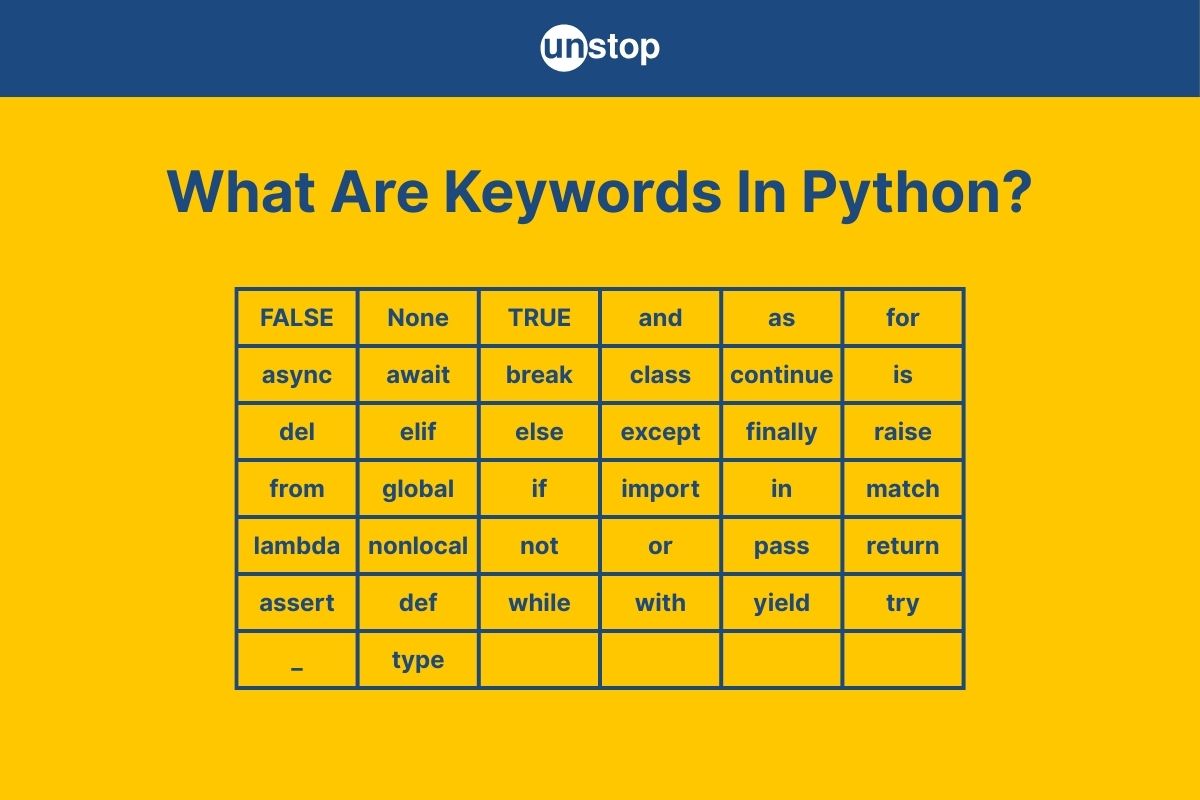
Python's simplicity and readability have made it a favorite among both novice and experienced programmers. Central to its clear syntax are keywords, i.e., reserved words that serve as the building blocks of Python code. These reserved words, such as if, for, and class, are integral to writing clear and efficient code. Understanding Python keywords is not just about memorizing a list; it's about grasping how they control the flow, logic, and functionality of your programs.
In this article, we will discuss the 35 official Python keywords, their categories, uses, and more with examples, enabling you to write more readable, maintainable, and effective code.
What Are Keywords In Python?
Python has a set of reserved words known as keywords that are integral to its syntax and structure.
- These keywords cannot be used as identifiers (such as variable names, function names, or class names) because they have predefined meanings that are integral to the language's functionality.
- Attempting to use a keyword as an identifier will result in a syntax error.
Analogy: Think of Python keywords like traffic signs on a road. Just as traffic signs direct the flow of vehicles and inform drivers of rules and regulations, Python keywords guide the flow of a program and define its structure. Ignoring or misusing traffic signs can lead to accidents or confusion; similarly, misusing Python keywords can lead to errors or unintended behavior in your code.
Example: Consider the if keyword, which is used to implement conditional statements in Python. It allows the program to make decisions based on certain conditions.
age = 20
if age >= 18:
print("You are eligible to vote.")
else:
print("You are not eligible to vote.")
In this example:
- The keyword if marks the statement to check whether the condition (age >= 18) is true.
- If true, it executes the indented block under it, printing "You are eligible to vote."
- If false, it executes the code under else, printing "You are not eligible to vote."
Here, if and else are keywords that control the flow of the program based on the condition provided.
List Of Python Keywords
As of Python 3.10, there are 35 standard keywords and 4 soft keywords. Below is a table listing each keyword, its syntax, a brief description, and an example demonstrating its usage:
|
Keyword |
Description |
Example |
|
False |
Boolean value representing false |
is_active = False |
|
None |
Represents the absence of a value |
result = None |
|
True |
Boolean value representing true |
is_valid = True |
|
and |
Logical AND operator |
if x > 0 and x < 10: |
|
as |
Alias for modules or context managers |
import math as m |
|
assert |
Debugging aid that tests a condition |
assert x > 0 |
|
async |
Defines an asynchronous function |
async def fetch_data(): |
|
await |
Waits for the result of an async function |
data = await fetch_data() |
|
break |
Exits the current loop prematurely |
if condition: break |
|
class |
Defines a new class |
class MyClass: |
|
continue |
Skips the rest of the loop and continues |
if x < 0: continue |
|
def |
Defines a new function |
def my_function(): |
|
del |
Deletes an object |
del my_list[0] |
|
elif |
Else if condition in the control flow |
elif x == 0: |
|
else |
Defines an alternative block in the control flow |
else: |
|
except |
Catches exceptions in try-except blocks |
except ValueError: |
|
finally |
Executes code regardless of exceptions |
finally: |
|
for |
Starts a for loop |
for i in range(5): |
|
from |
Imports specific parts of a module |
from math import pi |
|
global |
Declares a global variable |
global count |
|
if |
Starts a conditional statement |
if x > 0: |
|
import |
Imports a module |
import os |
|
in |
Checks for membership |
if item in list: |
|
is |
Tests object identity |
if x is y: |
|
lambda |
Creates an anonymous function |
lambda x: x * 2 |
|
nonlocal |
Declares a non-local variable |
nonlocal count |
|
not |
Logical NOT operator |
if not done: |
|
or |
Logical OR operator |
if x < 0 or y < 0: |
|
pass |
Null operation; placeholder |
pass |
|
raise |
Raises an exception |
raise ValueError("Invalid input") |
|
return |
Exits a function and returns a value |
return result |
|
try |
Starts a try-except block |
try: |
|
while |
Starts a while loop |
while x > 0: |
|
with |
Context manager for resource management |
with open('file.txt') as f: |
|
yield |
Returns a generator |
yield x |
Soft Keywords (Introduced In Python 3.10)
|
Keyword |
Description |
Example |
|
match |
Starts a pattern matching block |
match value: |
|
case |
Defines a pattern to match in a match block |
case 1: |
|
_ |
Wildcard pattern in match-case statements |
case _: |
|
type |
Introduced in Python 3.12, used in type alias declarations. |
type Point = tuple[float, float] |
These soft keywords are reserved in specific contexts and can be used as identifiers elsewhere in the code.
Types/Categories Of Python Keywords
Python programming language’s 35 keywords can be grouped based on their functionalities, making it easier to comprehend their roles within the language. This categorization aids in understanding how these keywords contribute to Python's syntax and control structures.
Below is a table that categorizes Python keywords, outlining their purposes, typical usage contexts, and the specific keywords within each category.
|
Category |
Purpose |
Usage Context |
Keywords |
|
Control Flow |
Directs the execution flow of the program based on conditions or loops. |
Conditional statements and loops |
if, elif, else, for, while, break, continue, pass |
|
Function and Class Definitions |
Defines functions and classes, enabling modular and object-oriented programming. |
Function and class declarations |
def, class, lambda, return, yield |
|
Exception Handling |
Manages errors and exceptions that occur during program execution. |
Error detection and handling |
try, except, finally, raise, assert |
|
Variable Scope/Handling |
Control the scope and accessibility of variables within different contexts. |
Variable declaration and scope management |
global, nonlocal, del |
|
Logical Operators |
Performs logical operations, often used in conditional statements. |
Boolean logic and condition evaluations |
and, or, not |
|
Membership and Identity Operators |
Checks for membership or identity between variables and objects. |
Comparisons and condition checks |
in, is |
|
Import and Module Management |
Facilitates the inclusion of external modules and packages. |
Importing and aliasing modules |
import, from, as |
|
Asynchronous Programming |
Supports asynchronous programming for concurrent execution. |
Async functions and event loops |
async, await |
|
Context Management |
Manages resources with context managers to ensure proper acquisition and release. |
Resource management (e.g., files) |
with, as |
|
Boolean and Null Values |
Represents truth values and the absence of a value. |
Boolean logic and null checks |
True, False, None |
|
Pattern Matching |
Enables structural pattern matching introduced in Python 3.10. |
Matching complex data structures |
match, case, _ |
|
Type Alias Definitions |
Defines type aliases to improve code readability and maintainability. |
Type hinting and static type checking. |
type |
Understanding these categories provides a structured approach to learning Python keywords, allowing for more efficient coding and better comprehension of Python's syntax and capabilities. In the next section, we will look at each of these categories in detail and explore how the keywords work with the help of code examples.
Control Flow Keywords In Python
Control flow is the backbone of any programming language, dictating the order in which individual statements, instructions, or function calls are executed or evaluated. In Python, control flow is managed through conditional statements, loops, and control statements that alter the execution path based on specific conditions. This mechanism allows developers to write dynamic and responsive programs that can make decisions, repeat tasks, and handle different scenarios effectively.
Python's control flow constructs are designed to be intuitive and readable, adhering to the language's philosophy of simplicity and clarity. By mastering these keywords, you can control the logic of your programs with precision and write code that is both efficient and easy to understand. The table below provides a list of the control flow keywords, followed by a code example.
|
Keyword |
Description |
|
if |
Executes a block of code if a specified condition is true. |
|
elif |
Specifies a new condition to test if the previous condition is false. |
|
else |
Executes a block of code if all preceding conditions are false. |
|
for |
Iterates over a sequence (such as a list, tuple, or string). |
|
Repeats a block of code as long as a specified condition is true. |
|
|
break |
Exits the nearest enclosing loop prematurely. |
|
continue |
Skips the rest of the code inside the loop for the current iteration. |
|
pass |
A null operation; it does nothing and is used as a placeholder. |
Code Example:
            for number in range(1, 6):
    if number == 3:
        print("Three encountered, skipping iteration.")
        continue
    elif number == 5:
        print("Five encountered, breaking the loop.")
        break
    else:
        print(f"Processing number: {number}")
else:
    print("Loop completed without encountering a break.")
Zm9yIG51bWJlciBpbiByYW5nZSgxLCA2KToKICAgIGlmIG51bWJlciA9PSAzOgogICAgICAgIHByaW50KCJUaHJlZSBlbmNvdW50ZXJlZCwgc2tpcHBpbmcgaXRlcmF0aW9uLiIpCiAgICAgICAgY29udGludWUKICAgIGVsaWYgbnVtYmVyID09IDU6CiAgICAgICAgcHJpbnQoIkZpdmUgZW5jb3VudGVyZWQsIGJyZWFraW5nIHRoZSBsb29wLiIpCiAgICAgICAgYnJlYWsKICAgIGVsc2U6CiAgICAgICAgcHJpbnQoZiJQcm9jZXNzaW5nIG51bWJlcjoge251bWJlcn0iKQplbHNlOgogICAgcHJpbnQoIkxvb3AgY29tcGxldGVkIHdpdGhvdXQgZW5jb3VudGVyaW5nIGEgYnJlYWsuIik=
Output:
Processing number: 1
Processing number: 2
Three encountered, skipping iteration.
Processing number: 4
Five encountered, breaking the loop.
Code Explanation:
- Here, we begin by defining a for loop, using for keyword. The loop iterates over numbers 1 through 5.
- Inside, we use if-elif-else statements to define different scenarios:
- When the number is 3, the continue statement skips the rest of the loop's body and proceeds to the next iteration.
- When the number is 5, the break statement exits the loop immediately.
- For other numbers, the program uses the print() function to display a message–” Processing message:” with the number (using f-strings).
- The else block associated with the loop would be implemented only if the loop wasn't terminated by a break statement.
This example demonstrates how control flow keywords can be used to manage the execution path of a program effectively.
Function & Class Definition Keywords
In Python, functions and classes are fundamental building blocks that promote code reusability and organization.
- Functions allow you to encapsulate a sequence of statements that perform a specific task. They can accept input parameters and return outputs, making them essential for modular programming.
- Classes enable object-oriented programming by allowing you to define custom data types with attributes (data) and methods (functions) that operate on the data. This approach helps in modeling real-world entities and behaviors.
Python provides specific keywords to define functions and classes, as well as to handle special scenarios like anonymous functions and generators.
|
Keyword |
Description |
|
def |
Defines a function or method. |
|
return |
Exits a function and optionally returns a value to the caller. |
|
class |
Defines a new class. |
|
lambda |
Creates an anonymous function (a function without a name). |
|
yield |
Pauses a generator function and returns a value; resumes from this point on next call. |
Code Example:
            class Calculator:
    def __init__(self):
        self.history = []

    def add(self, x, y):
        result = x + y
        self.history.append(result)
        return result

    def get_history(self):
        return self.history

    def generator_example(self):
        for value in self.history:
            yield value

# Using lambda to create a simple function
multiply = lambda x, y: x * y

# Instantiate the Calculator class
calc = Calculator()

# Perform addition
sum_result = calc.add(5, 3)
print(f"Sum: {sum_result}")

# Use the lambda function
product_result = multiply(4, 2)
print(f"Product: {product_result}")

# Retrieve history using the generator
print("History:")
for item in calc.generator_example():
    print(item)
Y2xhc3MgQ2FsY3VsYXRvcjoKICAgIGRlZiBfX2luaXRfXyhzZWxmKToKICAgICAgICBzZWxmLmhpc3RvcnkgPSBbXQoKICAgIGRlZiBhZGQoc2VsZiwgeCwgeSk6CiAgICAgICAgcmVzdWx0ID0geCArIHkKICAgICAgICBzZWxmLmhpc3RvcnkuYXBwZW5kKHJlc3VsdCkKICAgICAgICByZXR1cm4gcmVzdWx0CgogICAgZGVmIGdldF9oaXN0b3J5KHNlbGYpOgogICAgICAgIHJldHVybiBzZWxmLmhpc3RvcnkKCiAgICBkZWYgZ2VuZXJhdG9yX2V4YW1wbGUoc2VsZik6CiAgICAgICAgZm9yIHZhbHVlIGluIHNlbGYuaGlzdG9yeToKICAgICAgICAgICAgeWllbGQgdmFsdWUKCiMgVXNpbmcgbGFtYmRhIHRvIGNyZWF0ZSBhIHNpbXBsZSBmdW5jdGlvbgptdWx0aXBseSA9IGxhbWJkYSB4LCB5OiB4ICogeQoKIyBJbnN0YW50aWF0ZSB0aGUgQ2FsY3VsYXRvciBjbGFzcwpjYWxjID0gQ2FsY3VsYXRvcigpCgojIFBlcmZvcm0gYWRkaXRpb24Kc3VtX3Jlc3VsdCA9IGNhbGMuYWRkKDUsIDMpCnByaW50KGYiU3VtOiB7c3VtX3Jlc3VsdH0iKQoKIyBVc2UgdGhlIGxhbWJkYSBmdW5jdGlvbgpwcm9kdWN0X3Jlc3VsdCA9IG11bHRpcGx5KDQsIDIpCnByaW50KGYiUHJvZHVjdDoge3Byb2R1Y3RfcmVzdWx0fSIpCgojIFJldHJpZXZlIGhpc3RvcnkgdXNpbmcgdGhlIGdlbmVyYXRvcgpwcmludCgiSGlzdG9yeToiKQpmb3IgaXRlbSBpbiBjYWxjLmdlbmVyYXRvcl9leGFtcGxlKCk6CiAgICBwcmludChpdGVtKQ==
Output:
Sum: 8
Product: 8
History:
8
Code Explanation:
- A Calculator class is defined with methods to add numbers and retrieve history. Here, we use the class and def keywords to define the class and methods, respectively.
- The add method uses the return keyword to return the sum of two numbers and stores the result in the history.
- The generator_example method demonstrates the use of the yield keyword to create a generator that yields each item in the history.
- A lambda function named multiply is defined as multiplying two numbers.
- An instance of Calculator is created, and its methods are used to perform operations and display results.
This example illustrates how function and class definition keywords work together to create organized and reusable code structures in Python.
Exception Handling Keywords In Python
In Python, exceptions are events that disrupt the normal flow of a program's execution. They typically occur due to unforeseen errors, such as dividing by zero, accessing an invalid index in a list, or attempting to open a non-existent file. Python provides a robust exception-handling mechanism to manage these situations gracefully and prevent abrupt program termination.
The core of this mechanism revolves around the try and except blocks, which are implemented using the Python keywords mentioned in the table below:
|
Keyword |
Description |
|
try |
Defines a block of code to test for errors. |
|
except |
Defines a block of code to handle the error. |
|
else |
Defines a block of code to execute if no errors or exceptions were raised. |
|
finally |
Defines a block of code to execute regardless of the result of the try and except blocks. |
|
raise |
Triggers an exception manually. |
|
assert |
Tests if a condition is true; if not, raises an AssertionError. |
Understanding and effectively utilizing these keywords is essential for writing robust and error-resistant Python code.
Code Example:
            def divide_numbers(a, b):
    try:
        result = a / b
    except ZeroDivisionError as e:
        print(f"Error: Cannot divide by zero. ({e})")
    else:
        print(f"Result: {result}")
    finally:
        print("Execution completed.")

# Using assert to ensure inputs are integers
def get_numbers():
    a = input("Enter first number: ")
    b = input("Enter second number: ")
    assert a.isdigit() and b.isdigit(), "Inputs must be numeric."
    return int(a), int(b)
try:
    num1, num2 = get_numbers()
    divide_numbers(num1, num2)
except AssertionError as error:
    print(f"Input Error: {error}")
ZGVmIGRpdmlkZV9udW1iZXJzKGEsIGIpOgogICAgdHJ5OgogICAgICAgIHJlc3VsdCA9IGEgLyBiCiAgICBleGNlcHQgWmVyb0RpdmlzaW9uRXJyb3IgYXMgZToKICAgICAgICBwcmludChmIkVycm9yOiBDYW5ub3QgZGl2aWRlIGJ5IHplcm8uICh7ZX0pIikKICAgIGVsc2U6CiAgICAgICAgcHJpbnQoZiJSZXN1bHQ6IHtyZXN1bHR9IikKICAgIGZpbmFsbHk6CiAgICAgICAgcHJpbnQoIkV4ZWN1dGlvbiBjb21wbGV0ZWQuIikKCiMgVXNpbmcgYXNzZXJ0IHRvIGVuc3VyZSBpbnB1dHMgYXJlIGludGVnZXJzCmRlZiBnZXRfbnVtYmVycygpOgogICAgYSA9IGlucHV0KCJFbnRlciBmaXJzdCBudW1iZXI6ICIpCiAgICBiID0gaW5wdXQoIkVudGVyIHNlY29uZCBudW1iZXI6ICIpCiAgICBhc3NlcnQgYS5pc2RpZ2l0KCkgYW5kIGIuaXNkaWdpdCgpLCAiSW5wdXRzIG11c3QgYmUgbnVtZXJpYy4iCiAgICByZXR1cm4gaW50KGEpLCBpbnQoYikKdHJ5OgogICAgbnVtMSwgbnVtMiA9IGdldF9udW1iZXJzKCkKICAgIGRpdmlkZV9udW1iZXJzKG51bTEsIG51bTIpCmV4Y2VwdCBBc3NlcnRpb25FcnJvciBhcyBlcnJvcjoKICAgIHByaW50KGYiSW5wdXQgRXJyb3I6IHtlcnJvcn0iKQ==
Output:
Enter first number: 10
Enter second number: 0
Error: Cannot divide by zero. (division by zero)
Execution completed.
Code Explanation:
- We define a function to divide numbers and use the try, except, else, and finally keywords to create an error-handling mechanism.
- try block: Attempts to perform the division operation.
- except ZeroDivisionError: Catches the specific error when dividing by zero and prints an error message.
- else block: Executes if no exceptions are raised in the try block, printing the result.
- finally block: Executes regardless of whether an exception occurred, indicating the end of execution.
- Then, we also define another function to take input from a user and check if the numbers are numeric using assert and built-in Python functions.
- assert statement: Ensures that the user inputs are numeric; otherwise, raises an AssertionError.
- Finally, we call for input; the block raises an error and handles everything gracefully, as shown in the output.
By understanding and utilizing these exception-handling keywords, you can write Python programs that are more resilient and capable of handling unexpected situations gracefully.
Quick Knowledge Check!
Variable Scope/Handling Python Keywords
In Python, understanding variable scope is essential for writing clean and efficient code. Scope determines the accessibility and lifespan of a variable within different parts of a program. Python provides specific keywords to manage variable scope and handle variables effectively: global, nonlocal, and del.
|
Keyword |
Description |
|
global |
Declares that a variable inside a function refers to a globally defined variable. |
|
nonlocal |
Declares that a variable inside a nested function refers to a variable in the nearest enclosing scope that is not global. |
|
del |
Deletes variables, list items, or dictionary entries. |
Code Example:
            # Using 'global' to modify a global variable inside a function
count = 0

def increment():
    global count
    count += 1
    print(f"Global count: {count}")

increment() # Output: Global count: 1

# Using 'nonlocal' to modify a variable in the enclosing scope
def outer():
    message = "Hello"

    def inner():
        nonlocal message
        message = "Hi"
        print(f"Inner message: {message}")

    inner()
        print(f"Outer message: {message}")

outer()
# Output:
# Inner message: Hi
# Outer message: Hi

# Using 'del' to delete a variable
x = 10
print(f"Value of x before deletion: {x}")
del x
# print(x) # This would raise a NameError as x is deleted
IyBVc2luZyAnZ2xvYmFsJyB0byBtb2RpZnkgYSBnbG9iYWwgdmFyaWFibGUgaW5zaWRlIGEgZnVuY3Rpb24KY291bnQgPSAwCgpkZWYgaW5jcmVtZW50KCk6CiAgICBnbG9iYWwgY291bnQKICAgIGNvdW50ICs9IDEKICAgIHByaW50KGYiR2xvYmFsIGNvdW50OiB7Y291bnR9IikKCmluY3JlbWVudCgpICMgT3V0cHV0OiBHbG9iYWwgY291bnQ6IDEKCiMgVXNpbmcgJ25vbmxvY2FsJyB0byBtb2RpZnkgYSB2YXJpYWJsZSBpbiB0aGUgZW5jbG9zaW5nIHNjb3BlCmRlZiBvdXRlcigpOgogICAgbWVzc2FnZSA9ICJIZWxsbyIKCiAgICBkZWYgaW5uZXIoKToKICAgICAgICBub25sb2NhbCBtZXNzYWdlCiAgICAgICAgbWVzc2FnZSA9ICJIaSIKICAgICAgICBwcmludChmIklubmVyIG1lc3NhZ2U6IHttZXNzYWdlfSIpCgogICAgaW5uZXIoKQogICAgICAgIHByaW50KGYiT3V0ZXIgbWVzc2FnZToge21lc3NhZ2V9IikKCm91dGVyKCkKIyBPdXRwdXQ6CiMgSW5uZXIgbWVzc2FnZTogSGkKIyBPdXRlciBtZXNzYWdlOiBIaQoKIyBVc2luZyAnZGVsJyB0byBkZWxldGUgYSB2YXJpYWJsZQp4ID0gMTAKcHJpbnQoZiJWYWx1ZSBvZiB4IGJlZm9yZSBkZWxldGlvbjoge3h9IikKZGVsIHgKIyBwcmludCh4KSAjIFRoaXMgd291bGQgcmFpc2UgYSBOYW1lRXJyb3IgYXMgeCBpcyBkZWxldGVk
Output:
Global count: 1
Inner message: Hi
Outer message: Hi
Value of x before deletion: 10
Code Explanation:
- global Keyword: In the increment function, the global keyword is used to indicate that the function intends to modify the global variable count. Without declaring count as global, assigning to it inside the function would create a new local variable, leaving the global count unchanged.
- nonlocal Keyword: In the outer function, message is a variable in the enclosing scope of the nested inner function. By declaring message as nonlocal inside inner, we allow the nested function to modify the message variable from the enclosing outer function. This demonstrates how nonlocal enables inner functions to modify variables from their enclosing scopes.
- del Keyword: The del statement is used to delete variables. In the example, after assigning 10 to x, we delete it using del x. Attempting to access x after deletion would result in a NameError since x no longer exists in the namespace.
By mastering these keywords, you can effectively manage variable scopes and lifecycles in Python, leading to more predictable and maintainable code.
Operator Keywords In Python (Logical & Membership)
In Python, certain keywords function as operators, enabling you to perform logical operations, test object identity, and check membership within collections. Unlike many programming languages that use symbols (e.g., &&, ||, !) for these operations, Python opts for English words, enhancing code readability and clarity.
These operator keywords are integral to constructing expressions that control the flow of logic in your programs. They allow you to combine conditions, invert boolean values, and assess relationships between objects and collections.
|
Keyword |
Description |
|
and |
Logical AND; returns True if both operands are True. |
|
or |
Logical OR; returns True if at least one operand is True. |
|
not |
Logical NOT; inverts the boolean value of the operand. |
|
in |
Membership test; returns True if a value exists within a sequence or collection. |
|
is |
Identity test; returns True if two references point to the same object. |
Code Example:
            x = 10
y = 20
z = [10, 20, 30]

# Logical AND
if x > 5 and y > 15:
    print("Both conditions are True.")

# Logical OR
if x < 5 or y > 15:
    print("At least one condition is True.")

# Logical NOT
if not x == y:
    print("x and y are not equal.")

# Membership test
if 20 in z:
    print("20 is in the list z.")

# Identity test
a = [1, 2, 3]
b = a
c = [1, 2, 3]

print(a is b) # True, because b references the same object as a
print(a is c) # False, because c is a different object with the same content
eCA9IDEwCnkgPSAyMAp6ID0gWzEwLCAyMCwgMzBdCgojIExvZ2ljYWwgQU5ECmlmIHggPiA1IGFuZCB5ID4gMTU6CiAgICBwcmludCgiQm90aCBjb25kaXRpb25zIGFyZSBUcnVlLiIpCgojIExvZ2ljYWwgT1IKaWYgeCA8IDUgb3IgeSA+IDE1OgogICAgcHJpbnQoIkF0IGxlYXN0IG9uZSBjb25kaXRpb24gaXMgVHJ1ZS4iKQoKIyBMb2dpY2FsIE5PVAppZiBub3QgeCA9PSB5OgogICAgcHJpbnQoInggYW5kIHkgYXJlIG5vdCBlcXVhbC4iKQoKIyBNZW1iZXJzaGlwIHRlc3QKaWYgMjAgaW4gejoKICAgIHByaW50KCIyMCBpcyBpbiB0aGUgbGlzdCB6LiIpCgojIElkZW50aXR5IHRlc3QKYSA9IFsxLCAyLCAzXQpiID0gYQpjID0gWzEsIDIsIDNdCgpwcmludChhIGlzIGIpICMgVHJ1ZSwgYmVjYXVzZSBiIHJlZmVyZW5jZXMgdGhlIHNhbWUgb2JqZWN0IGFzIGEKcHJpbnQoYSBpcyBjKSAjIEZhbHNlLCBiZWNhdXNlIGMgaXMgYSBkaWZmZXJlbnQgb2JqZWN0IHdpdGggdGhlIHNhbWUgY29udGVudA==
Output:
Both conditions are True.
At least one condition is True.
x and y are not equal.
20 is in the list z.
True
False
Code Explanation:
- Logical AND (and): Evaluates to True only if both conditions are True.
- Logical OR (or): Evaluates to True if at least one condition is True.
- Logical NOT (not): Inverts the result of the condition.
- Membership Test (in): Checks if a value exists within a collection.
- Identity Test (is): Determines if two references point to the same object in memory.
- Logical AND (and): The condition x > 5 and y > 15 checks if both x is greater than 5 and y is greater than 15. Since x is 10 and y is 20, both conditions are true, so the message "Both conditions are True." is printed.
- Logical OR (or): The condition x < 5 or y > 15 evaluates whether at least one of the conditions is true. Here, x is not less than 5, but y is greater than 15, so the overall condition is true, resulting in the message "At least one condition is True." being printed.
- Logical NOT (not): The statement not x == y inverts the result of x == y. Since x (10) is not equal to y (20), x == y is false; applying not makes it true, leading to the message "x and y are not equal." being printed.
- Membership Test (in): The condition 20 in z checks if the value 20 exists within the Python list z. Since z contains [10, 20, 30], the condition is true, and "20 is in the list z." is printed.
- Identity Test (is):
- a is b evaluates to true because both variables reference the same object.
- a is c evaluates to false because, despite having identical contents, a and c are different objects in memory.
By understanding and utilizing these operator keywords, you can write more expressive and readable Python code that effectively handles logical operations and object comparisons.
Quick Knowledge Check
Module & Import Management Keywords
In Python, modules are files containing Python code that define functions, classes, and variables. They promote code reusability and better organization. To utilize code from one module in another, Python provides specific keywords that facilitate the import process.
- The import keyword is used to bring in entire modules, making their contents accessible using dot notation. For instance, import math allows access to the math module's functions like math.sqrt().
- The from keyword enables importing specific attributes or functions from a module directly into the current namespace. For example, from math import sqrt allows direct use of sqrt() without the math. prefix.
- The as keyword allows aliasing modules or functions during import, which can simplify code and prevent naming conflicts. For instance, import numpy as np lets you use np as a shorthand for numpy.
These keywords are essential for managing dependencies and structuring Python programs effectively.
|
Keyword |
Description |
|
import |
Imports a module into the current namespace. |
|
from |
Imports specific attributes or functions from a module. |
|
as |
Assigns an alias to a module or function during import. |
Code Example:
            # Importing the entire math module
import math

# Using the sqrt function with the module name
print("Square root of 16 is:", math.sqrt(16))

# Importing only the sqrt function from math
from math import sqrt

# Using the sqrt function directly
print("Square root of 25 is:", sqrt(25))

# Importing the datetime module with an alias
import datetime as dt

# Getting the current date and time
now = dt.datetime.now()
print("Current date and time:", now)
IyBJbXBvcnRpbmcgdGhlIGVudGlyZSBtYXRoIG1vZHVsZQppbXBvcnQgbWF0aAoKIyBVc2luZyB0aGUgc3FydCBmdW5jdGlvbiB3aXRoIHRoZSBtb2R1bGUgbmFtZQpwcmludCgiU3F1YXJlIHJvb3Qgb2YgMTYgaXM6IiwgbWF0aC5zcXJ0KDE2KSkKCiMgSW1wb3J0aW5nIG9ubHkgdGhlIHNxcnQgZnVuY3Rpb24gZnJvbSBtYXRoCmZyb20gbWF0aCBpbXBvcnQgc3FydAoKIyBVc2luZyB0aGUgc3FydCBmdW5jdGlvbiBkaXJlY3RseQpwcmludCgiU3F1YXJlIHJvb3Qgb2YgMjUgaXM6Iiwgc3FydCgyNSkpCgojIEltcG9ydGluZyB0aGUgZGF0ZXRpbWUgbW9kdWxlIHdpdGggYW4gYWxpYXMKaW1wb3J0IGRhdGV0aW1lIGFzIGR0CgojIEdldHRpbmcgdGhlIGN1cnJlbnQgZGF0ZSBhbmQgdGltZQpub3cgPSBkdC5kYXRldGltZS5ub3coKQpwcmludCgiQ3VycmVudCBkYXRlIGFuZCB0aW1lOiIsIG5vdyk=
Output:
Square root of 16 is: 4.0
Square root of 25 is: 5.0
Current date and time: 2026-04-14 02:10:28.123456
Code Explanation:
- import math: Brings in the entire math module, allowing access to its functions using the math. prefix.
- from math import sqrt: Imports only the sqrt function from the math module, enabling direct use without the module prefix.
- import datetime as dt: Imports the datetime module and assigns it the alias dt, simplifying references to its classes and functions.
By understanding and utilizing these module and import management keywords, you can write more organized and maintainable Python code, effectively managing dependencies and namespaces.
Asynchronous Programming Keywords In Python
Asynchronous programming in Python allows for concurrent execution of tasks, enabling programs to handle operations like I/O-bound tasks more efficiently. This is particularly useful when dealing with tasks that might take an unpredictable amount of time, such as network requests or file operations.
Python introduces two keywords to facilitate asynchronous programming:
|
Keyword |
Description |
|
async |
Declares an asynchronous function (coroutine) that can be paused and resumed. |
|
await |
Pauses the execution of the coroutine until the awaited task completes. |
Code Example:
            import asyncio

async def fetch_data():
    print("Start fetching data...")
    await asyncio.sleep(2)  # Simulates a delay (e.g., network operation)
    print("Data fetched successfully.")
    return {"data": 123}

async def main():
    print("Program started.")
    result = await fetch_data()
    print(f"Result: {result}")

# Running the asynchronous main function
asyncio.run(main())
aW1wb3J0IGFzeW5jaW8KCmFzeW5jIGRlZiBmZXRjaF9kYXRhKCk6CiAgICBwcmludCgiU3RhcnQgZmV0Y2hpbmcgZGF0YS4uLiIpCiAgICBhd2FpdCBhc3luY2lvLnNsZWVwKDIpwqAgIyBTaW11bGF0ZXMgYSBkZWxheSAoZS5nLiwgbmV0d29yayBvcGVyYXRpb24pCiAgICBwcmludCgiRGF0YSBmZXRjaGVkIHN1Y2Nlc3NmdWxseS4iKQogICAgcmV0dXJuIHsiZGF0YSI6IDEyM30KCmFzeW5jIGRlZiBtYWluKCk6CiAgICBwcmludCgiUHJvZ3JhbSBzdGFydGVkLiIpCiAgICByZXN1bHQgPSBhd2FpdCBmZXRjaF9kYXRhKCkKICAgIHByaW50KGYiUmVzdWx0OiB7cmVzdWx0fSIpCgojIFJ1bm5pbmcgdGhlIGFzeW5jaHJvbm91cyBtYWluIGZ1bmN0aW9uCmFzeW5jaW8ucnVuKG1haW4oKSk=
Output:
Program started.
Start fetching data…
Data fetched successfully.
Result: {'data': 123}
Code Explanation:
- async def fetch_data(): Defines an asynchronous function that simulates data fetching.
- await asyncio.sleep(2): Pauses the coroutine for 2 seconds, simulating a delay (like a network request). During this pause, other tasks can run concurrently.
- async def main(): Defines the main coroutine that calls fetch_data() and awaits its result.
- asyncio.run(main()): Executes the main() coroutine, managing the event loop automatically.
By using async and await, Python allows for writing non-blocking code that can handle multiple operations concurrently, leading to more efficient and responsive programs.
Quick Knowledge Check
Context Management Keywords In Python
In Python, context management refers to the handling of resources such as files, network connections, or locks, ensuring they are acquired and released appropriately. This is particularly important for managing resources that require setup and teardown operations, like opening and closing files.
Python's with statement simplifies exception handling and resource management by encapsulating the setup and teardown actions within a context manager. This approach ensures that resources are properly managed, even if errors occur within the block.
|
Keyword |
Description |
|
with |
Used to wrap the execution of a block of code within methods defined by a context manager. |
|
as |
Binds the result of the context manager's __enter__() method to a variable, allowing access to the resource within the block. |
Code Example:
            # Using with to manage file opening and closing
with open('example.txt', 'w') as file:
    file.write('Hello, world!')
    # No need to explicitly close the file; it's handled by the context manager

# Using with to acquire and release a lock
import threading
lock = threading.Lock()
with lock as acquired_lock:
    # Critical section of code
    # The lock is automatically acquired at this point
    # and released when the block is exited
    pass
IyBVc2luZyB3aXRoIHRvIG1hbmFnZSBmaWxlIG9wZW5pbmcgYW5kIGNsb3NpbmcKd2l0aCBvcGVuKCdleGFtcGxlLnR4dCcsICd3JykgYXMgZmlsZToKICAgIGZpbGUud3JpdGUoJ0hlbGxvLCB3b3JsZCEnKQogICAgIyBObyBuZWVkIHRvIGV4cGxpY2l0bHkgY2xvc2UgdGhlIGZpbGU7IGl0J3MgaGFuZGxlZCBieSB0aGUgY29udGV4dCBtYW5hZ2VyCgojIFVzaW5nIHdpdGggdG8gYWNxdWlyZSBhbmQgcmVsZWFzZSBhIGxvY2sKaW1wb3J0IHRocmVhZGluZwpsb2NrID0gdGhyZWFkaW5nLkxvY2soKQp3aXRoIGxvY2sgYXMgYWNxdWlyZWRfbG9jazoKICAgICMgQ3JpdGljYWwgc2VjdGlvbiBvZiBjb2RlCiAgICAjIFRoZSBsb2NrIGlzIGF1dG9tYXRpY2FsbHkgYWNxdWlyZWQgYXQgdGhpcyBwb2ludAogICAgIyBhbmQgcmVsZWFzZWQgd2hlbiB0aGUgYmxvY2sgaXMgZXhpdGVkCiAgICBwYXNz
Output (example.txt):
Hello, world!
Code Explanation:
- File Handling with with and as: The with statement is used to open a file in write mode. The file is automatically closed when the block is exited, even if exceptions occur within the block. The as keyword binds the opened file object to the variable file, allowing you to interact with it directly.
- Lock Management with with and as: In multithreaded programming, the with statement is used to acquire a lock, ensuring that only one thread can execute the critical section at a time. The as keyword binds the acquired lock to the variable acquired_lock, though it's not used further in this example. The lock is automatically released when the block is exited using the pass statement.
By utilizing the with and as keywords, you can write cleaner and more reliable code for resource management, reducing the risk of errors and ensuring that resources are properly cleaned up after use.
Boolean & Null Values In Python
In Python, Boolean and null values are fundamental for logic and control flow. They represent truth values and the absence of a value, respectively. Understanding these values and using these Python keywords is crucial for making decisions and handling conditions in your programs.
|
Keyword |
Description |
|
True |
Represents the Boolean value true. |
|
False |
Represents the Boolean value false. |
|
None |
Represents the absence of a value or a null value. |
Code Example:
            def check_value(value):
    if value is None:
        return "No value provided"
    elif value:
      return "Value is True"
    else:
      return "Value is False"

print(check_value(True))
print(check_value(None))
print(check_value(False))
ZGVmIGNoZWNrX3ZhbHVlKHZhbHVlKToKICAgIGlmIHZhbHVlIGlzIE5vbmU6CiAgICAgICAgcmV0dXJuICJObyB2YWx1ZSBwcm92aWRlZCIKICAgIGVsaWYgdmFsdWU6CiAgICAgIHJldHVybiAiVmFsdWUgaXMgVHJ1ZSIKICAgIGVsc2U6CiAgICAgIHJldHVybiAiVmFsdWUgaXMgRmFsc2UiCgpwcmludChjaGVja192YWx1ZShUcnVlKSkKcHJpbnQoY2hlY2tfdmFsdWUoTm9uZSkpCnByaW50KGNoZWNrX3ZhbHVlKEZhbHNlKSk=
Output:
Value is True
No value provided
Value is False
Code Explanation:
In this example, the function check_value takes an input and uses an if-elif-else statement to evaluate it as follows:
- If value is None, it returns "No value provided".
- If value is truthy (not None and not False), it returns "Value is True".
- Otherwise, it returns "Value is False".
This demonstrates how True, False, and None are used in conditional statements to control the flow of the program.
Pattern Matching/Soft Python Keywords
Introduced in Python 3.10, pattern matching keywords allows for more readable and expressive code when dealing with complex data structures. It is particularly useful for matching and destructuring objects, lists, and other data types.
|
Keyword |
Description |
|
match |
Begins a pattern-matching block. |
|
case |
Defines a pattern to match against. |
|
_ |
A wildcard pattern that matches anything. |
Code Example:
            def handle_response(response):
    match response:
        case {"status": 200, "data": data}:
            return f"Success: {data}"
      case {"status": 404}:
            return "Error: Not Found"
        case _:
            return "Error: Unknown"

print(handle_response({"status": 200, "data": "OK"}))
print(handle_response({"status": 404}))
ZGVmIGhhbmRsZV9yZXNwb25zZShyZXNwb25zZSk6CiAgICBtYXRjaCByZXNwb25zZToKICAgICAgICBjYXNlIHsic3RhdHVzIjogMjAwLCAiZGF0YSI6IGRhdGF9OgogICAgICAgICAgICByZXR1cm4gZiJTdWNjZXNzOiB7ZGF0YX0iCiAgICAgIGNhc2UgeyJzdGF0dXMiOiA0MDR9OgogICAgICAgICAgICByZXR1cm4gIkVycm9yOiBOb3QgRm91bmQiCiAgICAgICAgY2FzZSBfOgogICAgICAgICAgICByZXR1cm4gIkVycm9yOiBVbmtub3duIgoKcHJpbnQoaGFuZGxlX3Jlc3BvbnNlKHsic3RhdHVzIjogMjAwLCAiZGF0YSI6ICJPSyJ9KSkKcHJpbnQoaGFuZGxlX3Jlc3BvbnNlKHsic3RhdHVzIjogNDA0fSkp
Output:
Success: OK
Error: Not Found
Code Explanation:
In this example, the function handle_response uses pattern matching to handle different types of responses:
- The match keyword initiates the pattern matching block.
- Each case defines a pattern to match against the response.
- The _ wildcard pattern matches any case not explicitly handled.
This approach of using the soft Python keywords provides a clear and concise way to handle various data structures.
Type Alias Definitions Keyword In Python
Type aliases in Python allow you to define custom names for existing types, enhancing code readability and maintainability. They are particularly useful in complex type hinting scenarios.
|
Keyword |
Description |
|
type |
Introduced in Python 3.12 to define type aliases. |
Code Example:
            type Vector = list[float]
type Matrix = list[Vector]

def scale_vector(v: Vector, scalar: float) -> Vector:
    return [x * scalar for x in v]

print(scale_vector([1.0, 2.0, 3.0], 2))
dHlwZSBWZWN0b3IgPSBsaXN0W2Zsb2F0XQp0eXBlIE1hdHJpeCA9IGxpc3RbVmVjdG9yXQoKZGVmIHNjYWxlX3ZlY3Rvcih2OiBWZWN0b3IsIHNjYWxhcjogZmxvYXQpIC0+IFZlY3RvcjoKICAgIHJldHVybiBbeCAqIHNjYWxhciBmb3IgeCBpbiB2XQoKcHJpbnQoc2NhbGVfdmVjdG9yKFsxLjAsIDIuMCwgMy4wXSwgMikp
Output:
[2.0, 4.0, 6.0]
Code Explanation:
In this example:
- The type keyword is used to define Vector as a list of floats and Matrix as a list of Vector.
- The function scale_vector takes a Vector and a scalar, returning a new Vector with each element scaled by the scalar.
This demonstrates how type aliases can simplify complex type annotations and improve code clarity.
Conclusion
Python's keywords form the foundation of its syntax and programming paradigms. From controlling flow and managing exceptions to handling asynchronous operations and defining type aliases, these reserved words are integral to writing clear and efficient Python code. By understanding and effectively utilizing these keywords, you can enhance your coding proficiency and develop more robust applications.
Frequently Asked Questions
Q1: How many keywords are there in Python?
As of Python 3.13, there are 35 reserved keywords. These are predefined words that have special meanings and cannot be used as identifiers (like variable names).
Q2: What are soft keywords in Python?
Soft keywords are identifiers that act as keywords only in specific contexts. For example, match, case, type, and _ are soft keywords introduced in Python 3.10 for structural pattern matching. Outside their specific contexts, they can be used as regular identifiers.
Q3: How can I get a list of all the keywords in Python?
You can use the built-in keyword module in Python:
import keyword
print(keyword.kwlist) # Lists all reserved keywords
print(keyword.softkwlist) # Lists all soft keywords (Python 3.10+)
As mentioned in the code comments, the different functions provided in the keyword module list the keyword reserves in Python.
Q4: Can I use Python keywords as variable names?
No, Python keywords are reserved and cannot be used as identifiers such as variable names, function names, or any other identifiers. Attempting to do so will result in a SyntaxError. However, soft keywords can be used as identifiers when not in their special context.
Q5: Why are some keywords 'soft' in Python?
Soft keywords allow the introduction of new language features without breaking existing code. By reserving words only in specific contexts, Python maintains backward compatibility and flexibility.
This compiles our discussion on Python keywords. Here are a few more topics you must explore:
- Python Strings | Create, Format, Reassign & More (+Examples)
- Hello, World! Program In Python | 7 Easy Methods (With Examples)
- Python IDLE | The Ultimate Beginner's Guide With Images & Codes!
- How To Print Without Newline In Python? (Mulitple Ways + Examples)
- Python Libraries | Standard, Third-Party & More (Lists + Examples)
- Python String Manipulation | Handbook With Techniques & Examples
Login to continue reading
And access exclusive content, personalized recommendations, and career-boosting opportunities.
Don't have an account? Sign up

Never miss an
Update




Top-Rated Practice by Students





Subscribe
to our newsletter





Comments
Add comment